AI agent for judges
Probation and Release Condition Monitor Agent
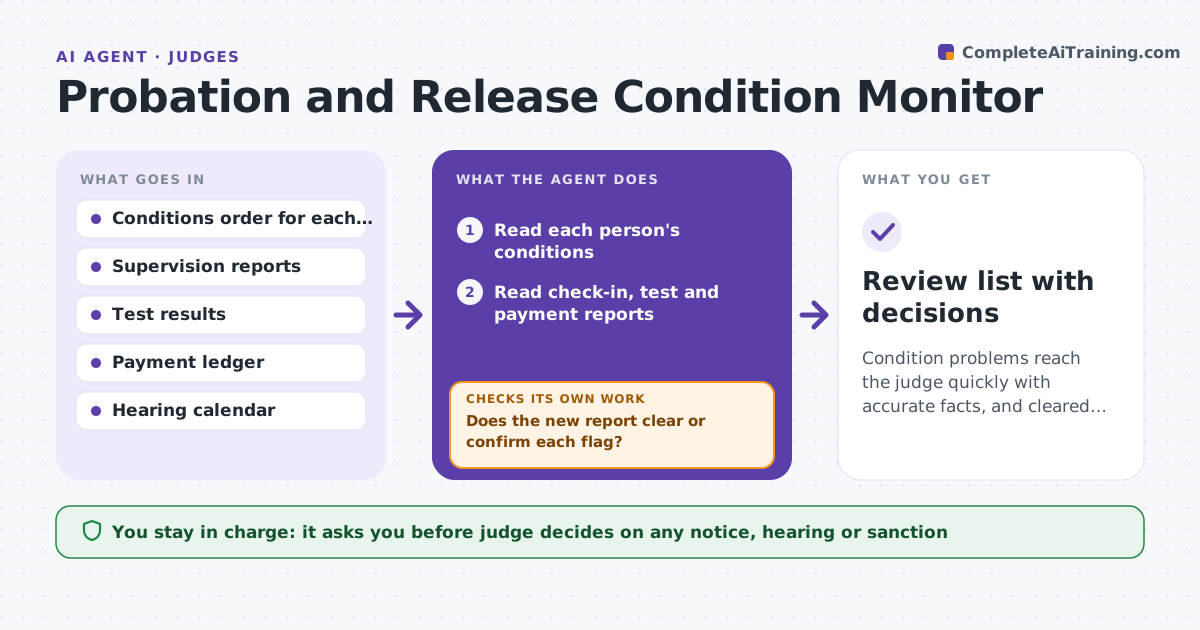
Condition problems reach the judge quickly with accurate facts, and cleared items are closed.
What it does
People on probation or release must report, test, pay and stay away from certain places. When reports arrive from many sources, a missed check-in or an unpaid fine can go unnoticed for weeks. This agent reads each report against that person's conditions and flags missed check-ins, tests and payments. It drafts a review item for each flag, with the dates and sources. As new reports come in, it rechecks and updates the item, since a late report may clear a flag. The judge decides whether to issue a notice. It never issues one itself. Edge case: a drug test is marked missed but the lab report shows it was done a day late, so the agent updates the item to a late test.
How it works
Follow the arrows from top to bottom. The orange dashed arrow is the loop: when a check fails, the agent goes back and tries again.
Read the steps as a list
- New reports arrive or the daily review starts
- Read each person's conditions
- Read check-in, test and payment reports
- Compare reports to the conditions and dates
- Flag missed, late and unverified items
- Draft a review item with sources
- Judge decides whether to issue a notice or set a hearingThe agent waits here for your OK.
- Recheck reports as they come in
- Does the new report clear or confirm each flag?If not: update the review item with the new facts and keep it open. Back to step 4.
- Review list with decisions
How it decides
It flags a missed check-in or test by comparing the dated report with the condition. It classes a flag as late, missed or unverified depending on the record.
- Flag a check-in missed by more than one day
- Class a result as late when a report shows it was done after the date
- Flag a payment behind schedule by 30 days
- Do not label a flag as a violation
Make it yours
Every agent is a starting point. You choose these settings for your own situation.
- Flag grace days (default 1)
- Payment lateness threshold
- Conditions tracked
- Review frequency
- Output format for the judge
What keeps you in control
It always asks you first
- Judge decides on any notice, hearing or sanction
Hard limits
- Never decide a violation or issue a notice
- Never share a person's records outside the court team
It stops when
- Done: every flag is cleared or sent to the judge
- Stop: a source report is missing or unreadable
Set it up
We guide you through the set-up, step by step
Members get the full set-up guide for this agent. No technical skills needed: you copy, paste and upload.
- One set of instructions to paste into your AI, with the clicks for ChatGPT, Claude, Microsoft 365 Copilot, Gemini and Grok
- The agent then walks you through connecting your own data, one source at a time
- A downloadable copy with the flow chart, the rules and the full guide