AI agent for process engineers
Process Unit Deviation Watch Agent
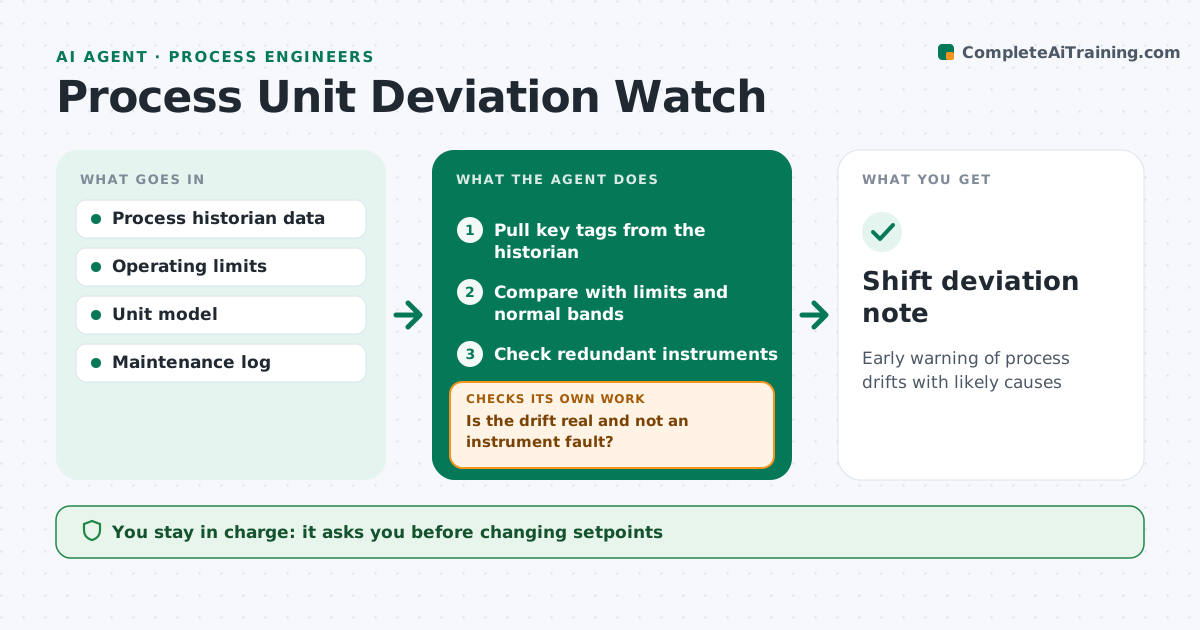
Early warning of process drifts with likely causes
What it does
Plant historians record thousands of tags, but process engineers rarely have time to watch trends closely. Each shift, this agent pulls key tags for the unit, such as reactor temperatures, column pressures, flows and yields. It compares them with operating limits and with normal behavior at the same rate and feed. When it sees a drift, it first checks redundant instruments to rule out a bad reading. If the drift is real, it looks at related tags to find a likely cause, such as fouling or a sticking valve, and ranks drifts by cost impact. It writes a short shift note with trends and suggestions. The engineer decides on any action; the agent never changes setpoints. Edge case: a sudden change during a planned rate change is ignored if it matches the plan.
How it works
Follow the arrows from top to bottom. The orange dashed arrow is the loop: when a check fails, the agent goes back and tries again.
Read the steps as a list
- Shift review
- Pull key tags from the historian
- Compare with limits and normal bands
- Check redundant instruments
- Is the drift real and not an instrument fault?If not: flag the instrument for maintenance and recheck. Back to step 3.
- Find likely cause from related tags
- Engineer decides actionsThe agent waits here for your OK.
- Shift deviation note
How it decides
It flags tags outside limits or drifting beyond normal bands for the same conditions, and checks instruments before blaming the process.
- Ignore changes that match planned moves
- Compare redundant instruments
- Rank drifts by cost impact
Make it yours
Every agent is a starting point. You choose these settings for your own situation.
- Tags to watch
- Normal band width
- Shift schedule
- Cost weights
What keeps you in control
It always asks you first
- Changing setpoints
- Raising maintenance work orders
Hard limits
- Read-only access to control systems
- Never changes setpoints
It stops when
- Done: note delivered
- Stop: historian unavailable
Set it up
We guide you through the set-up, step by step
Members get the full set-up guide for this agent. No technical skills needed: you copy, paste and upload.
- One set of instructions to paste into your AI, with the clicks for ChatGPT, Claude, Microsoft 365 Copilot, Gemini and Grok
- The agent then walks you through connecting your own data, one source at a time
- A downloadable copy with the flow chart, the rules and the full guide