AI agent for food scientists
Product Claims Substantiation Agent
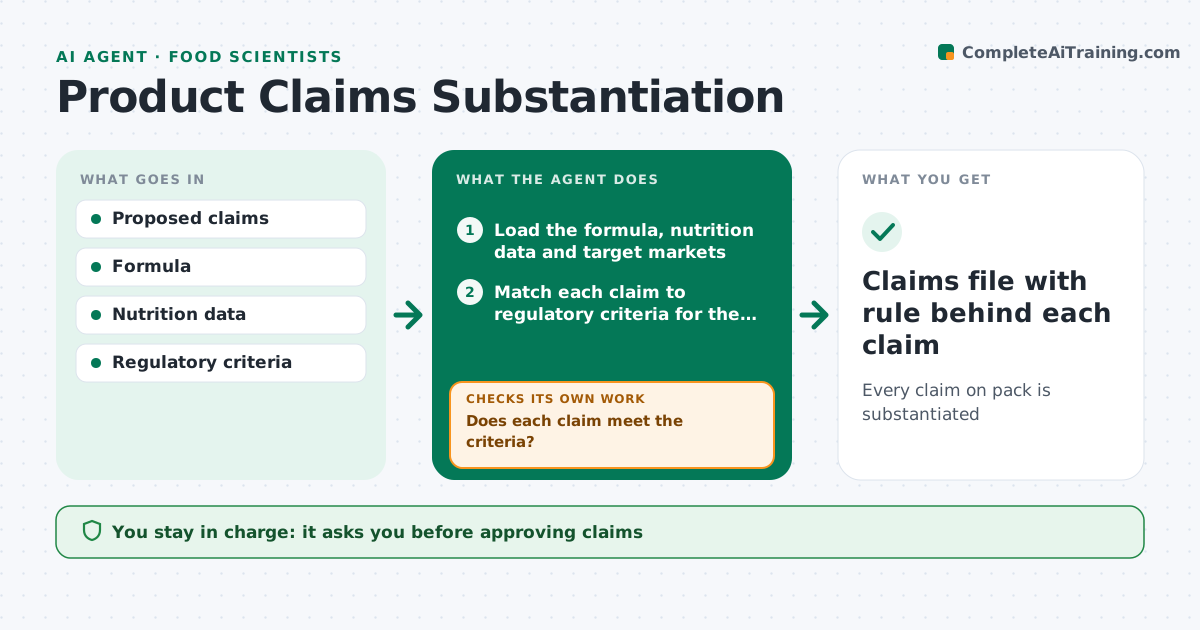
Every claim on pack is substantiated
What it does
Marketing teams propose claims like low fat or high protein, and each one must meet a legal definition in that market. This agent reads proposed claims, matches them with the regulatory criteria, and checks the formula and nutrition data. It lists each claim as pass, fail or needs more data, with the rule behind it, and suggests compliant wording where a claim fails. When the formula changes, it rechecks every existing claim. Before print, it compares the artwork wording with the approved claim word for word, since a small change can change the legal meaning. If the artwork differs, it lists the differences for the design team and checks the next proof. You approve claims before they go on artwork. Edge case: a natural claim with no legal definition is flagged for company policy review.
How it works
Follow the arrows from top to bottom. The orange dashed arrow is the loop: when a check fails, the agent goes back and tries again.
Read the steps as a list
- Claims proposed for a product
- Load the formula, nutrition data and target markets
- Match each claim to regulatory criteria for the market
- Check formula and nutrition data against each criterion
- Does each claim meet the criteria?If not: mark it fail or needs data and suggest compliant wording. Back to step 3.
- Compare artwork wording with the approved claims
- Does the artwork match the approved wording exactly?If not: list the differences for the design team and recheck the new proof. Back to step 6.
- Food scientist approves claimsThe agent waits here for your OK.
- Claims file with rule behind each claim
How it decides
It checks each claim against the legal criteria for the market.
- Use market criteria
- Flag undefined claims
- Recheck on formula change
Make it yours
Every agent is a starting point. You choose these settings for your own situation.
- Markets
- Policy rules
- Report format
What keeps you in control
It always asks you first
- Approving claims
Hard limits
- Never approves claims
It stops when
- Done: claims approved
- Stop: criteria unclear
Set it up
We guide you through the set-up, step by step
Members get the full set-up guide for this agent. No technical skills needed: you copy, paste and upload.
- One set of instructions to paste into your AI, with the clicks for ChatGPT, Claude, Microsoft 365 Copilot, Gemini and Grok
- The agent then walks you through connecting your own data, one source at a time
- A downloadable copy with the flow chart, the rules and the full guide