AI agent for laboratory managers
Proficiency Testing Result Follow-up Agent
Document a complete investigation and effective correction for every failed proficiency result.
What it does
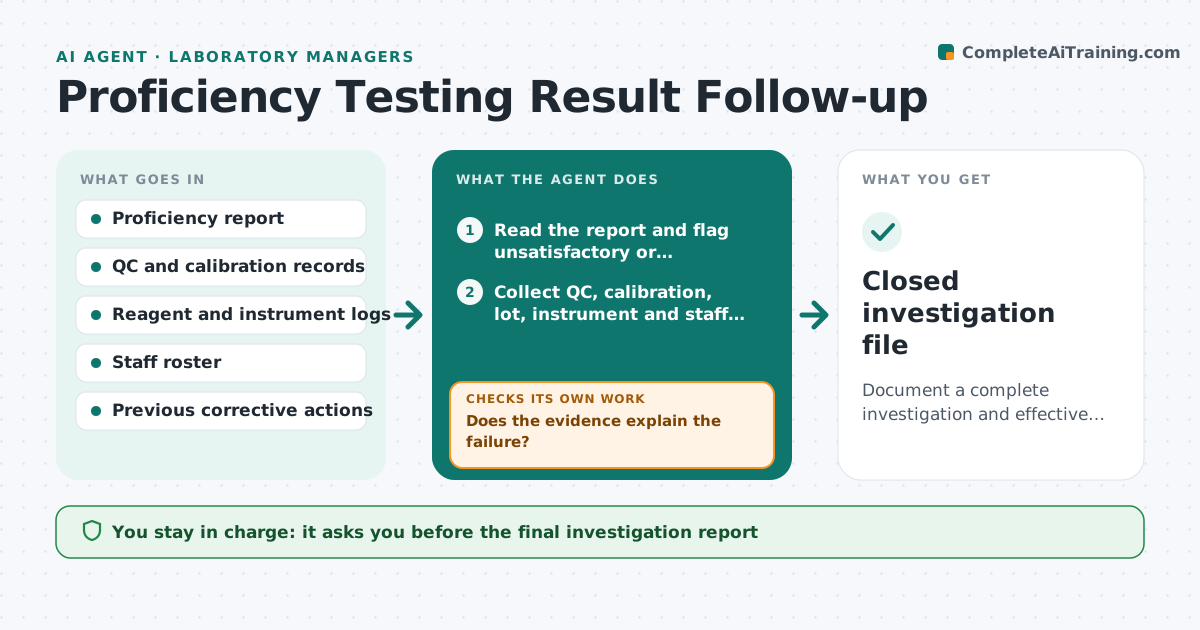
When a lab fails a proficiency testing challenge, the accreditor expects a documented investigation with causes and corrective actions. Under time pressure labs write something short and late. This agent reads each returned proficiency report and flags unsatisfactory or borderline results. For each it builds an investigation file, pulling in the QC data, calibration records, reagent lots, instrument logs and staff on duty around the test date. It lists possible causes and the evidence for each, drafts corrective actions, and tracks them to completion. At the next round it checks whether the same test passed. The manager approves the final report. Edge case: if the evidence points to a clerical error in the result entry, it drafts that finding with the original entry attached.
How it works
Follow the arrows from top to bottom. The orange dashed arrow is the loop: when a check fails, the agent goes back and tries again.
Read the steps as a list
- Proficiency report is received
- Read the report and flag unsatisfactory or borderline results
- Collect QC, calibration, lot, instrument and staff records for the test date
- List possible causes with the supporting evidence
- Does the evidence explain the failure?If not: Request more records or test data and rebuild the cause list. Back to step 3.
- Draft corrective actions with owners and dates
- Manager approves the investigation reportThe agent waits here for your OK.
- Track each action to completion
- Read the next round results for the same test
- Did the same test pass in the next round?If not: Reopen the investigation with the new data and extend the actions. Back to step 4.
- Closed investigation file
How it decides
Flags results outside the accepted range, ranks possible causes by evidence in the logs, and counts a correction as effective only if the next round passes.
- Result outside the acceptable range always starts an investigation
- Borderline results over 80% of the limit are watched
- A cause needs at least one record that supports it
- An action is effective only after a passing next round
Make it yours
Every agent is a starting point. You choose these settings for your own situation.
- Borderline warning level (default 80% of limit)
- Records to pull
- Action due dates
- Report template
- Tests covered
What keeps you in control
It always asks you first
- The final investigation report
- Any change to a procedure
- Submission to the accreditor
Hard limits
- Never alter original results or records
- Never submit to an accreditor without approval
It stops when
- Done: next round passes and the file is closed
- Stop: test discontinued
- Stop: accreditor takes over
Set it up
We guide you through the set-up, step by step
Members get the full set-up guide for this agent. No technical skills needed: you copy, paste and upload.
- One set of instructions to paste into your AI, with the clicks for ChatGPT, Claude, Microsoft 365 Copilot, Gemini and Grok
- The agent then walks you through connecting your own data, one source at a time
- A downloadable copy with the flow chart, the rules and the full guide