AI agent for retail managers
Promotion Results Review Agent
Know which promotions really made money
What it does
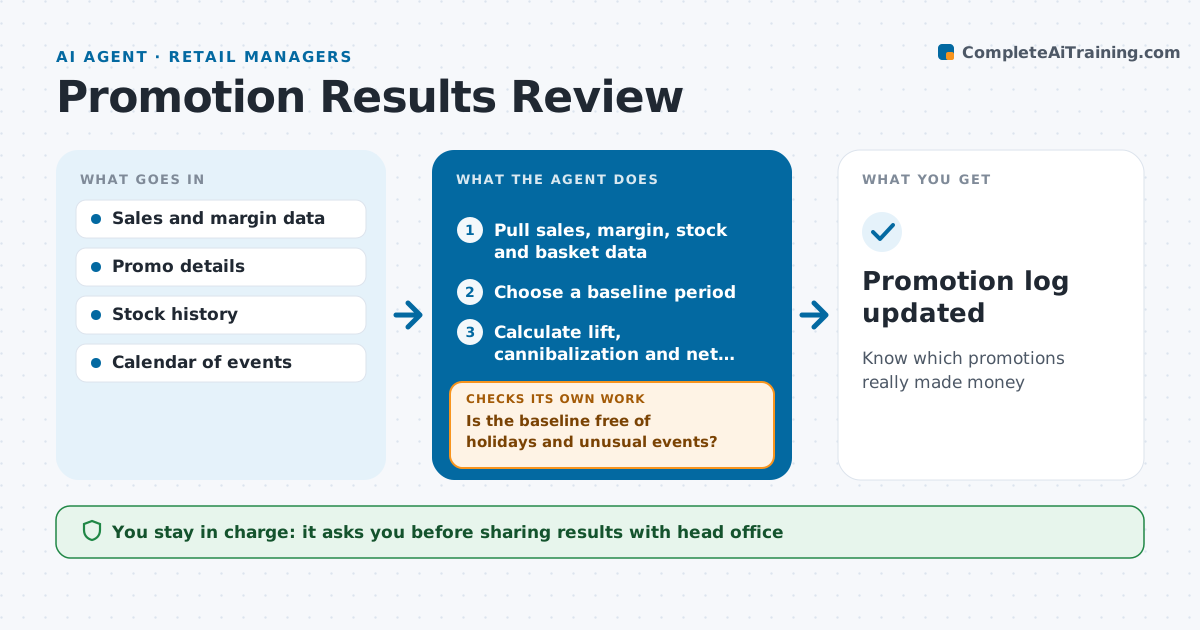
Promotions often look like wins on unit sales while quietly losing money. After each promotion, this agent measures sales lift on the promoted items against a baseline of similar weeks. It also looks at margin, stockouts during the promotion, sales of similar non-promoted items, and basket size. It checks the baseline is fair, excluding holidays and weather events. If the baseline is distorted, it picks another comparison period and measures again. It drafts a review with net impact and a recommendation to repeat, change or drop the promotion. The manager decides what to do next. Edge case: if the promoted item ran out by day two, it estimates lost sales and flags the stock plan rather than calling the promotion weak.
How it works
Follow the arrows from top to bottom. The orange dashed arrow is the loop: when a check fails, the agent goes back and tries again.
Read the steps as a list
- Promotion ended a week ago
- Pull sales, margin, stock and basket data
- Choose a baseline period
- Is the baseline free of holidays and unusual events?If not: pick another comparison period. Back to step 3.
- Calculate lift, cannibalization and net margin
- Draft review and recommendation
- Manager decides repeat, change or dropThe agent waits here for your OK.
- Promotion log updated
How it decides
It judges net margin impact after cannibalization and stockouts, not item sales alone.
- Judge on net margin
- Flag stockouts in the first half of a promo
- Exclude holiday weeks from baselines
Make it yours
Every agent is a starting point. You choose these settings for your own situation.
- Baseline weeks
- Metrics included
- Review timing
- Report recipients
What keeps you in control
It always asks you first
- Sharing results with head office
Hard limits
- Never changes prices
- Read-only data access
It stops when
- Done: review filed
- Stop: missing margin data
Set it up
We guide you through the set-up, step by step
Members get the full set-up guide for this agent. No technical skills needed: you copy, paste and upload.
- One set of instructions to paste into your AI, with the clicks for ChatGPT, Claude, Microsoft 365 Copilot, Gemini and Grok
- The agent then walks you through connecting your own data, one source at a time
- A downloadable copy with the flow chart, the rules and the full guide