AI agent for demand planners
Promotion Uplift Planning Agent
Promotion forecasts based on past results that supply can meet
What it does
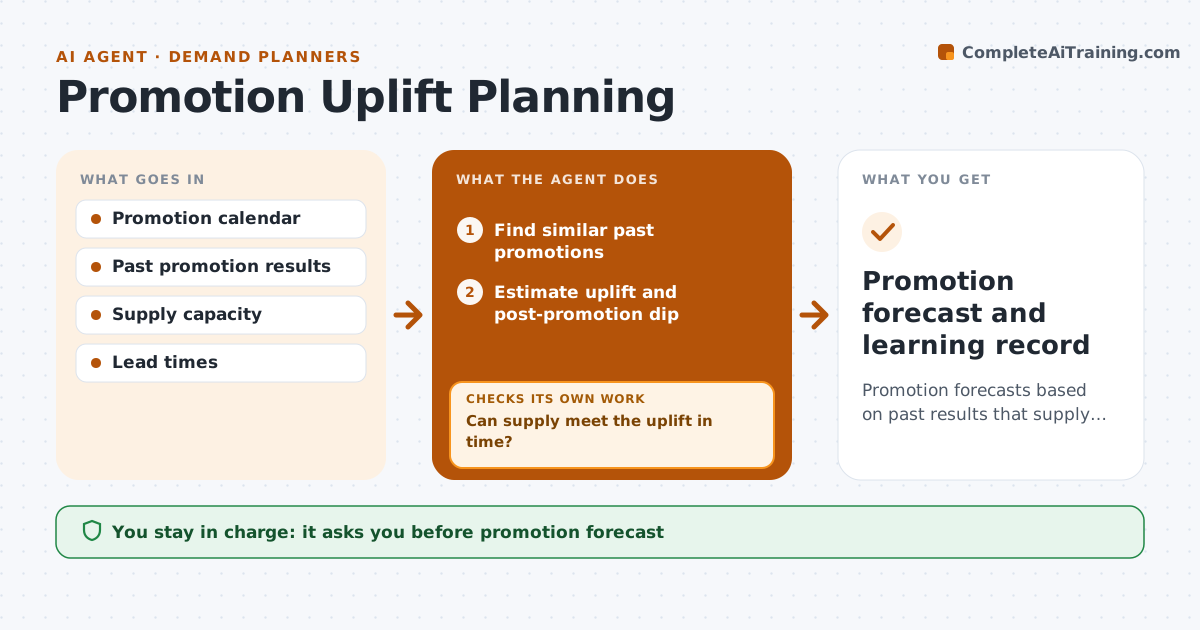
Sales and marketing plan promotions, and the planner must turn them into volume without emptying shelves or overloading the plant. When a promotion is added to the calendar, this agent finds similar past promotions by price cut, display and season. It uses the median uplift of the three most similar ones and always includes the dip that follows. It then checks the volume against production capacity and supplier lead times. If supply cannot meet the uplift in time, it drafts options, such as a later start or a smaller range, and re-estimates. The planner approves the promotion forecast. After the promotion, it compares actuals with the forecast and updates the uplift library so the next estimate is better. Edge case: a promotion with no similar history gets a range instead of one number and a flag for close watch.
How it works
Follow the arrows from top to bottom. The orange dashed arrow is the loop: when a check fails, the agent goes back and tries again.
Read the steps as a list
- Promotion added to calendar
- Find similar past promotions
- Estimate uplift and post-promotion dip
- Check against production and supplier capacity
- Can supply meet the uplift in time?If not: draft options such as smaller range or later start and re-estimate. Back to step 3.
- Planner approves the promotion forecastThe agent waits here for your OK.
- Compare actuals after the promotion and update the uplift library
- Promotion forecast and learning record
How it decides
It uses the median uplift of the three most similar past promotions and checks it against supply capacity before submitting.
- Three most similar promotions set the estimate
- No history means a range plus close watch
- Post-promotion dip is always included
Make it yours
Every agent is a starting point. You choose these settings for your own situation.
- Similarity factors
- Number of past promotions used
- Supply checks included
- Learning library location
What keeps you in control
It always asks you first
- Promotion forecast
- Options sent to sales
Hard limits
- Never commits supply
- Never changes promotion terms
It stops when
- Done: promotion closed and library updated
- Stop: promotion details missing, ask the sales owner
Set it up
We guide you through the set-up, step by step
Members get the full set-up guide for this agent. No technical skills needed: you copy, paste and upload.
- One set of instructions to paste into your AI, with the clicks for ChatGPT, Claude, Microsoft 365 Copilot, Gemini and Grok
- The agent then walks you through connecting your own data, one source at a time
- A downloadable copy with the flow chart, the rules and the full guide