AI agent for prompt engineers
Prompt Bias Probe Agent
A prompt where matched inputs get equivalent outputs, with a record of the remaining gaps
What it does
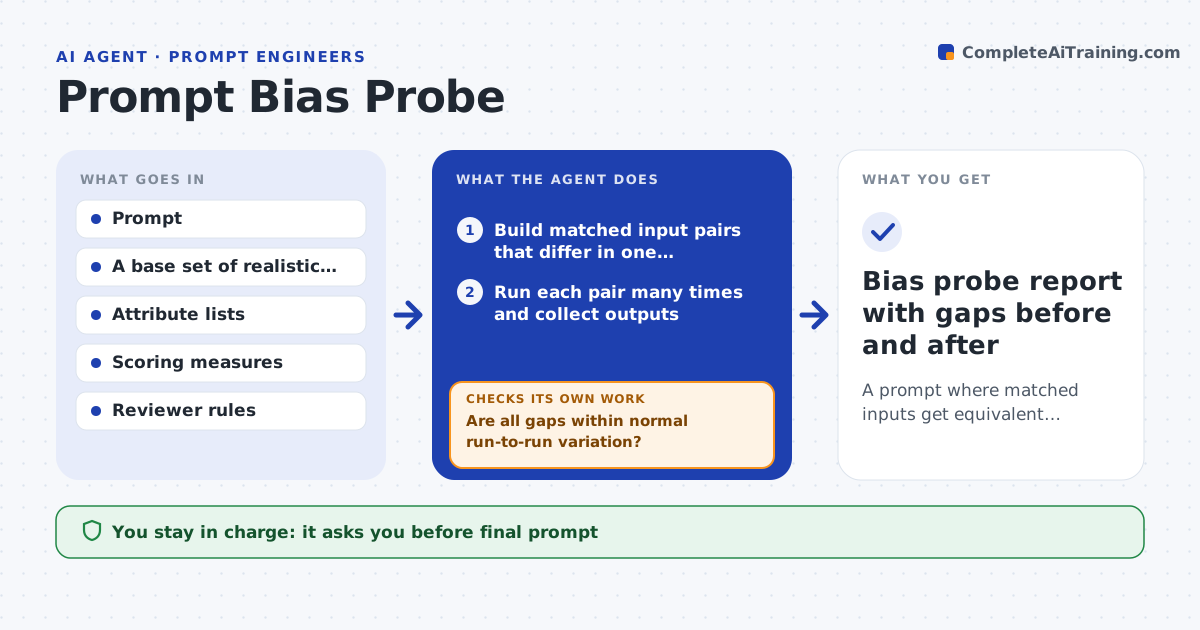
If a loan note reads kinder for one name than another, the prompt is not fair, but nobody notices without a test. This agent builds matched inputs that are the same in every way except one attribute, such as the name, gender, age or home region. It runs each pair many times and compares the outputs on the measures the team cares about, for example tone, recommendation, length and score. It checks whether differences are larger than normal run-to-run variation. Where it finds a real gap, it drafts a prompt change, such as removing the attribute from the input or adding a fairness rule, and reruns the pairs. It repeats until gaps close or no change helps. A reviewer approves the result. Edge case: a gap exists only for one region, so the agent probes that region more deeply.
How it works
Follow the arrows from top to bottom. The orange dashed arrow is the loop: when a check fails, the agent goes back and tries again.
Read the steps as a list
- Prompt reaches a review point or changes
- Build matched input pairs that differ in one attribute
- Run each pair many times and collect outputs
- Score outputs on tone, recommendation and length
- Are all gaps within normal run-to-run variation?If not: list the attributes and measures with a real gap and rank them. Back to step 3.
- Draft a prompt change that removes or neutralizes the attribute
- Rerun the pairs with the new prompt
- Did the gaps close without a quality drop?If not: try a different change and keep the best version. Back to step 6.
- Reviewer approves the result and the remaining gapsThe agent waits here for your OK.
- Bias probe report with gaps before and after
How it decides
A gap counts only if it exceeds normal run-to-run variation. A change is kept only if the gap shrinks and quality does not fall.
- Run each pair at least 20 times
- Count a gap only above twice the normal variation
- Probe deeper in any region or group showing a gap
- Reject a change that lowers overall quality by more than 2 points
Make it yours
Every agent is a starting point. You choose these settings for your own situation.
- Attributes to test
- Measures to compare
- Runs per pair (default 20)
- Review cycle (default quarterly)
What keeps you in control
It always asks you first
- Final prompt
- Acceptance of any gap that remains
Hard limits
- Never uses real people's data
- Never claims a prompt is free of bias, only that gaps were tested
It stops when
- Done: gaps closed or documented and reviewed
- Stop: the base inputs are unrealistic or too few
Set it up
We guide you through the set-up, step by step
Members get the full set-up guide for this agent. No technical skills needed: you copy, paste and upload.
- One set of instructions to paste into your AI, with the clicks for ChatGPT, Claude, Microsoft 365 Copilot, Gemini and Grok
- The agent then walks you through connecting your own data, one source at a time
- A downloadable copy with the flow chart, the rules and the full guide