AI agent for prompt engineers
Prompt Guideline Documentation Sync Agent
Keep the team prompt guide in line with what tested prompts actually show works
What it does
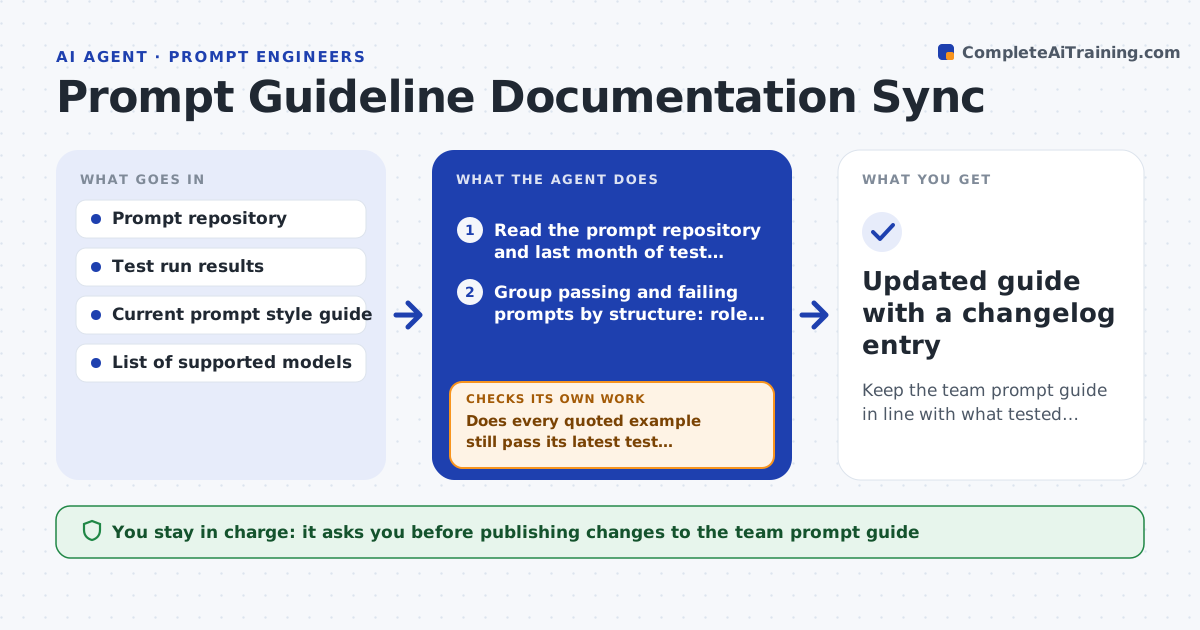
Prompt guides go stale fast. A rule written in spring may contradict what the team learned in summer, and new hires copy the guide, not the tested prompts. This agent reads the prompt repository and the latest test results each month. It lists the patterns the passing prompts share, such as where the output format is stated or how examples are labeled, and compares them with the written guide. Where the guide and the evidence disagree, it drafts a change with two or three before-and-after examples taken from real prompts. It then checks every example it quotes against the test log; if an example no longer passes, it swaps it for one that does. The prompt lead decides which changes go into the guide. Edge case: a pattern that helps one model and hurts another is written up as a model-specific note, not a general rule.
How it works
Follow the arrows from top to bottom. The orange dashed arrow is the loop: when a check fails, the agent goes back and tries again.
Read the steps as a list
- Monthly guide review starts
- Read the prompt repository and last month of test results
- Group passing and failing prompts by structure: role, format block, examples, constraints
- List patterns that separate passing from failing prompts
- Compare each pattern with the current guide sections
- Draft guide changes with before-and-after examples from real prompts
- Does every quoted example still pass its latest test run?If not: replace the example with a currently passing prompt or drop it. Back to step 6.
- Does the change hold for every supported model?If not: split it into a model-specific note and recheck the pattern counts. Back to step 4.
- Prompt lead approves which changes go into the guideThe agent waits here for your OK.
- Updated guide with a changelog entry
How it decides
A pattern becomes a proposed rule only when it appears in most passing prompts and the opposite pattern shows up in failing ones; patterns split by model become model notes.
- Propose a rule only when 70% or more of passing prompts share the pattern
- Mark a rule model-specific when results differ by more than 10 points between models
- Flag any guide section not backed by a passing example in the last 90 days as stale
- Never delete a rule outright; mark it deprecated for one cycle first
Make it yours
Every agent is a starting point. You choose these settings for your own situation.
- Share of passing prompts needed to propose a rule (default 70%)
- Models the guide covers (default all models in the test suite)
- Review schedule (default monthly)
- Guide format: wiki page or markdown file (default markdown)
What keeps you in control
It always asks you first
- Publishing changes to the team prompt guide
- Deprecating an existing rule
Hard limits
- Never edits the live guide without approval
- Quotes only prompts from the team repository, never customer data inside test inputs
It stops when
- Done: guide changes approved and changelog written
- Stop: fewer than 20 test runs this month, so the evidence is too thin
Set it up
We guide you through the set-up, step by step
Members get the full set-up guide for this agent. No technical skills needed: you copy, paste and upload.
- One set of instructions to paste into your AI, with the clicks for ChatGPT, Claude, Microsoft 365 Copilot, Gemini and Grok
- The agent then walks you through connecting your own data, one source at a time
- A downloadable copy with the flow chart, the rules and the full guide