AI agent for clinical data managers
Protocol Amendment Database Impact Agent
Update the database to match an amendment with every change mapped and tested
What it does
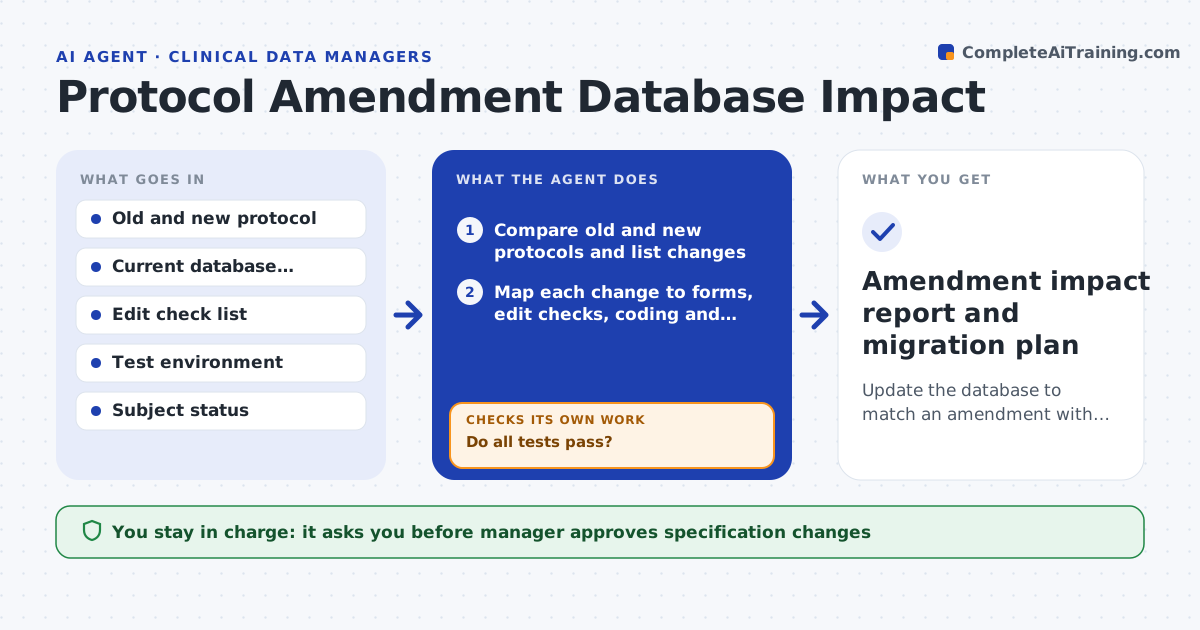
A protocol amendment adds a visit and changes a lab window, and weeks later someone notices the forms and checks were not updated. This agent compares the old and new protocol text and lists every change: new or removed visits, assessments, windows, eligibility criteria, lab ranges and dosing rules. It maps each change to its place in the database: case report forms, edit checks, coding and derivations. It drafts the changes to the specification and the edit checks, and tests them in a test environment with test data, including edge cases at the window boundaries. If a test fails, it fixes and retests. The manager approves migration of the changes to production. Edge case: an existing subject is mid-study, so the agent drafts how old data will map to the new version.
How it works
Follow the arrows from top to bottom. The orange dashed arrow is the loop: when a check fails, the agent goes back and tries again.
Read the steps as a list
- Protocol amendment approved
- Compare old and new protocols and list changes
- Map each change to forms, edit checks, coding and derivations
- Draft the specification and edit check changes
- Manager approves the specification changesThe agent waits here for your OK.
- Build the changes in the test environment
- Run test cases including window boundaries and existing subjects
- Do all tests pass?If not: fix the failing change in the draft and run the tests again. Back to step 4.
- Draft the migration plan for subjects already enrolled
- Manager approves migration to productionThe agent waits here for your OK.
- Amendment impact report and migration plan
How it decides
It maps each protocol change to the database item it affects and requires a passing test for each before it recommends migration.
- List every visit, assessment and window change
- Test each edit check at the boundary and one step either side
- Require a data mapping plan for enrolled subjects
- Treat any eligibility change as a priority review
Make it yours
Every agent is a starting point. You choose these settings for your own situation.
- Specification template
- Test case format
- Edit check naming
- Subject mapping rules
- Sponsor review step
What keeps you in control
It always asks you first
- Manager approves specification changes
- Manager approves production migration
Hard limits
- Test everything in a test environment, never in production
- Never migrate without approval
It stops when
- Done: all tests pass and the migration plan is approved
- Stop: the amendment is ambiguous and the sponsor must clarify
Set it up
We guide you through the set-up, step by step
Members get the full set-up guide for this agent. No technical skills needed: you copy, paste and upload.
- One set of instructions to paste into your AI, with the clicks for ChatGPT, Claude, Microsoft 365 Copilot, Gemini and Grok
- The agent then walks you through connecting your own data, one source at a time
- A downloadable copy with the flow chart, the rules and the full guide