AI agent for procurement specialists
Public Procurement Evidence Completeness Agent
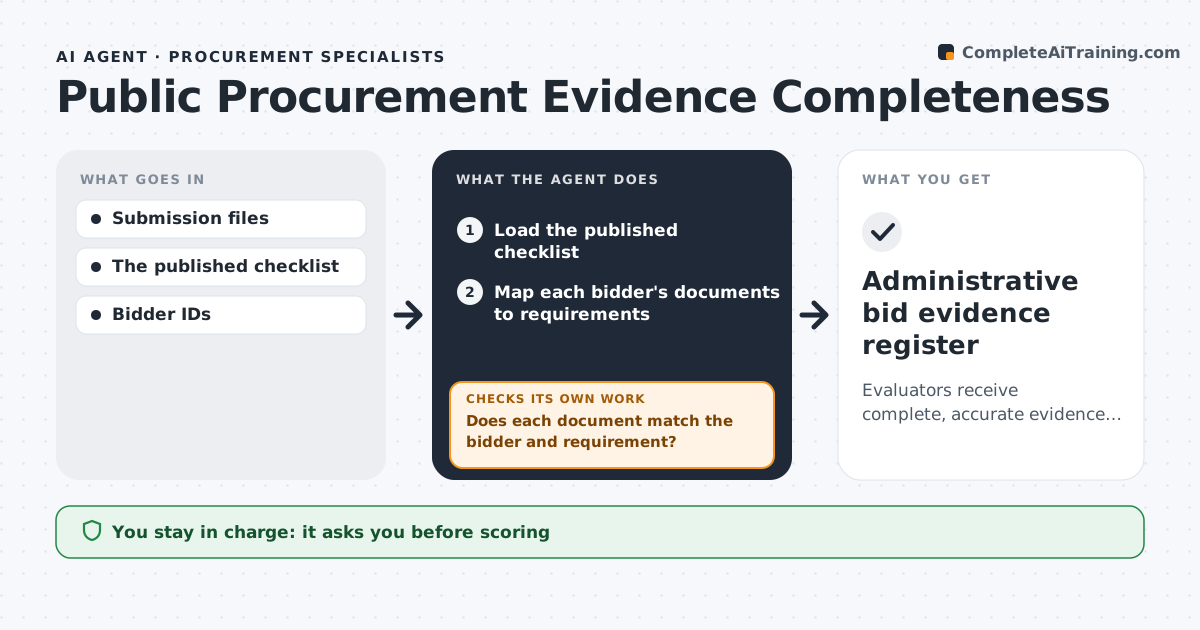
Evaluators receive complete, accurate evidence registers for every bid.
What it does
Bid evaluation packets often lack required administrative evidence such as certificates, insurance or declarations. When the submission deadline passes, this agent maps each bidder's documents to the published checklist. It checks ambiguous or mislabeled attachments by reading their content, not just the file name. A document for another entity never satisfies a requirement. Gaps are recorded explicitly so evaluators can see them. It assembles evaluator packets but does no scoring. The procurement lead reviews the register; exclusion and award decisions stay with the evaluation panel. Edge case: an insurance certificate names the bidder's parent company, so the agent records a gap instead of accepting it.
How it works
Follow the arrows from top to bottom. The orange dashed arrow is the loop: when a check fails, the agent goes back and tries again.
Read the steps as a list
- Submission deadline passes
- Load the published checklist
- Map each bidder's documents to requirements
- Read mislabeled or unclear attachments
- Does each document match the bidder and requirement?If not: record an explicit gap. Back to step 3.
- Assemble evaluator packets
- Procurement lead reviews the registerThe agent waits here for your OK.
- Administrative bid evidence register
How it decides
It checks each requirement with entity matching and keeps gaps explicit.
- A document counts only when bidder entity and requirement both match.
- Mislabeled files are judged by their content.
- Gaps are recorded, never filled by assumption.
- No scoring, exclusion or award by the agent.
Make it yours
Every agent is a starting point. You choose these settings for your own situation.
- Published checklist per tender
- Document types that need content reading, not just names
- How gaps are shown to evaluators
- Who reviews the register
- Packet format per evaluator
What keeps you in control
It always asks you first
- Scoring
- Exclusion
- Award
Hard limits
- Never scores bids.
It stops when
- Done: all bids registered.
Set it up
We guide you through the set-up, step by step
Members get the full set-up guide for this agent. No technical skills needed: you copy, paste and upload.
- One set of instructions to paste into your AI, with the clicks for ChatGPT, Claude, Microsoft 365 Copilot, Gemini and Grok
- The agent then walks you through connecting your own data, one source at a time
- A downloadable copy with the flow chart, the rules and the full guide