AI agent for elected officials
Public Statement Fact Check Agent
Every factual claim in a public statement checked against an official source
What it does
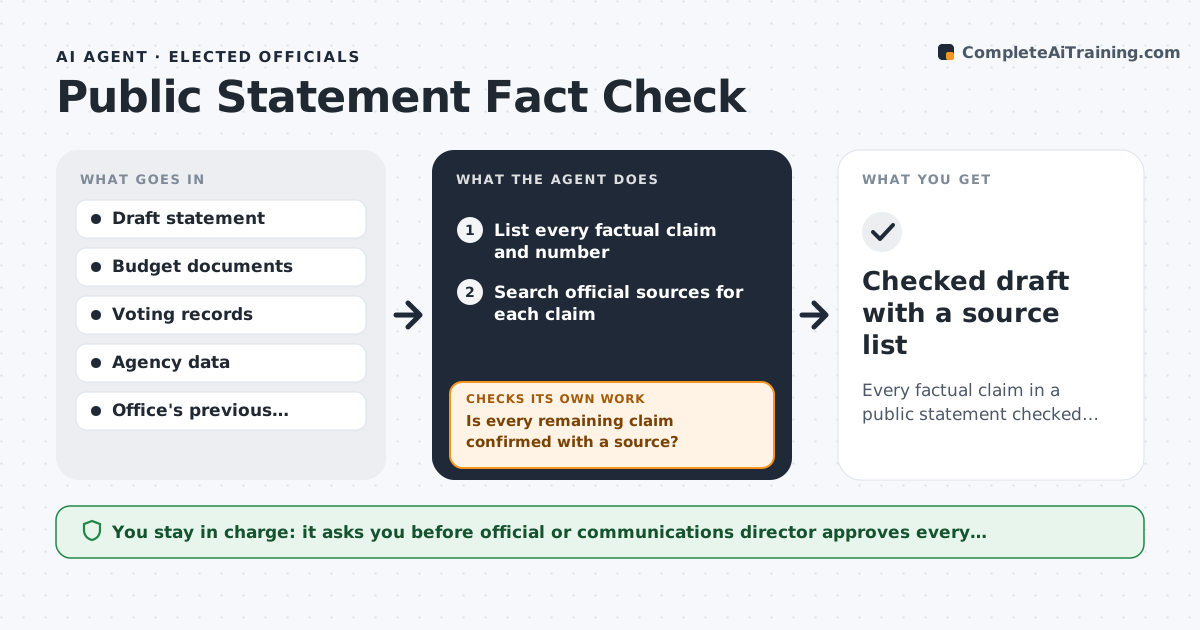
Elected officials put out many statements each week, and one wrong number can turn into a news story. This agent reads a draft speech, newsletter or post placed in the review folder and lists every factual claim and figure. It searches official sources such as budget documents, agency data and the voting record, then marks each claim confirmed, wrong or unconfirmed. Wrong claims are rewritten with the sourced figure. It re-checks the revised draft until every remaining claim has a source, and removes what cannot be confirmed. It does not change the message or the tone. The official or communications director approves before anything is published. Edge case: if a claim about an opponent's record cannot be found in the official vote record, it is removed rather than softened.
How it works
Follow the arrows from top to bottom. The orange dashed arrow is the loop: when a check fails, the agent goes back and tries again.
Read the steps as a list
- Draft placed in the review folder
- List every factual claim and number
- Search official sources for each claim
- Mark claims as confirmed, wrong or unconfirmed
- Rewrite wrong claims with the sourced figure
- Is every remaining claim confirmed with a source?If not: remove or rewrite the claim and search again. Back to step 3.
- Official or comms director approves for publishingThe agent waits here for your OK.
- Checked draft with a source list
How it decides
A claim passes only when an official source supports the exact figure or fact. Unconfirmed claims about others are removed.
- Exact figures must match the source
- Unconfirmed claims about other people are removed
- Tone and message are left as written
Make it yours
Every agent is a starting point. You choose these settings for your own situation.
- Which official sources to trust
- How to handle unconfirmed claims (remove or flag)
- Statement types covered (speeches, posts, newsletters)
- Review turnaround time
What keeps you in control
It always asks you first
- Official or communications director approves every publication
Hard limits
- Never publishes or posts
- Does not use campaign resources for official content or the reverse
It stops when
- Done: all claims sourced
- Stop: draft has no factual claims
Set it up
We guide you through the set-up, step by step
Members get the full set-up guide for this agent. No technical skills needed: you copy, paste and upload.
- One set of instructions to paste into your AI, with the clicks for ChatGPT, Claude, Microsoft 365 Copilot, Gemini and Grok
- The agent then walks you through connecting your own data, one source at a time
- A downloadable copy with the flow chart, the rules and the full guide