AI agent for network engineers
QoS Policy Verification Agent
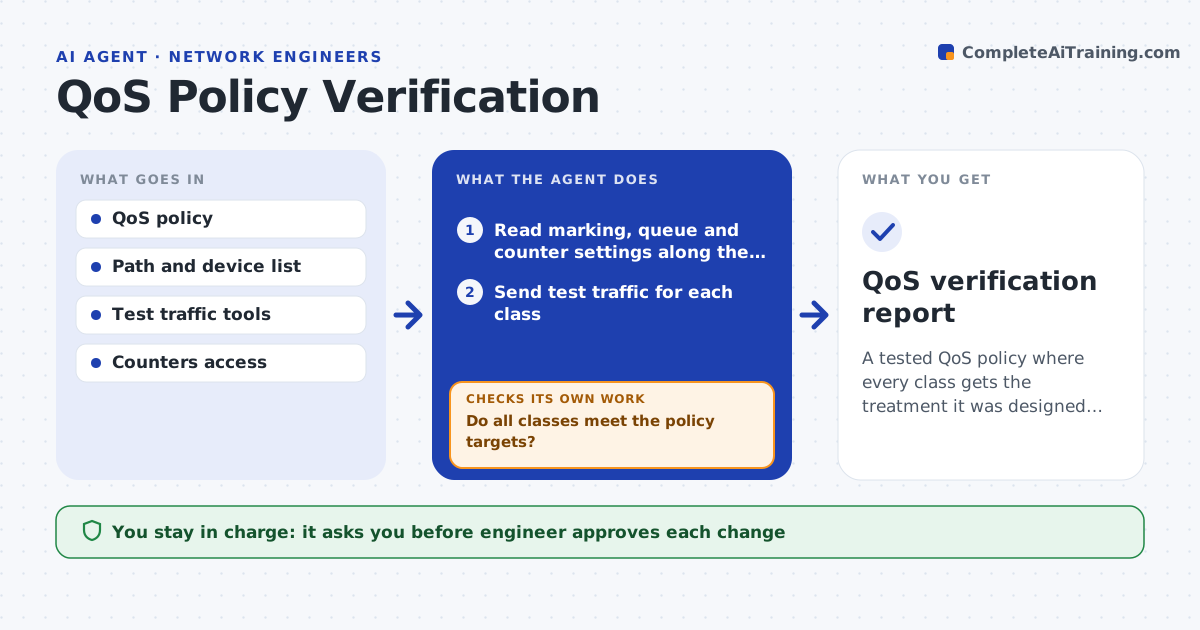
A tested QoS policy where every class gets the treatment it was designed to get
What it does
Quality of service policies are set but never verified from end to end. This agent checks the marking, queues and counters along a path. It runs test traffic of different classes, such as voice, video and bulk data, and compares the results with the policy. If drops appear in the wrong class, it traces which device is responsible and proposes a fix. After the engineer approves the change, it runs the same tests again. Edge case: voice is marked correctly at the access switch but remarked to default at the WAN edge, so the agent identifies that device as the fault.
How it works
Follow the arrows from top to bottom. The orange dashed arrow is the loop: when a check fails, the agent goes back and tries again.
Read the steps as a list
- QoS check is due
- Read marking, queue and counter settings along the path
- Send test traffic for each class
- Compare markings, drops and delay with the policy
- Do all classes meet the policy targets?If not: trace the path to find the device where the marking or queue is wrong. Back to step 2.
- Propose a fix for the faulty device
- Engineer approves the changeThe agent waits here for your OK.
- Apply the fix in a window
- Rerun the test traffic
- Do all classes now meet the targets?If not: review the next device on the path and propose another fix. Back to step 8.
- QoS verification report
How it decides
A class passes when markings are preserved along the path and drops and delay stay within the policy targets.
- Fail a class when markings change along the path
- Fail a class when delay or drops exceed the target
- Find the first device where behavior differs
- Test every class after any fix
Make it yours
Every agent is a starting point. You choose these settings for your own situation.
- Classes and targets
- Test paths
- Test windows
- Devices included
What keeps you in control
It always asks you first
- Engineer approves each change
Hard limits
- Never changes a device without approval
- Never runs test traffic that disrupts users
It stops when
- Done: every class passes
- Stop: the test cannot cover the full path
Set it up
We guide you through the set-up, step by step
Members get the full set-up guide for this agent. No technical skills needed: you copy, paste and upload.
- One set of instructions to paste into your AI, with the clicks for ChatGPT, Claude, Microsoft 365 Copilot, Gemini and Grok
- The agent then walks you through connecting your own data, one source at a time
- A downloadable copy with the flow chart, the rules and the full guide