AI agent for procurement specialists
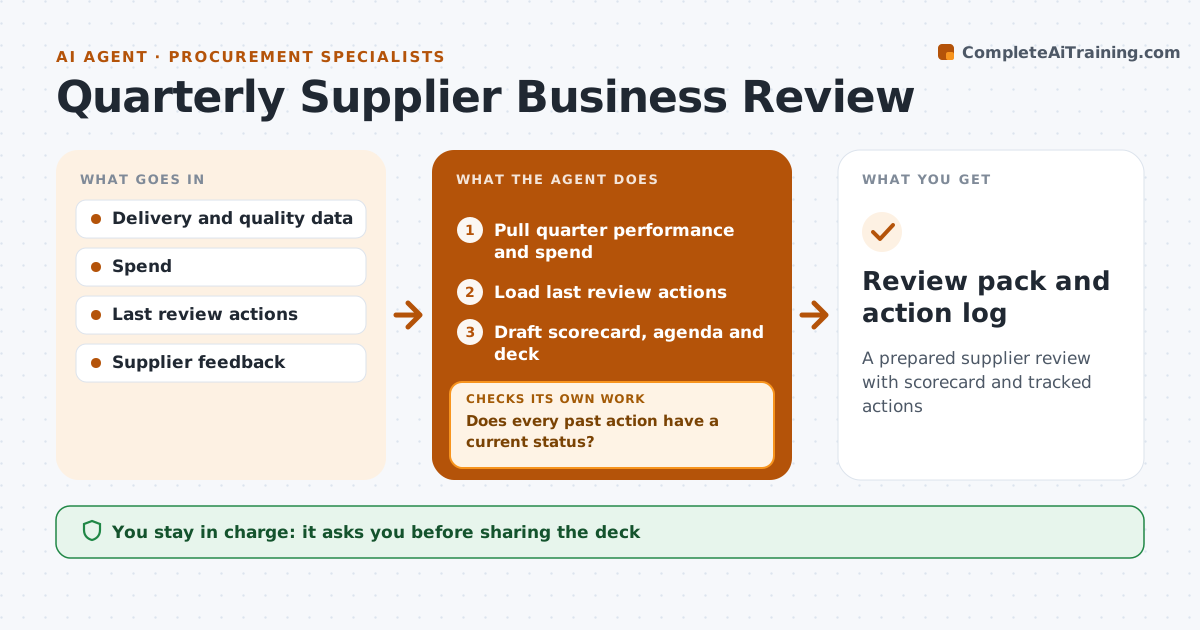
Quarterly Supplier Business Review Agent
A prepared supplier review with scorecard and tracked actions
What it does
Quarterly reviews with key suppliers are often prepared in a rush, and agreed actions are forgotten. This agent collects delivery, quality, cost and responsiveness data for the quarter, plus the actions from the last review. It builds a scorecard and checks progress on each past action. If actions are open, it asks the owners for status before the meeting and asks again if they do not reply. If a metric is defined differently from the supplier's version, it notes the difference so the meeting does not argue over numbers. It drafts the deck and agenda, with topics such as cost ideas and risks. After the meeting it records new actions and tracks them. The manager approves the deck before it is shared.
How it works
Follow the arrows from top to bottom. The orange dashed arrow is the loop: when a check fails, the agent goes back and tries again.
Read the steps as a list
- Review date approaches
- Pull quarter performance and spend
- Load last review actions
- Does every past action have a current status?If not: ask owners for status and update the list. Back to step 3.
- Draft scorecard, agenda and deck
- Manager approves deck for sharingThe agent waits here for your OK.
- Record new actions after the meeting
- Review pack and action log
How it decides
It marks metrics red, amber or green against targets and only includes actions with a current status.
- Red means below target for the quarter
- Old actions need status
- Note metric definition differences
Make it yours
Every agent is a starting point. You choose these settings for your own situation.
- Metrics and targets
- Deck format
- Lead time before the meeting
- Who owns actions
What keeps you in control
It always asks you first
- Sharing the deck
Hard limits
- Never shares with suppliers without approval
It stops when
- Done: review held and actions logged
- Stop: data missing; postpone review
Set it up
We guide you through the set-up, step by step
Members get the full set-up guide for this agent. No technical skills needed: you copy, paste and upload.
- One set of instructions to paste into your AI, with the clicks for ChatGPT, Claude, Microsoft 365 Copilot, Gemini and Grok
- The agent then walks you through connecting your own data, one source at a time
- A downloadable copy with the flow chart, the rules and the full guide