AI agent for vice president of sales
Quote and Deal Desk Exception Agent
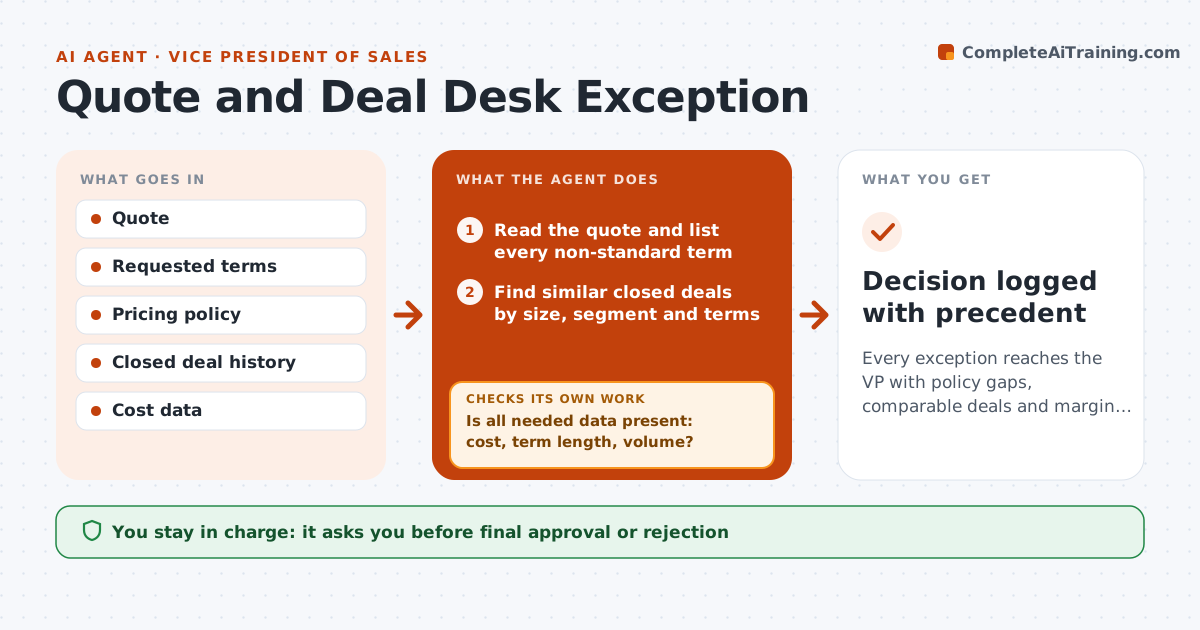
Every exception reaches the VP with policy gaps, comparable deals and margin impact already worked out.
What it does
A rep asks for 30 percent off and net-90 terms two days before quarter end, and the VP has ten minutes to decide. This agent prepares the decision for each exception request. It compares the requested terms to pricing policy, finds similar closed deals by size, segment and terms, and calculates the margin impact of the request. It flags risks such as a discount deeper than anything approved before or payment terms outside finance rules. If data is missing, like cost or the contract length, it asks the rep and rechecks once the answer arrives. It then writes a one-page brief with a recommendation. You approve or reject. Edge case: multi-year deals are compared on yearly value so a long contract does not look cheap.
How it works
Follow the arrows from top to bottom. The orange dashed arrow is the loop: when a check fails, the agent goes back and tries again.
Read the steps as a list
- Exception request submitted
- Read the quote and list every non-standard term
- Is all needed data present: cost, term length, volume?If not: ask the rep for the missing items and wait for the reply. Back to step 2.
- Find similar closed deals by size, segment and terms
- Compare each term to policy and to the similar deals
- Calculate margin and cash impact of the request
- Does the margin stay above the floor?If not: model a counter offer with smaller concessions and recalculate. Back to step 6.
- Write the brief with a recommendation and a counter option
- VP approves, counters or rejectsThe agent waits here for your OK.
- Record the decision and reason in the CRM as a draft note
- Decision logged with precedent
How it decides
It compares each requested term to policy limits and to the median of similar closed deals, and recommends approve, counter or reject based on margin and precedent.
- Margin below the floor: recommend a counter, not approval
- Discount deeper than any similar deal in 12 months: flag as no precedent
- Payment terms over 60 days: send to finance for a credit check
- Request within 5 percent of policy: recommend approve
Make it yours
Every agent is a starting point. You choose these settings for your own situation.
- Margin floor (default 40 percent)
- Discount limits by segment
- Payment terms limit in days
- Number of similar deals to compare (default 6)
- Who is notified for finance review
What keeps you in control
It always asks you first
- Final approval or rejection
- Any counter offer sent to the customer
Hard limits
- Never approve or send terms to a customer
- Never ignore a margin floor
It stops when
- Done: decision recorded with reason
- Stop: rep does not supply the missing data in 24 hours
Set it up
We guide you through the set-up, step by step
Members get the full set-up guide for this agent. No technical skills needed: you copy, paste and upload.
- One set of instructions to paste into your AI, with the clicks for ChatGPT, Claude, Microsoft 365 Copilot, Gemini and Grok
- The agent then walks you through connecting your own data, one source at a time
- A downloadable copy with the flow chart, the rules and the full guide