AI agent for geologists
Rainfall Trigger Slope Watch Agent
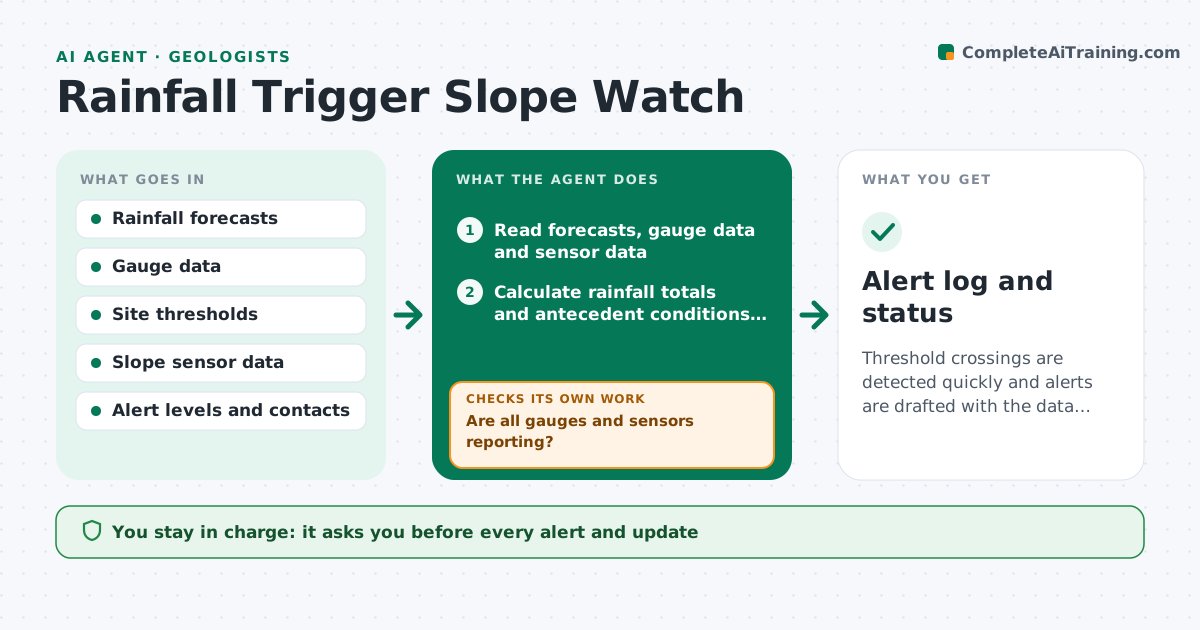
Threshold crossings are detected quickly and alerts are drafted with the data behind them.
What it does
A slope above a road has a threshold such as 60 mm in 24 hours, and someone has to look at the forecast, the gauge and the sensors, often at night. This agent compares forecasts and gauge data to the site thresholds, including antecedent rainfall. It reads sensors on watched slopes, such as piezometers, inclinometers and crack meters, and drafts alerts when thresholds are met or when sensors show movement. It rechecks as new data arrives and updates the alert level up or down. You approve every alert. Edge case: a gauge that stops reporting is treated as a risk and replaced by the nearest gauge with a note.
How it works
Follow the arrows from top to bottom. The orange dashed arrow is the loop: when a check fails, the agent goes back and tries again.
Read the steps as a list
- Scheduled run or rain event
- Read forecasts, gauge data and sensor data
- Are all gauges and sensors reporting?If not: substitute the nearest gauge with a note and flag the faulty source. Back to step 2.
- Calculate rainfall totals and antecedent conditions for each site
- Compare to thresholds and read sensor movement
- Is any threshold or movement trigger met or forecast within the lead time?If not: log as normal and set the next run. Back to step 4.
- Draft an alert with the data, level and recommended actions
- Geologist approves every alertThe agent waits here for your OK.
- Read new data after the alert
- Should the alert level be raised, kept or lowered?If not: revise the alert and send the update to the geologist for approval. Back to step 8.
- Alert log and status
How it decides
It checks rainfall totals and antecedent conditions against each site's threshold, then sensor movement. Meeting a rainfall threshold or a movement trigger raises the level.
- 24-hour rainfall at or above the site threshold: raise to alert level 2
- Crack meter movement over 2 mm per hour: raise a level regardless of rain
- Gauge offline over 1 hour: use the nearest gauge and flag
- Rain below 50 percent of the threshold for 6 hours: propose lowering the level
Make it yours
Every agent is a starting point. You choose these settings for your own situation.
- Thresholds by slope
- Run frequency
- Alert levels and wording
- Sensors included
- Substitute gauges
What keeps you in control
It always asks you first
- Every alert and update
Hard limits
- Never send an alert or close a road
- Never ignore a failed sensor
It stops when
- Done: event ended and level returned to normal
- Stop: all data feeds down, escalate to the geologist
Set it up
We guide you through the set-up, step by step
Members get the full set-up guide for this agent. No technical skills needed: you copy, paste and upload.
- One set of instructions to paste into your AI, with the clicks for ChatGPT, Claude, Microsoft 365 Copilot, Gemini and Grok
- The agent then walks you through connecting your own data, one source at a time
- A downloadable copy with the flow chart, the rules and the full guide