AI agent for chief human resources officers
Reduction in Force Planning Agent
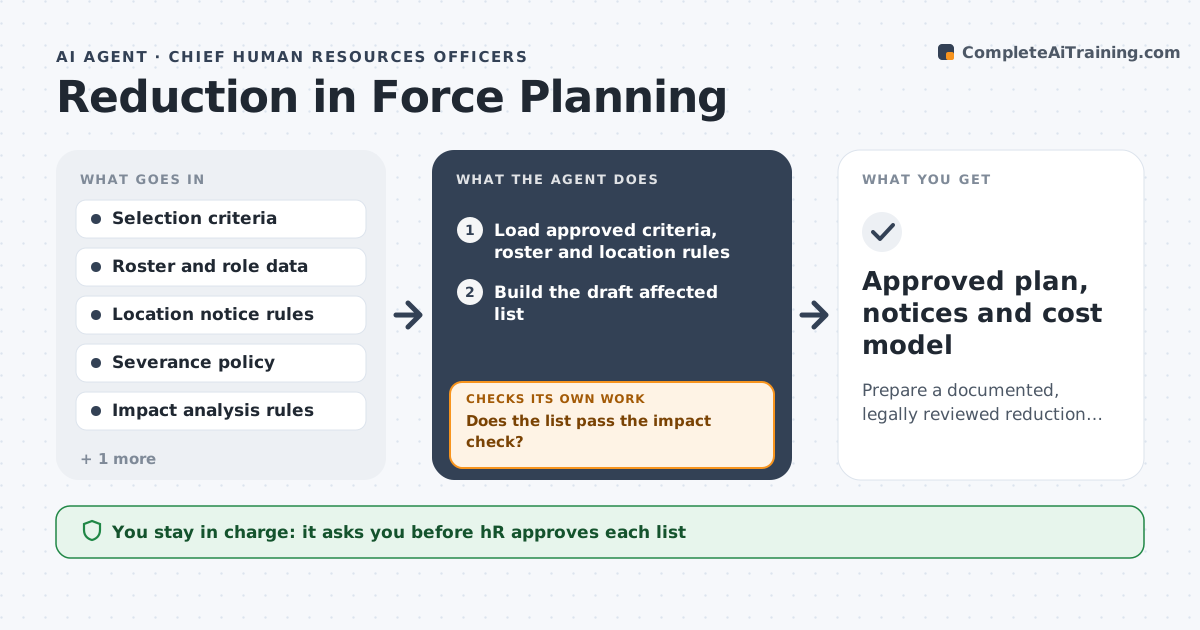
Prepare a documented, legally reviewed reduction plan with checked selection, notices and costs
What it does
When a company must cut positions, a mistake in selection or notice can create serious legal and human harm. This agent works from criteria HR and legal give it. It builds the affected list, then checks it for adverse impact across protected groups using the company's own analysis rules and checks notice requirements by location, such as advance notice periods. It models severance, benefits and timelines for each scenario. If the impact check fails, it revises the criteria options and rebuilds the list. It presents several scenarios with the numbers. HR and legal approve every list and every notice before anything is sent. Edge case: an employee on protected leave is flagged for legal review rather than placed on a list.
How it works
Follow the arrows from top to bottom. The orange dashed arrow is the loop: when a check fails, the agent goes back and tries again.
Read the steps as a list
- Leadership requests a reduction plan
- Load approved criteria, roster and location rules
- Build the draft affected list
- Run the adverse impact analysis
- Does the list pass the impact check?If not: Revise the criteria options with HR and legal and rebuild the list. Back to step 3.
- Check notice periods and leave status by location
- Model severance, benefits and timeline per scenario
- Are notice rules and costs within limits?If not: Adjust the dates or scenario and recompute. Back to step 7.
- HR and legal approve every list and noticeThe agent waits here for your OK.
- Prepare notice packages for approved employees
- Approved plan, notices and cost model
How it decides
It builds lists only from approved criteria and rejects any list whose impact ratio falls below the legal review threshold.
- Use only criteria approved by HR and legal
- Flag employees on protected leave for legal review
- Reject any list that fails the impact threshold
- Apply the longest applicable notice rule by location
Make it yours
Every agent is a starting point. You choose these settings for your own situation.
- Selection criteria (default as approved by HR and legal)
- Impact threshold (default 0.80)
- Notice rules by location (default the legal table)
- Severance formula (default company policy)
What keeps you in control
It always asks you first
- HR approves each list
- Legal approves each list and every notice
Hard limits
- Never send a notice or contact an employee
- Never select by protected traits
- All lists and notices need HR and legal approval
It stops when
- Done: Approved lists and notices ready for HR to deliver
- Stop: Impact check cannot pass, so hand to HR and legal
Set it up
We guide you through the set-up, step by step
Members get the full set-up guide for this agent. No technical skills needed: you copy, paste and upload.
- One set of instructions to paste into your AI, with the clicks for ChatGPT, Claude, Microsoft 365 Copilot, Gemini and Grok
- The agent then walks you through connecting your own data, one source at a time
- A downloadable copy with the flow chart, the rules and the full guide