AI agent for social scientists
HR Survey Question Repair Agent
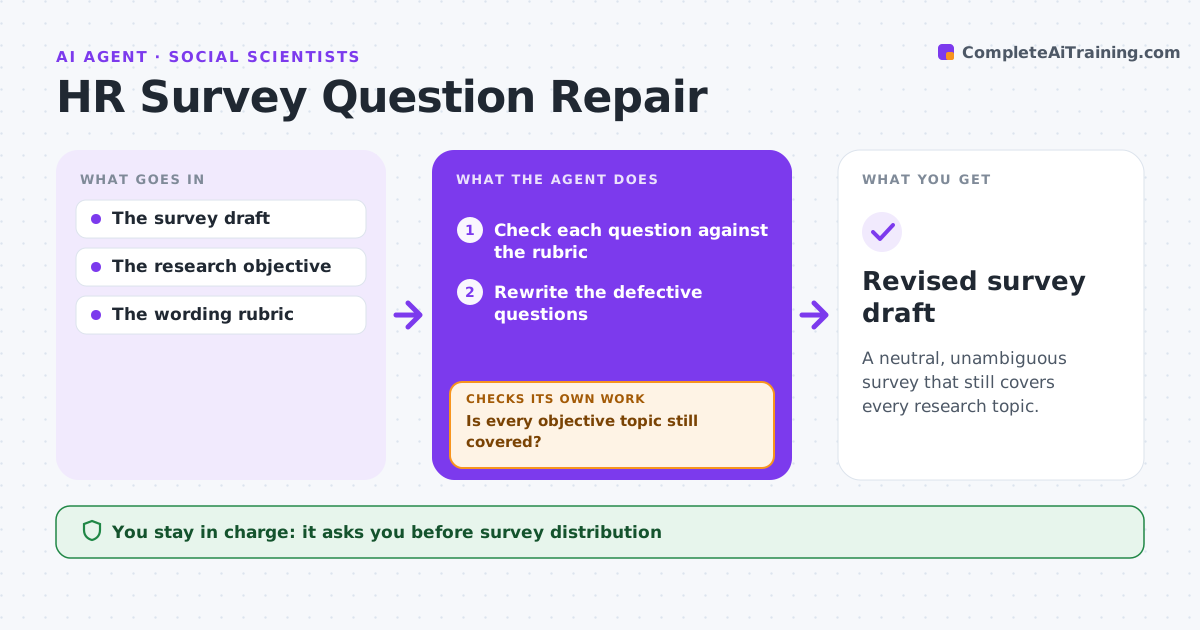
A neutral, unambiguous survey that still covers every research topic.
What it does
Employee surveys often contain leading or double-barreled questions, such as one item asking about both workload and the manager. Answers to these questions cannot be interpreted. This agent checks each question in a survey draft against a wording rubric that covers leading phrasing, two topics in one item and unclear scales. It rewrites defective questions into neutral, single-topic items. Then it maps every question back to the research objective, because splitting or rewording can quietly drop a topic. If a topic has lost its question, it adds or adjusts one and checks again. The people research lead approves before anything is sent. Edge case: removing a leading question about career growth leaves no item covering development, so the agent drafts a neutral replacement.
How it works
Follow the arrows from top to bottom. The orange dashed arrow is the loop: when a check fails, the agent goes back and tries again.
Read the steps as a list
- Survey draft ready
- Check each question against the rubric
- Rewrite the defective questions
- Map questions back to the research objective
- Is every objective topic still covered?If not: add or adjust a question for the dropped topic. Back to step 3.
- People research lead approves distributionThe agent waits here for your OK.
- Revised survey draft
How it decides
It fixes the most severe defect first and re-checks objective coverage after each edit.
- Defects are leading wording, two topics in one item, or an unclear scale.
- Every objective topic keeps at least one question.
- Split a double-barreled item only if the survey stays within the length limit; otherwise ask which topic to keep.
Make it yours
Every agent is a starting point. You choose these settings for your own situation.
- Wording rubric and defect types checked
- Research objective topics that must stay covered
- Maximum survey length (default 35 questions)
- Who approves distribution (default people research lead)
What keeps you in control
It always asks you first
- Survey distribution
- Employee assessment
Hard limits
- No distribution.
It stops when
- Done: rubric passes and coverage complete.
Set it up
We guide you through the set-up, step by step
Members get the full set-up guide for this agent. No technical skills needed: you copy, paste and upload.
- One set of instructions to paste into your AI, with the clicks for ChatGPT, Claude, Microsoft 365 Copilot, Gemini and Grok
- The agent then walks you through connecting your own data, one source at a time
- A downloadable copy with the flow chart, the rules and the full guide