AI agent for recruiters
Offer Approval Package Agent
A complete offer package, within policy or with a documented exception, approved by everyone required
What it does
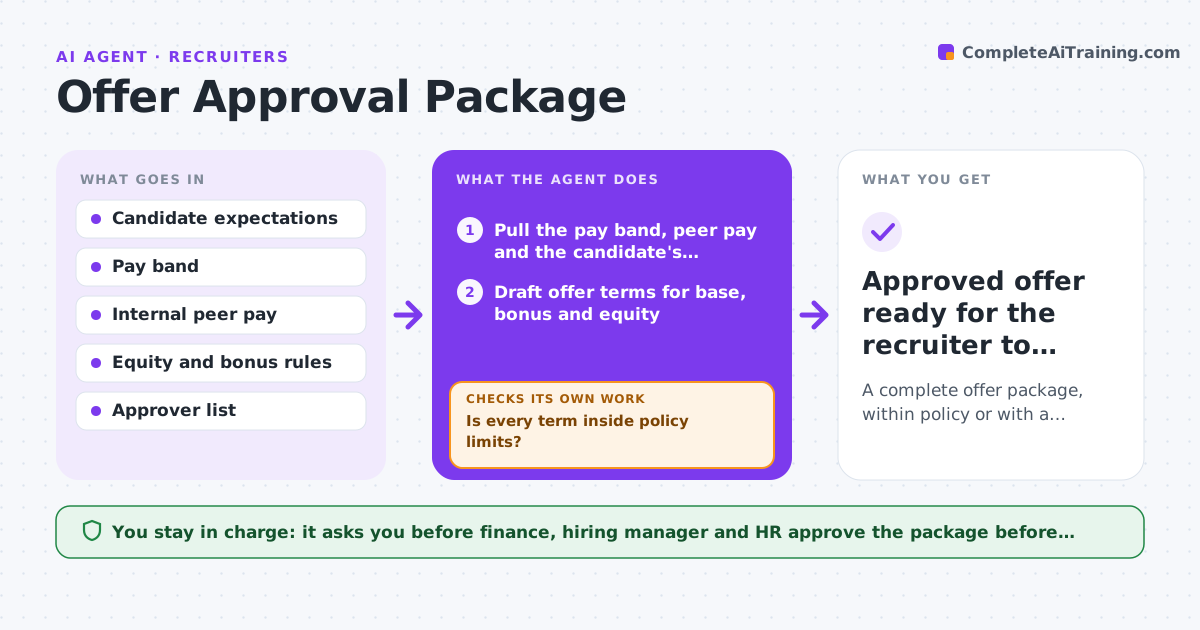
Offers are delayed because the pay band, equity or approver details are wrong or missing. This agent reads the candidate's expectations, the pay band for the level and the pay of current internal peers. It drafts offer terms and checks them against policy limits for base, bonus and equity. If a term falls outside the band, it flags it and builds an exception request that explains the reason and cost. It then lists who must approve and routes the package in order. Finance, the hiring manager and HR approve before the offer is released. Edge case: the candidate asks for 8% above the band maximum, so the agent shows the cost of an exception and a within-band option.
How it works
Follow the arrows from top to bottom. The orange dashed arrow is the loop: when a check fails, the agent goes back and tries again.
Read the steps as a list
- Finalist is selected
- Pull the pay band, peer pay and the candidate's expectations
- Draft offer terms for base, bonus and equity
- Is every term inside policy limits?If not: flag the term, build an exception request and draft a within-band alternative. Back to step 2.
- Compare to internal peers for fairness
- Is the offer within the peer range for similar level and tenure?If not: adjust or add a written reason for the difference. Back to step 2.
- Assemble the package and the approver order
- Finance, hiring manager and HR approve in orderThe agent waits here for your OK.
- Approved offer ready for the recruiter to release
How it decides
Terms inside the band go straight to approval. Terms outside the band trigger an exception request with cost and a within-band alternative.
- Put any term outside the band into an exception request
- Compare to peers with the same level and role
- Require finance approval for any exception
- Show a within-band option beside each exception
Make it yours
Every agent is a starting point. You choose these settings for your own situation.
- Policy limits for base, bonus and equity
- Peer comparison rules (default: same level and role)
- Approver order
- Exception request format
What keeps you in control
It always asks you first
- Finance, hiring manager and HR approve the package before release
Hard limits
- Never releases an offer
- Never changes the pay band
It stops when
- Done: all approvals are in and the package is ready
- Stop: no pay band exists for the role
Set it up
We guide you through the set-up, step by step
Members get the full set-up guide for this agent. No technical skills needed: you copy, paste and upload.
- One set of instructions to paste into your AI, with the clicks for ChatGPT, Claude, Microsoft 365 Copilot, Gemini and Grok
- The agent then walks you through connecting your own data, one source at a time
- A downloadable copy with the flow chart, the rules and the full guide