AI agent for bioinformaticians
Reference Database Update Impact Agent
Know exactly how a reference update changes results before adopting it
What it does
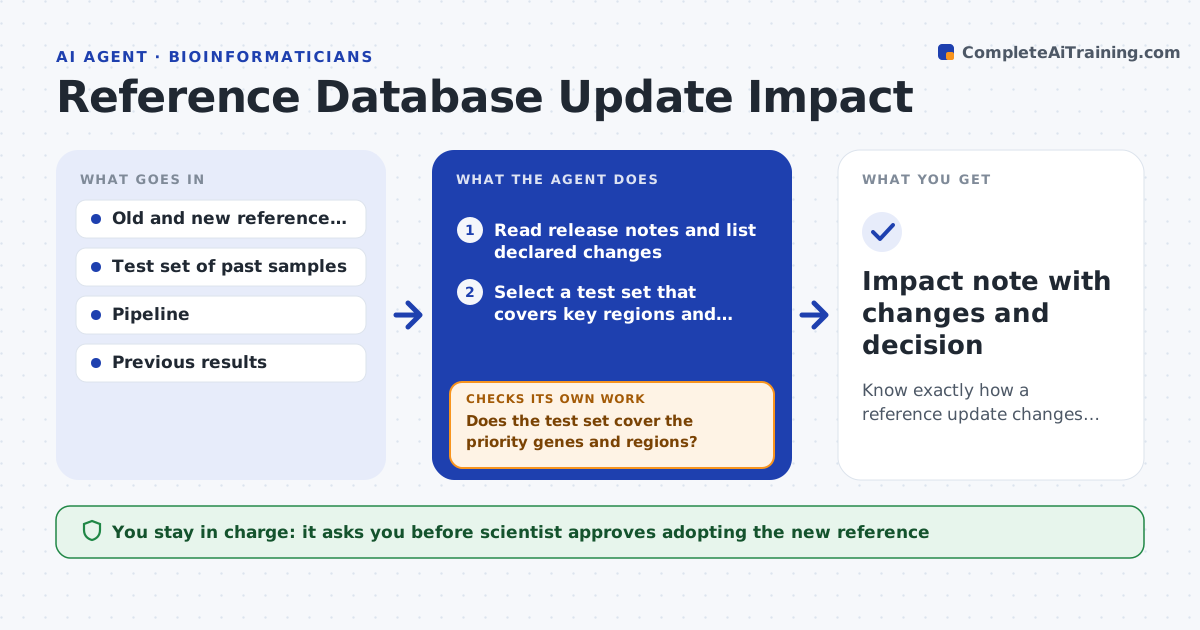
When a genome build, annotation or taxonomy database updates, old and new results can differ, and nobody has measured by how much. This agent notices a new release, picks a test set of past samples with known results, and reruns the pipeline on both the old and new reference versions. It compares variant calls, gene counts, taxa and filtered reads, then lists what changed and by how much. Large differences are investigated: it traces each to renamed genes, moved coordinates, or new entries. It writes a short impact note for the scientist. If the test set does not cover an important region, it adds samples and reruns. The scientist approves the upgrade. Edge case: a drop in a gene count is only a rename, so the agent maps old names to new ones first.
How it works
Follow the arrows from top to bottom. The orange dashed arrow is the loop: when a check fails, the agent goes back and tries again.
Read the steps as a list
- New reference release detected
- Read release notes and list declared changes
- Select a test set that covers key regions and sample types
- Run the pipeline on old and new references
- Compare calls, counts and filtered reads
- Does the test set cover the priority genes and regions?If not: add samples covering the missing regions and rerun both versions. Back to step 3.
- Trace each large difference to a rename, coordinate shift or new entry
- Is every large difference explained?If not: inspect the raw reads for unexplained cases and test again. Back to step 7.
- Scientist approves the upgrade or keeps the old versionThe agent waits here for your OK.
- Impact note with changes and decision
How it decides
It treats a difference as important when it affects more than a set share of calls or any gene on the priority list, and then traces the cause.
- Investigate any gene whose count changes by more than 10%
- Always check genes on the clinical or priority list
- Match renamed genes through the release's mapping table before counting differences
- Recommend delay when more than 2% of variant calls change without explanation
Make it yours
Every agent is a starting point. You choose these settings for your own situation.
- Priority gene list
- Difference threshold to investigate (default 10%)
- Test set size and selection rule
- Which reference sources to watch
- Unexplained call change limit (default 2%)
What keeps you in control
It always asks you first
- Scientist approves adopting the new reference
- Lab lead approves rerunning already reported cases
Hard limits
- Never overwrite old reference files
- Never rerun reported clinical cases without lab lead approval
It stops when
- Done: the impact note is written and the upgrade decision is recorded
- Stop: differences stay unexplained and the version is kept
Set it up
We guide you through the set-up, step by step
Members get the full set-up guide for this agent. No technical skills needed: you copy, paste and upload.
- One set of instructions to paste into your AI, with the clicks for ChatGPT, Claude, Microsoft 365 Copilot, Gemini and Grok
- The agent then walks you through connecting your own data, one source at a time
- A downloadable copy with the flow chart, the rules and the full guide