AI agent for court reporters
Remote Deposition Logistics Agent
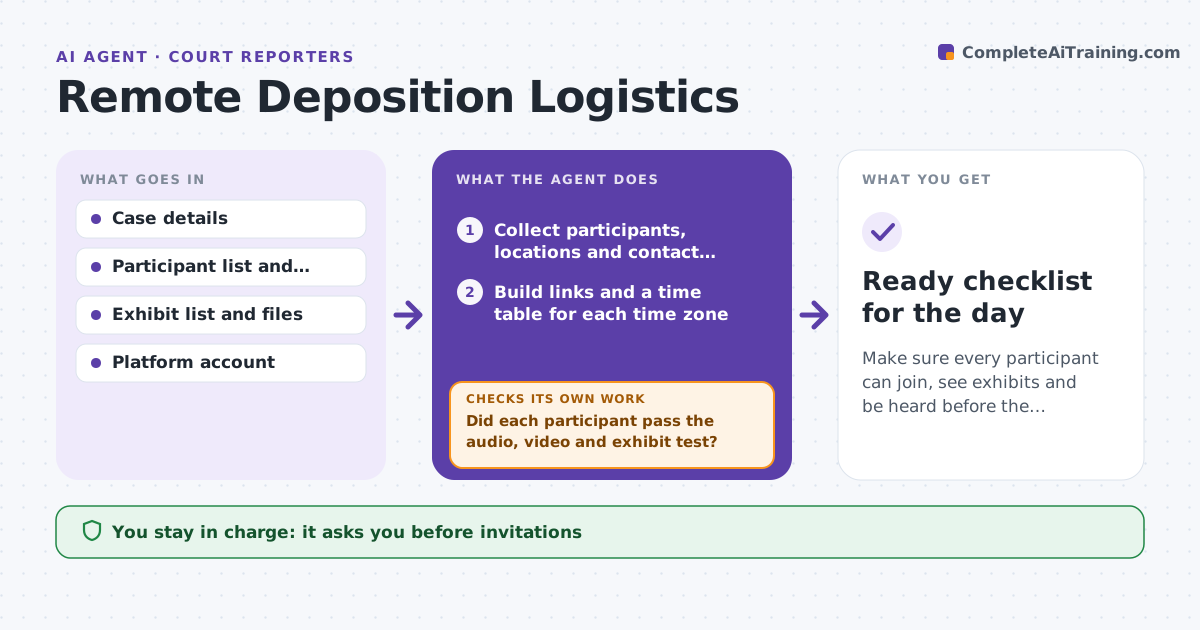
Make sure every participant can join, see exhibits and be heard before the deposition begins.
What it does
A remote deposition has a lot that can go wrong: a wrong time zone in the invite, a link that does not work for the witness, an exhibit that cannot be shared. The reporter and the assistant find out when everyone is waiting. This agent collects the participants, their locations and devices, and builds the meeting links with times converted to each time zone. It checks that exhibits are in the sharing folder and open correctly. It runs a short test with each participant and records the results, then rechecks after any change. The person responsible approves the invitations. Edge case: a witness with no camera or poor connection is offered a phone setup or a nearby office room before the date.
How it works
Follow the arrows from top to bottom. The orange dashed arrow is the loop: when a check fails, the agent goes back and tries again.
Read the steps as a list
- Deposition is scheduled
- Collect participants, locations and contact details
- Build links and a time table for each time zone
- Check that every exhibit is in the sharing folder and opens
- Person approves invitations before they go outThe agent waits here for your OK.
- Send invitations and a test session request
- Did each participant pass the audio, video and exhibit test?If not: Send fix steps or offer a phone or office room option and test again. Back to step 6.
- Do the time, link and exhibits still match after any change?If not: Update the invitations and notify the participants. Back to step 3.
- Send a reminder 1 day before
- Ready checklist for the day
How it decides
Converts times to each time zone, tests each participant's connection and exhibit access, and marks a participant as not ready until the test passes.
- Time zone table in every invitation
- Participant must pass a test before the day
- Exhibit that fails to open is replaced before invites
- Reminder 1 day before with link and phone number
Make it yours
Every agent is a starting point. You choose these settings for your own situation.
- Platform
- Test lead time (default 3 days)
- Exhibit size limit
- Languages for invitations
- Reminder timing
What keeps you in control
It always asks you first
- Invitations
- Any change in time or platform
- Sharing exhibits with participants
Hard limits
- Never send invitations without approval
- Never share exhibits with the wrong party
It stops when
- Done: all participants ready
- Stop: deposition cancelled
- Stop: platform not allowed by the court
Set it up
We guide you through the set-up, step by step
Members get the full set-up guide for this agent. No technical skills needed: you copy, paste and upload.
- One set of instructions to paste into your AI, with the clicks for ChatGPT, Claude, Microsoft 365 Copilot, Gemini and Grok
- The agent then walks you through connecting your own data, one source at a time
- A downloadable copy with the flow chart, the rules and the full guide