AI agent for human resources directors
Remote Employee Location Compliance Agent
Make sure every location change is approved with its payroll, tax and permit steps done
What it does
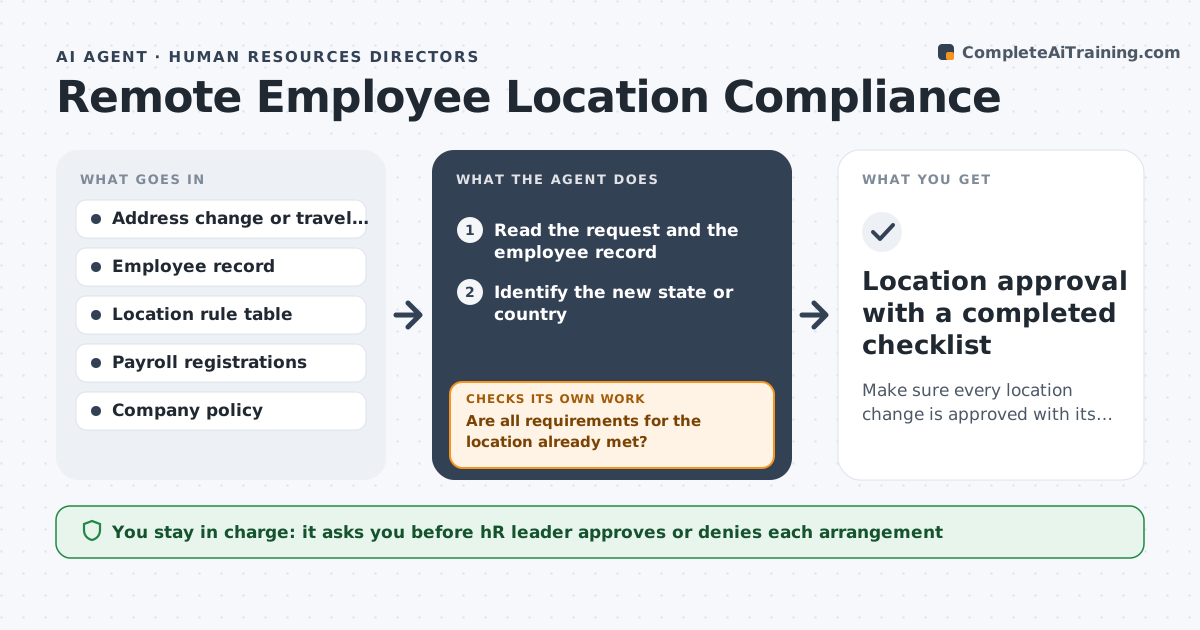
An employee moves from Texas to Oregon and payroll learns two months later. This agent reads address changes and travel or work-from-abroad requests and flags any new state or country. It then checks what the new location requires: employer registration, state payroll tax setup, local benefit rules, work permits and the days allowed abroad before tax or permit issues begin. It lists the missing steps with an owner and a date and re-checks as each is completed. It keeps working until every requirement is met or the arrangement is declined. The HR leader approves or denies the arrangement. Edge case: a two-week trip abroad stays under the allowed days but is logged so repeats are visible.
How it works
Follow the arrows from top to bottom. The orange dashed arrow is the loop: when a check fails, the agent goes back and tries again.
Read the steps as a list
- Address change or remote work request received
- Read the request and the employee record
- Identify the new state or country
- Check registration, payroll tax, permit and benefit rules
- Are all requirements for the location already met?If not: List missing steps with owner and date. Back to step 4.
- Draft the recommendation to approve, delay or deny
- HR leader approves or denies the arrangementThe agent waits here for your OK.
- Track completion of each step
- Is every step done before the start date?If not: Chase the owner and push back the start date. Back to step 8.
- Location approval with a completed checklist
How it decides
It marks a request as blocked until each rule in the location checklist is complete. It treats more than 30 days abroad as needing review.
- Require review for any stay abroad over 30 days
- Block the start until payroll registration is complete
- Require a permit check before any non-resident work
- Log short trips even when they pass
Make it yours
Every agent is a starting point. You choose these settings for your own situation.
- Days abroad before review (default 30)
- Rule table source (default the company's compliance file)
- Notice period before move (default 30 days)
- Reminder frequency (default weekly)
What keeps you in control
It always asks you first
- HR leader approves or denies each arrangement
- Payroll approves tax setup changes
Hard limits
- Never approve or deny on its own
- Never change payroll records without payroll
- Use the company's rule table, not guesses
It stops when
- Done: All steps complete and the arrangement approved
- Stop: Location cannot be supported, so hand to the HR leader
Set it up
We guide you through the set-up, step by step
Members get the full set-up guide for this agent. No technical skills needed: you copy, paste and upload.
- One set of instructions to paste into your AI, with the clicks for ChatGPT, Claude, Microsoft 365 Copilot, Gemini and Grok
- The agent then walks you through connecting your own data, one source at a time
- A downloadable copy with the flow chart, the rules and the full guide