AI agent for property managers
Rent Roll and Ledger Audit Agent
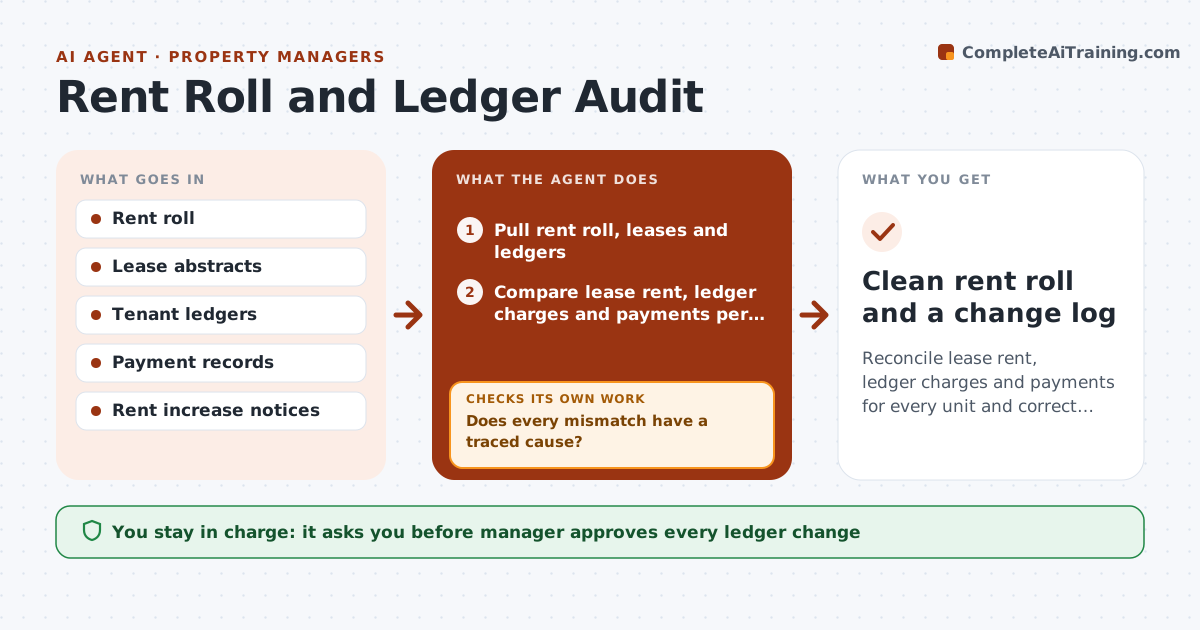
Reconcile lease rent, ledger charges and payments for every unit and correct the right record
What it does
The rent roll says one thing, the lease another, and the ledger a third. The agent compares each unit's lease rent, ledger charges and payments each month. It flags mismatches such as a missed rent increase, a duplicate charge or a payment posted to the wrong unit. For each one it traces a cause by checking the lease, the notice history and the posting dates. Then it drafts a correction entry and a short note explaining why. After corrections are applied it reruns the comparison, and if a difference remains it follows it further. The manager approves every ledger change. Edge case: a tenant has paid the old rent for four months because the increase was never entered, and the agent calculates the back charge and lists options.
How it works
Follow the arrows from top to bottom. The orange dashed arrow is the loop: when a check fails, the agent goes back and tries again.
Read the steps as a list
- Month end close or lease update
- Pull rent roll, leases and ledgers
- Compare lease rent, ledger charges and payments per unit
- List mismatches and classify each
- Does every mismatch have a traced cause?If not: Check notice history, posting dates and neighboring units, then reclassify. Back to step 2.
- Draft correction entries with explanations
- Manager approves each ledger changeThe agent waits here for your OK.
- Apply approved entries to the draft ledger and rerun the comparison
- Do all units now agree across the three records?If not: Trace the remaining differences and draft further corrections. Back to step 3.
- Clean rent roll and a change log
How it decides
Each difference is traced to a cause in a fixed order: lease terms, charge posting, payment posting; corrections are proposed only after a cause is found.
- Treat the signed lease as the source of truth for rent amount
- Never propose a back charge older than the policy limit (default 12 months)
- Flag any difference over $5 per unit
- Group identical errors across units into one correction batch
Make it yours
Every agent is a starting point. You choose these settings for your own situation.
- Difference threshold (default $5)
- Back charge limit in months (default 12)
- Which properties to include
- Report format for the owner
What keeps you in control
It always asks you first
- Manager approves every ledger change
- Manager approves any tenant back charge or credit
Hard limits
- Never change a ledger without manager approval
- Never charge a tenant for an error without showing the lease basis
It stops when
- Done: the three records agree for every unit and changes are approved
- Stop: a lease is missing or unreadable and the manager must supply it
Set it up
We guide you through the set-up, step by step
Members get the full set-up guide for this agent. No technical skills needed: you copy, paste and upload.
- One set of instructions to paste into your AI, with the clicks for ChatGPT, Claude, Microsoft 365 Copilot, Gemini and Grok
- The agent then walks you through connecting your own data, one source at a time
- A downloadable copy with the flow chart, the rules and the full guide