AI agent for property managers
Rental Management Handoff and Tenant Turnover Agent
Run every lease end on time with documented, fair deposit decisions
What it does
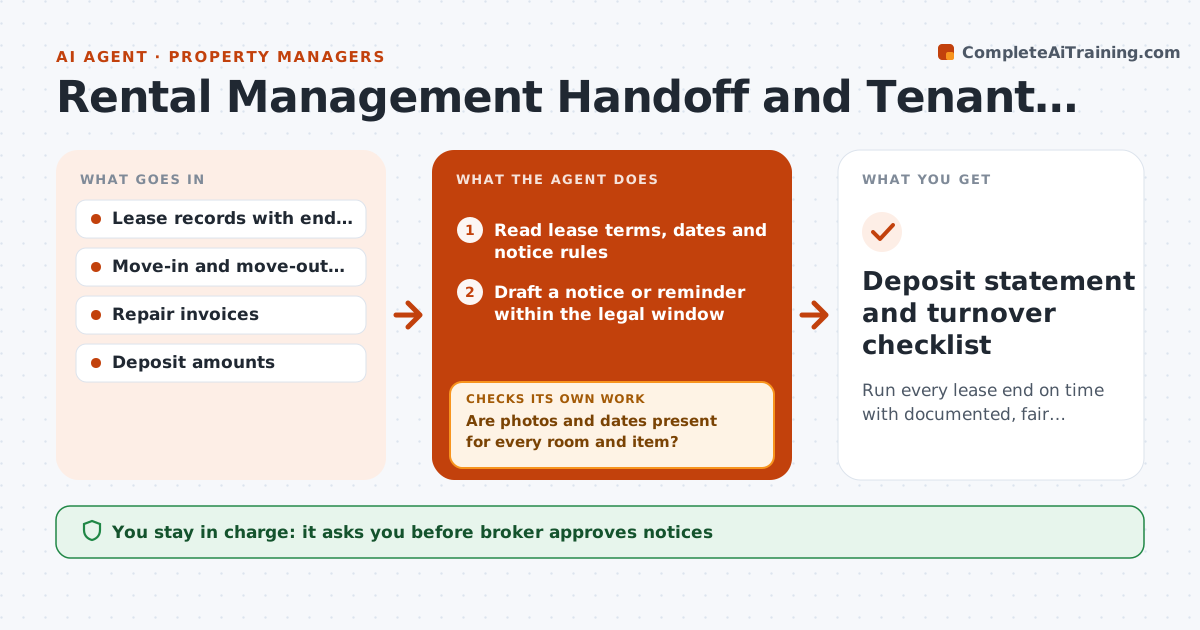
A broker who manages a few dozen rentals keeps lease dates in a spreadsheet, notices in email and inspection photos on a phone. A missed notice window can force an unwanted renewal, and a weak move-out report loses the deposit dispute. This agent keeps the turnover on rails. It tracks lease end dates, drafts notice reminders inside the legal windows, schedules move-out inspections and, after the inspection, compares photos and notes with the move-in report to propose deposit deductions with the evidence. If photos or dates are missing, it asks for them and rechecks. The broker approves every deduction and notice. Edge case: normal wear on carpet. The agent marks it as not deductible and explains the rule.
How it works
Follow the arrows from top to bottom. The orange dashed arrow is the loop: when a check fails, the agent goes back and tries again.
Read the steps as a list
- Lease nears its notice window
- Read lease terms, dates and notice rules
- Draft a notice or reminder within the legal window
- Broker approves the noticeThe agent waits here for your OK.
- Send the notice and schedule the move-out inspection
- Read move-out photos and notes and match them to the move-in report
- Are photos and dates present for every room and item?If not: Ask the inspector for the missing photos and recheck. Back to step 6.
- Separate damage from normal wear and price each item
- Does each deduction have evidence and a cost?If not: Drop it or request an invoice before including it. Back to step 8.
- Broker approves every deduction and the deposit statementThe agent waits here for your OK.
- Deposit statement and turnover checklist
How it decides
It compares move-out items with move-in condition and separates damage from normal wear using the broker's rules. Every deduction needs a photo and a cost.
- Notice reminders go out at least 7 days before the legal deadline
- Normal wear is not deducted
- Deductions over $200 need an invoice or quote
- A missing move-in photo weakens a claim and is flagged
Make it yours
Every agent is a starting point. You choose these settings for your own situation.
- Notice windows by state or lease
- Cost list for common repairs
- Wear rules
- Reminder lead time
- Deduction invoice threshold (default $200)
What keeps you in control
It always asks you first
- Broker approves notices
- Broker approves each deduction and the deposit statement
Hard limits
- Never sends notices or deposit statements without approval
- Does not interpret law, uses the broker's rule sheet
It stops when
- Done: deposit statement sent and unit ready to list
- Stop: tenant disputes the statement, hand to the broker
Set it up
We guide you through the set-up, step by step
Members get the full set-up guide for this agent. No technical skills needed: you copy, paste and upload.
- One set of instructions to paste into your AI, with the clicks for ChatGPT, Claude, Microsoft 365 Copilot, Gemini and Grok
- The agent then walks you through connecting your own data, one source at a time
- A downloadable copy with the flow chart, the rules and the full guide