AI agent for court reporters
Reporter Equipment Readiness Agent
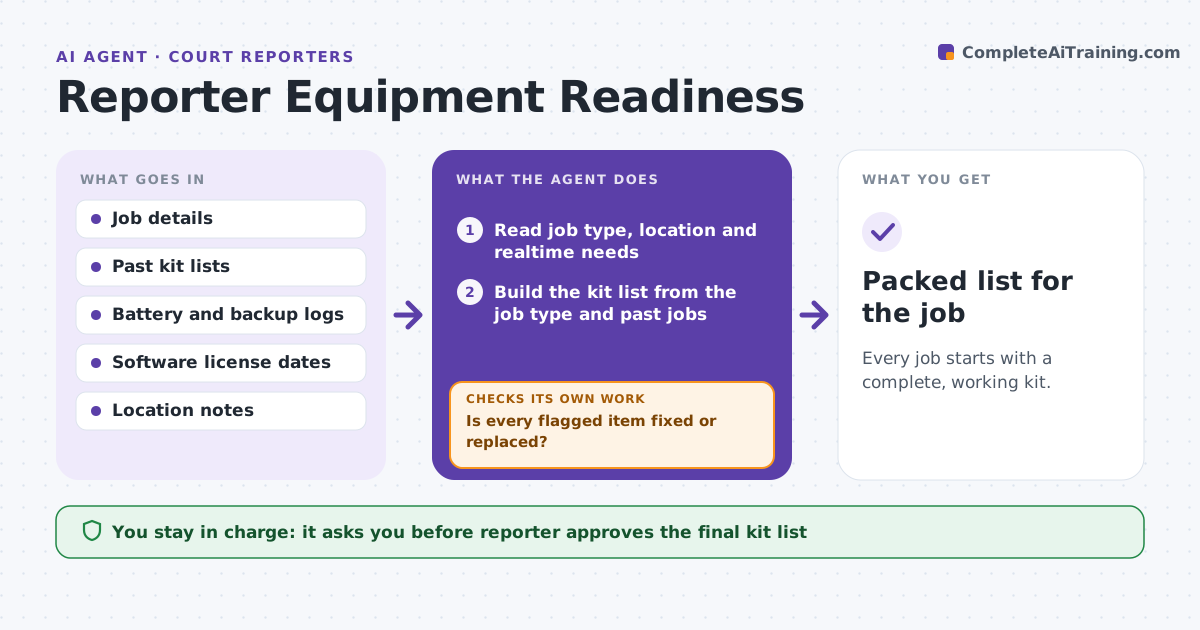
Every job starts with a complete, working kit.
What it does
A dead battery or a missing cable in the middle of a deposition is a bad day. Reporters build their kit from memory and it fails when the job type changes. The day before each job, this agent builds a kit list from the job type, location and whether it is realtime. It reads battery logs, backup file status and software license dates, then flags what is missing or due. It asks the reporter to confirm items, reruns the list after updates and keeps going until nothing is flagged. The reporter approves the final list. Edge case: a job in another state needs an extension cord and a different adapter, which the agent adds from the location notes.
How it works
Follow the arrows from top to bottom. The orange dashed arrow is the loop: when a check fails, the agent goes back and tries again.
Read the steps as a list
- Day before a job
- Read job type, location and realtime needs
- Build the kit list from the job type and past jobs
- Check battery logs, backup files and license dates
- Flag items missing, low or expiring
- Is every flagged item fixed or replaced?If not: ask the reporter for status and update the list. Back to step 4.
- Add location extras such as cords and adapters
- Reporter approves the final kit listThe agent waits here for your OK.
- Packed list for the job
How it decides
It adds items from the job type and location rules. It flags a battery when the log shows under 80% capacity or no charge record in 3 days, and a license expiring within 14 days.
- Flag a battery under 80% capacity
- Flag a license expiring within 14 days
- Add travel items when the location is over 50 miles away
- Always include a spare cable for each connection type
Make it yours
Every agent is a starting point. You choose these settings for your own situation.
- Battery threshold (default 80%)
- License warning days (default 14)
- Standard kit by job type
- Travel distance rule
- Reminder time
What keeps you in control
It always asks you first
- Reporter approves the final kit list
Hard limits
- Never mark an item ready without the reporter's confirmation
- Never order equipment itself
It stops when
- Done: nothing flagged and the list is approved
- Stop: a critical item cannot be fixed before the job
Set it up
We guide you through the set-up, step by step
Members get the full set-up guide for this agent. No technical skills needed: you copy, paste and upload.
- One set of instructions to paste into your AI, with the clicks for ChatGPT, Claude, Microsoft 365 Copilot, Gemini and Grok
- The agent then walks you through connecting your own data, one source at a time
- A downloadable copy with the flow chart, the rules and the full guide