AI agent for immigration consultants
Request for Evidence Response Agent
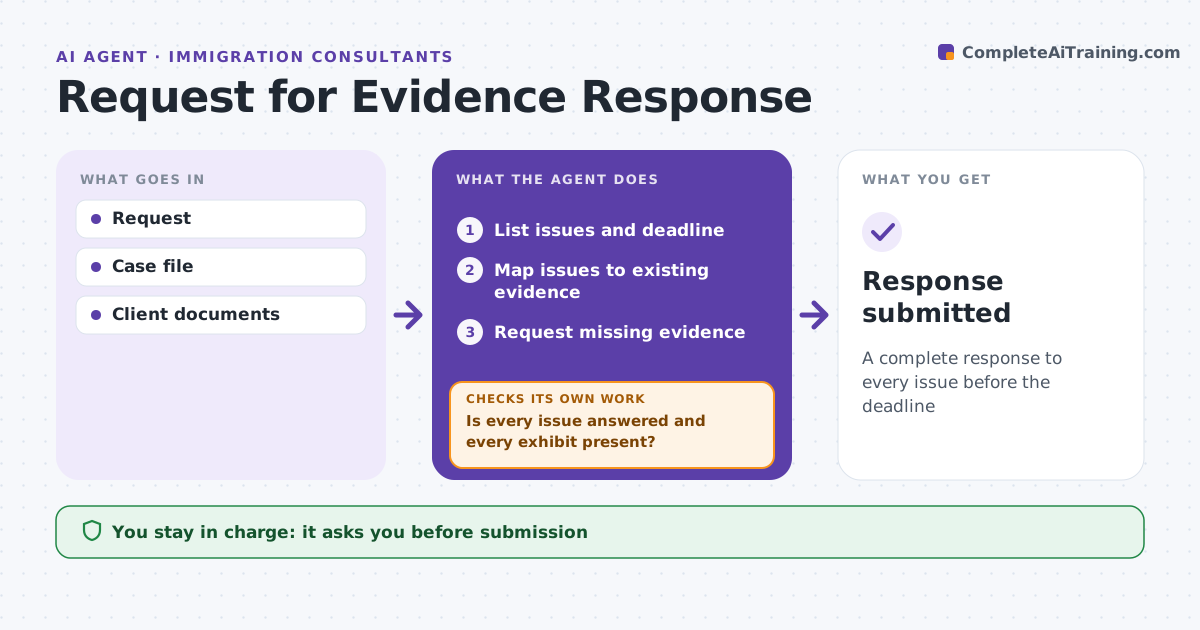
A complete response to every issue before the deadline
What it does
A request for evidence puts a case at risk, and a response that misses one point can mean denial. When a request arrives, this agent reads it and lists each issue raised, the evidence that would answer it and the deadline. It checks the case file for documents that already answer each issue and drafts requests to the client for the rest. Third-party evidence, such as employer financials, is requested first because it takes longest. It drafts the cover letter, answering each point with references to exhibits. It then checks that every issue is answered and every exhibit cited exists. If not, it adds the missing parts. If an issue cannot be answered, it advises the consultant. The consultant approves before submission. Edge case: proof of employer ability to pay must come from the employer.
How it works
Follow the arrows from top to bottom. The orange dashed arrow is the loop: when a check fails, the agent goes back and tries again.
Read the steps as a list
- Request received
- List issues and deadline
- Map issues to existing evidence
- Request missing evidence
- Draft cover letter
- Is every issue answered and every exhibit present?If not: add missing evidence or text. Back to step 3.
- Consultant approvesThe agent waits here for your OK.
- Response submitted
How it decides
It maps each issue to evidence and checks full coverage.
- Deadline within 14 days: priority
- Third-party evidence: request early
- Issue not answerable: advise consultant
Make it yours
Every agent is a starting point. You choose these settings for your own situation.
- Letter template
- Deadline alerts
- Evidence types
- Exhibit numbering
What keeps you in control
It always asks you first
- Submission
- Client requests
Hard limits
- Never submits
- Never fabricates evidence
It stops when
- Done: submitted
- Stop: deadline missed risk, alert consultant
Set it up
We guide you through the set-up, step by step
Members get the full set-up guide for this agent. No technical skills needed: you copy, paste and upload.
- One set of instructions to paste into your AI, with the clicks for ChatGPT, Claude, Microsoft 365 Copilot, Gemini and Grok
- The agent then walks you through connecting your own data, one source at a time
- A downloadable copy with the flow chart, the rules and the full guide