AI agent for geologists
Resource Model Update Impact Agent
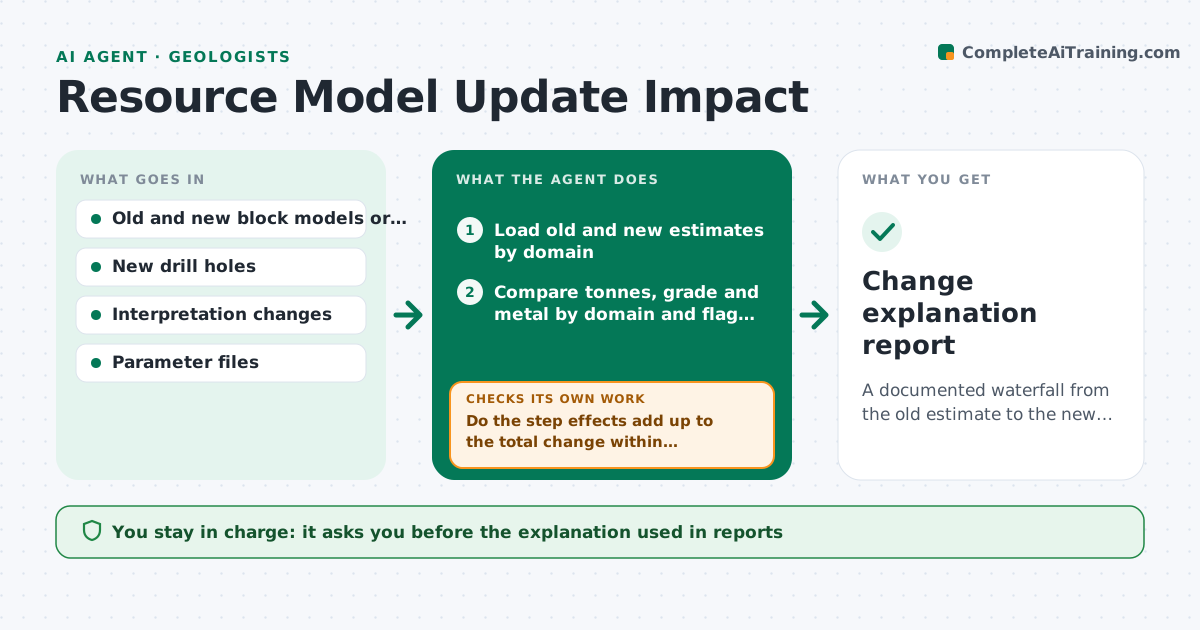
A documented waterfall from the old estimate to the new one with a cause for every large change.
What it does
After a drilling campaign, the resource estimate moves by 12 percent and the manager asks why, and the answer takes a week. This agent compares old and new estimates by domain and flags large changes. It traces each change to new holes, changed interpretations or parameter edits, by rerunning the estimate in steps: first with only new drilling, then with the interpretation changes, then with the parameter changes. It lists the effect of each step so the cause is clear. It reruns with suspected causes isolated when the steps do not add up. You approve the explanation. Edge case: a change in cutoff grade is separated from changes in tonnes and grade, so they are not mixed.
How it works
Follow the arrows from top to bottom. The orange dashed arrow is the loop: when a check fails, the agent goes back and tries again.
Read the steps as a list
- New estimate produced
- Load old and new estimates by domain
- Compare tonnes, grade and metal by domain and flag large changes
- List new holes, interpretation changes and parameter edits
- Rerun in steps: new holes, interpretation, parameters
- Calculate the effect of each step on tonnes, grade and metal
- Do the step effects add up to the total change within tolerance?If not: isolate suspected causes in separate reruns and recompute. Back to step 5.
- Separate cutoff effects from tonnes and grade effects
- Write the waterfall and a plain explanation for each domain
- Geologist approves the explanationThe agent waits here for your OK.
- Change explanation report
How it decides
It steps from old to new by applying one class of change at a time and compares each step's effect. Unexplained residuals trigger isolated reruns.
- Domain change over 10 percent in metal: needs an explanation
- Residual over 2 percent after the step runs: isolate the cause
- Parameter change with no logged reason: flag for the geologist
- Cutoff change: show separately from tonnes and grade
Make it yours
Every agent is a starting point. You choose these settings for your own situation.
- Domains
- Flag threshold (default 10 percent)
- Residual tolerance
- Order of the steps
- Report format
What keeps you in control
It always asks you first
- The explanation used in reports
Hard limits
- Never change the models
- Never leave a large change unexplained in the report
It stops when
- Done: all large changes explained
- Stop: parameter files missing
Set it up
We guide you through the set-up, step by step
Members get the full set-up guide for this agent. No technical skills needed: you copy, paste and upload.
- One set of instructions to paste into your AI, with the clicks for ChatGPT, Claude, Microsoft 365 Copilot, Gemini and Grok
- The agent then walks you through connecting your own data, one source at a time
- A downloadable copy with the flow chart, the rules and the full guide