AI agent for managers
RFP Answer Evidence Agent
RFP answers backed by current, approved evidence.
What it does
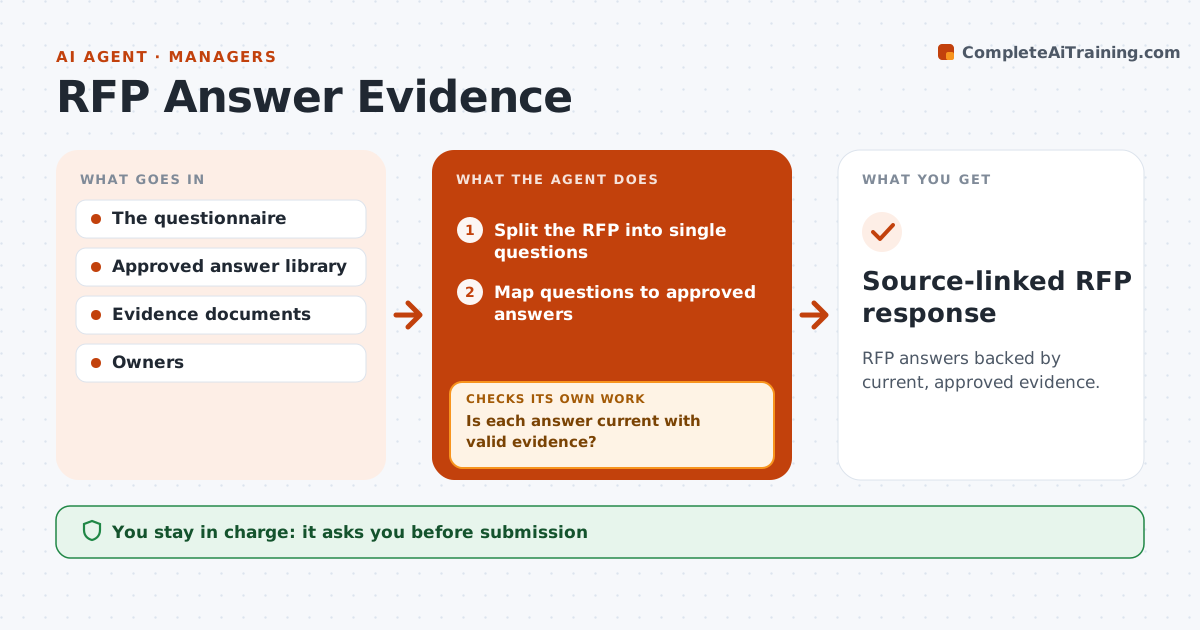
RFP and security questionnaire answers are often copied from old responses, so outdated or unsupported claims go out to buyers. This agent maps every question to the current approved answer in the library and checks the dated evidence behind it, such as certificates, audit reports and policies. If an answer is outdated or its evidence has expired, it looks for another valid source or sends an owner question to the right subject expert. It drafts responses with gaps flagged clearly, then checks the full response again for unsupported claims before the bid manager approves submission. It never invents an answer. Edge case: a question that combines two topics is split and each half is answered and sourced separately.
How it works
Follow the arrows from top to bottom. The orange dashed arrow is the loop: when a check fails, the agent goes back and tries again.
Read the steps as a list
- RFP arrives
- Split the RFP into single questions
- Map questions to approved answers
- Is each answer current with valid evidence?If not: find another source or ask the owner. Back to step 3.
- Draft responses with gaps flagged
- Is the full draft free of unsupported claims?If not: remove or reword the claim and flag it. Back to step 5.
- Bid manager approves submissionThe agent waits here for your OK.
- Source-linked RFP response
How it decides
It picks the most current approved answer and checks evidence validity.
- Expired evidence cannot support an answer.
- No answer is invented; gaps go to the owner.
- Combined questions are split and sourced separately.
- Only the bid manager submits.
Make it yours
Every agent is a starting point. You choose these settings for your own situation.
- Answer library and evidence repository
- Evidence age limit (default: 12 months, or certificate expiry)
- Subject experts per topic
- Who approves submission (default: bid manager)
- Export format required by the buyer
What keeps you in control
It always asks you first
- Submission
- Security attestations
- Contractual commitments
Hard limits
- No attestations.
It stops when
- Done: response ready.
Set it up
We guide you through the set-up, step by step
Members get the full set-up guide for this agent. No technical skills needed: you copy, paste and upload.
- One set of instructions to paste into your AI, with the clicks for ChatGPT, Claude, Microsoft 365 Copilot, Gemini and Grok
- The agent then walks you through connecting your own data, one source at a time
- A downloadable copy with the flow chart, the rules and the full guide