AI agent for procurement specialists
RFQ Bid Comparison Agent
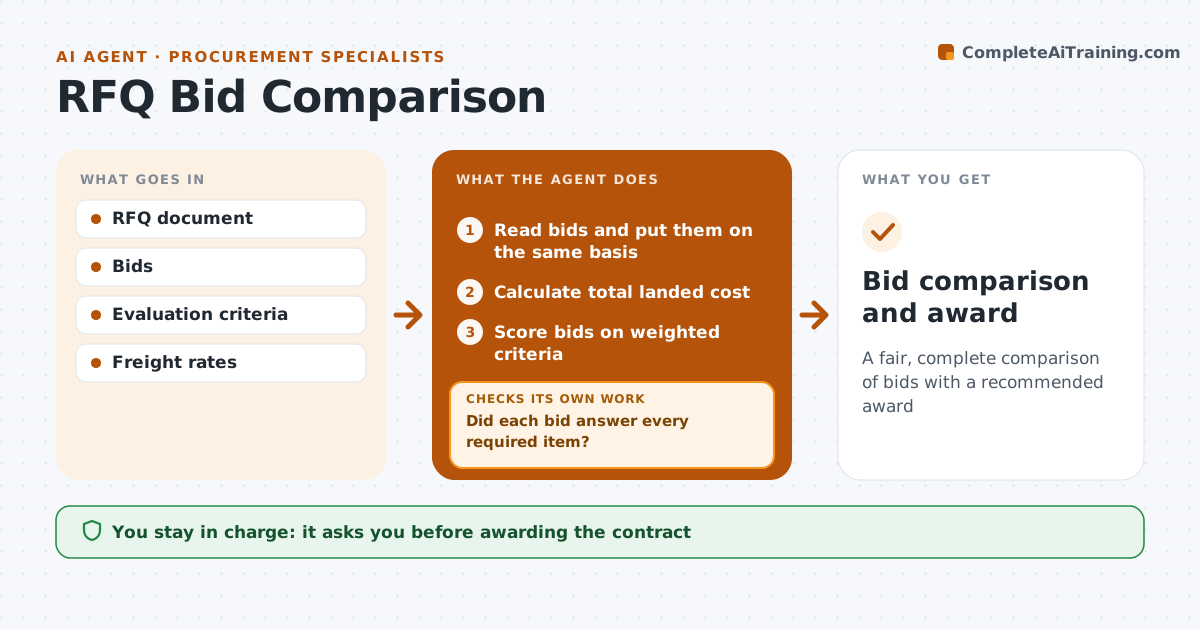
A fair, complete comparison of bids with a recommended award
What it does
After an RFQ, bids arrive in different units, terms and formats, and they get compared on price alone. This agent reads each bid and puts them on the same basis: unit price, freight, payment terms, lead time and exceptions to the spec. It checks that every bid answered every required item. If a bid is incomplete, it drafts a clarification request and waits for the answer before scoring. A low bid that leaves out tooling is adjusted so it does not look unfairly cheap. It then scores bids on total cost and the weighted criteria set for this buy. It checks the ranking holds if the top two criteria weights shift slightly. It drafts a recommendation. The buyer approves the award and every message to suppliers.
How it works
Follow the arrows from top to bottom. The orange dashed arrow is the loop: when a check fails, the agent goes back and tries again.
Read the steps as a list
- RFQ closes
- Read bids and put them on the same basis
- Did each bid answer every required item?If not: draft clarification requests and wait for answers. Back to step 2.
- Calculate total landed cost
- Score bids on weighted criteria
- Draft recommendation
- Buyer approves awardThe agent waits here for your OK.
- Bid comparison and award
How it decides
It scores total landed cost and weighted criteria only for bids that answered all required items.
- Include tooling and freight in cost
- Missing items block scoring
- Weights set before bids are opened
Make it yours
Every agent is a starting point. You choose these settings for your own situation.
- Scoring weights
- Required items
- Freight assumptions
- Clarification deadline
What keeps you in control
It always asks you first
- Awarding the contract
- Sending clarifications
Hard limits
- Never sends award notices
It stops when
- Done: award approved
- Stop: no compliant bids; rerun RFQ
Set it up
We guide you through the set-up, step by step
Members get the full set-up guide for this agent. No technical skills needed: you copy, paste and upload.
- One set of instructions to paste into your AI, with the clicks for ChatGPT, Claude, Microsoft 365 Copilot, Gemini and Grok
- The agent then walks you through connecting your own data, one source at a time
- A downloadable copy with the flow chart, the rules and the full guide