AI agent for clinical data managers
Safety Event Reconciliation Agent
Make serious adverse event records agree between the safety and clinical systems
What it does
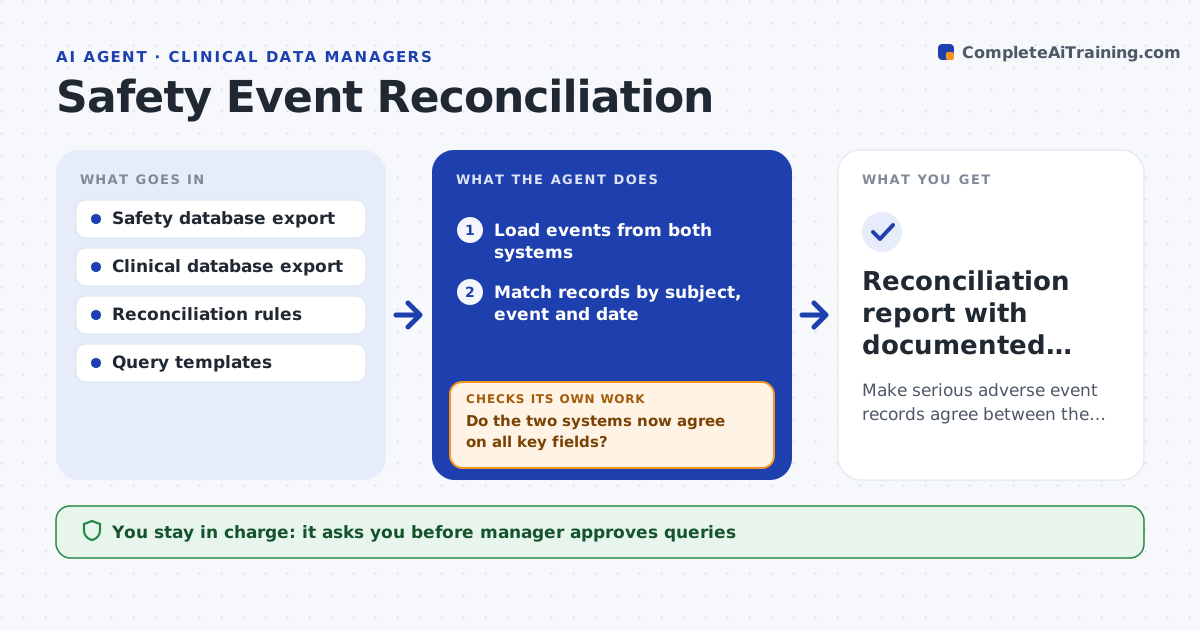
A serious adverse event is recorded in the safety database with one onset date and in the clinical database with another, and the study report cannot be locked until they match. This agent compares event records between the two systems: subject, event term, onset and stop dates, seriousness, outcome and causality. It finds records that exist in one system only and records that differ. It classifies each difference as a coding variance, a date mismatch, a missing record or a real conflict, and raises queries to the site or the safety team with the specific field. It checks responses, updates the comparison and repeats until the systems match. The manager approves the final reconciliation. Edge case: dates differ by a day due to time zone, so the agent notes it as a recorded variance.
How it works
Follow the arrows from top to bottom. The orange dashed arrow is the loop: when a check fails, the agent goes back and tries again.
Read the steps as a list
- Reconciliation cycle
- Load events from both systems
- Match records by subject, event and date
- Classify differences as coding, date, missing or conflict
- Draft queries with the specific fields in question
- Manager approves the queriesThe agent waits here for your OK.
- Send queries to the site or safety team
- Read the responses and reload both exports
- Do the two systems now agree on all key fields?If not: reclassify the remaining differences and raise new queries. Back to step 3.
- Manager approves the final reconciliationThe agent waits here for your OK.
- Reconciliation report with documented variances
How it decides
It matches records by subject and event, treats differences in key fields as discrepancies, and closes each only when both systems agree or a variance is documented.
- Compare subject, term, dates, seriousness, outcome and causality
- Accept a one-day date difference only with a documented time zone reason
- Treat a record missing from one system as a priority discrepancy
- Do not close a conflict without a written answer
Make it yours
Every agent is a starting point. You choose these settings for your own situation.
- Fields to compare
- Date tolerance rule
- Query template
- Cycle schedule
- Systems and export formats
What keeps you in control
It always asks you first
- Manager approves queries
- Manager approves final reconciliation
Hard limits
- Never edit either database
- Never contact subjects, only sites and teams
It stops when
- Done: systems agree or variances are documented and approved
- Stop: a conflict needs a medical decision
Set it up
We guide you through the set-up, step by step
Members get the full set-up guide for this agent. No technical skills needed: you copy, paste and upload.
- One set of instructions to paste into your AI, with the clicks for ChatGPT, Claude, Microsoft 365 Copilot, Gemini and Grok
- The agent then walks you through connecting your own data, one source at a time
- A downloadable copy with the flow chart, the rules and the full guide