AI agent for laboratory technicians
Sample Backlog Prioritization Agent
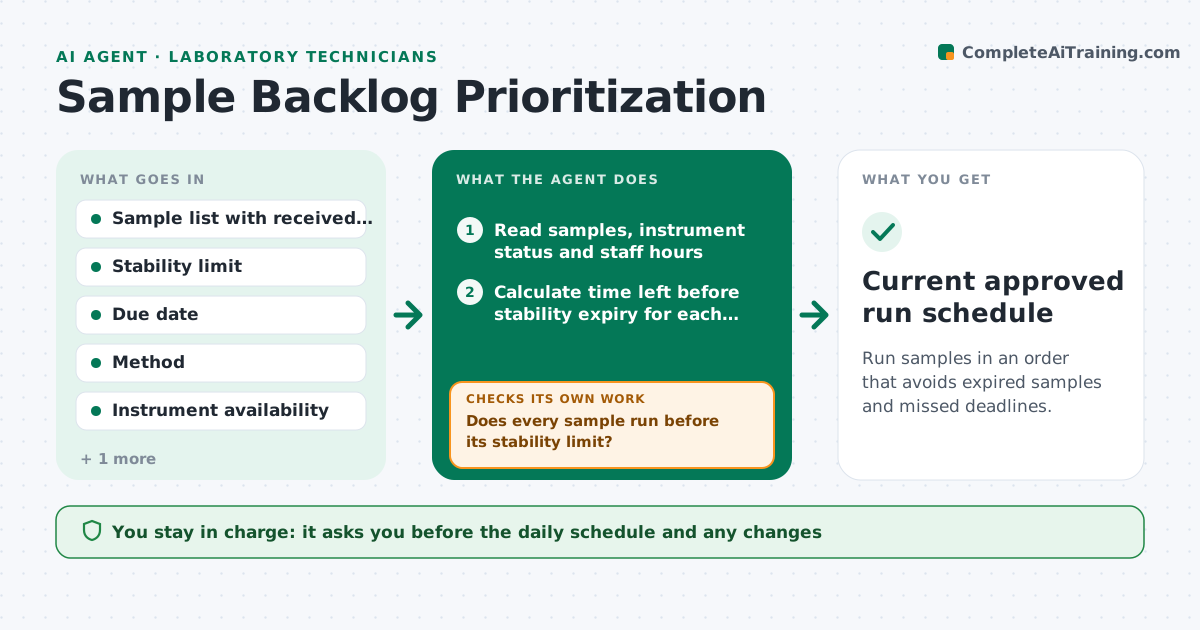
Run samples in an order that avoids expired samples and missed deadlines.
What it does
When samples pile up, the first in line is not always the one that matters most. Some have short stability windows, some belong to urgent studies or clients, and an instrument may be down. This agent reads the sample list with its due dates, stability limits, storage conditions and test requirements, and ranks the waiting samples. It then schedules runs against instrument time and staff hours, so the highest risk items go first and runs are grouped when methods match. When a new sample arrives or an instrument breaks, it re-ranks and rebuilds the schedule. It warns when a sample will expire before its run. It never moves samples or changes priority labels itself. The lead approves the schedule. Edge case: a sample that cannot be run in time is flagged for resampling.
How it works
Follow the arrows from top to bottom. The orange dashed arrow is the loop: when a check fails, the agent goes back and tries again.
Read the steps as a list
- Morning run or new event
- Read samples, instrument status and staff hours
- Calculate time left before stability expiry for each sample
- Rank samples by expiry risk, due date and method group
- Build a schedule against instrument time
- Does every sample run before its stability limit?If not: move at-risk samples up, split runs or use another instrument. Back to step 4.
- List samples that cannot be saved and propose resampling
- Lead approves the scheduleThe agent waits here for your OK.
- Publish the schedule and watch for new events
- Did a new sample or breakdown change the plan?If not: re-rank and rebuild the schedule, then ask for approval of the changes. Back to step 3.
- Current approved run schedule
How it decides
It ranks by time left before stability expiry first, then due date, then method grouping. It rejects any schedule that puts a sample past its stability limit.
- Rank a sample first if less than 25% of its stability window remains
- Group samples by method only if no sample exceeds its limit
- Re-rank after every new arrival or instrument fault
- Flag a sample for resampling if no slot fits before expiry
Make it yours
Every agent is a starting point. You choose these settings for your own situation.
- Stability warning threshold (default 25% of window left)
- Method grouping on or off
- Staff shifts
- Urgent client list
- Re-rank triggers
What keeps you in control
It always asks you first
- The daily schedule and any changes
- Requests for resampling
Hard limits
- Never change a sample's recorded priority
- Always show why a sample moved
It stops when
- Done: all samples run or flagged
- Stop: no instrument available for a required method
Set it up
We guide you through the set-up, step by step
Members get the full set-up guide for this agent. No technical skills needed: you copy, paste and upload.
- One set of instructions to paste into your AI, with the clicks for ChatGPT, Claude, Microsoft 365 Copilot, Gemini and Grok
- The agent then walks you through connecting your own data, one source at a time
- A downloadable copy with the flow chart, the rules and the full guide