AI agent for retail managers
Seasonal Buy Plan Agent
Build a seasonal buy plan, track early sell-through against it and adjust reorders and markdowns
What it does
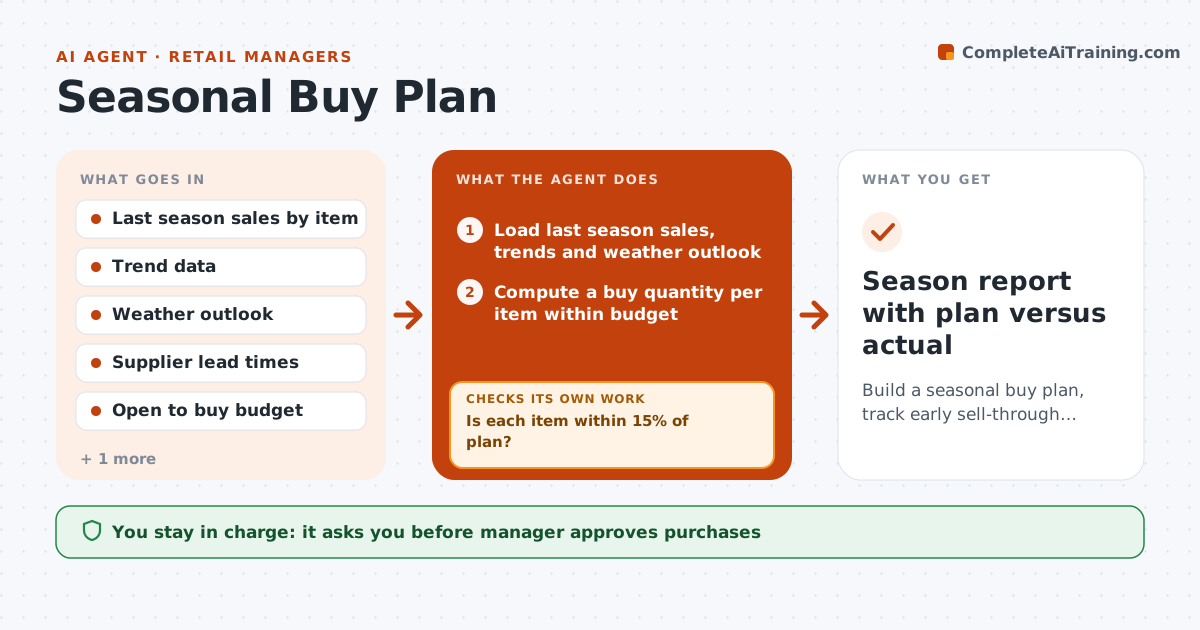
Seasonal buys are placed months ahead and often miss. The agent builds a buy plan for each item from last season's sales, trends and weather signals, and sets quantities within the open-to-buy budget and supplier lead times. Once the season begins, it tracks sell-through each week against the plan. When an item runs ahead, it proposes a reorder if the lead time still allows. When an item runs behind, it checks price, placement and stock before proposing a markdown. It rechecks the effect the following week. The manager approves every purchase and markdown. Edge case: a cold spring cuts garden item sales by 30% in two weeks, and the agent proposes pulling forward a promotion.
How it works
Follow the arrows from top to bottom. The orange dashed arrow is the loop: when a check fails, the agent goes back and tries again.
Read the steps as a list
- Planning window opens
- Load last season sales, trends and weather outlook
- Compute a buy quantity per item within budget
- Manager approves the buyThe agent waits here for your OK.
- Track weekly sell-through against the plan
- Is each item within 15% of plan?If not: Classify items as ahead or behind and find the cause. Back to step 5.
- Propose reorders for items ahead and markdowns for items behind, after checking stock and placement
- Manager approves reorders and markdownsThe agent waits here for your OK.
- Read sales the next week
- Did the action move sell-through back toward plan?If not: Adjust the reorder or markdown depth and propose again. Back to step 7.
- Season report with plan versus actual
How it decides
Buy quantities start from last season adjusted for trend and weather; weekly sell-through decides reorder, hold or markdown.
- Reorder when sell-through is 15% ahead and lead time fits
- Check stock and placement before marking down
- Cap total buy at the open-to-buy budget
- Start markdowns at 4 weeks before season end
Make it yours
Every agent is a starting point. You choose these settings for your own situation.
- Plan variance trigger (default 15%)
- Weather source
- Markdown schedule
- Budget cap
What keeps you in control
It always asks you first
- Manager approves purchases
- Manager approves markdowns
Hard limits
- Never place an order without approval
- Never mark down before checking the cause
It stops when
- Done: season closes with leftover stock within target
- Stop: budget is exhausted
Set it up
We guide you through the set-up, step by step
Members get the full set-up guide for this agent. No technical skills needed: you copy, paste and upload.
- One set of instructions to paste into your AI, with the clicks for ChatGPT, Claude, Microsoft 365 Copilot, Gemini and Grok
- The agent then walks you through connecting your own data, one source at a time
- A downloadable copy with the flow chart, the rules and the full guide