AI agent for statisticians
Sensory Panel Analysis Agent
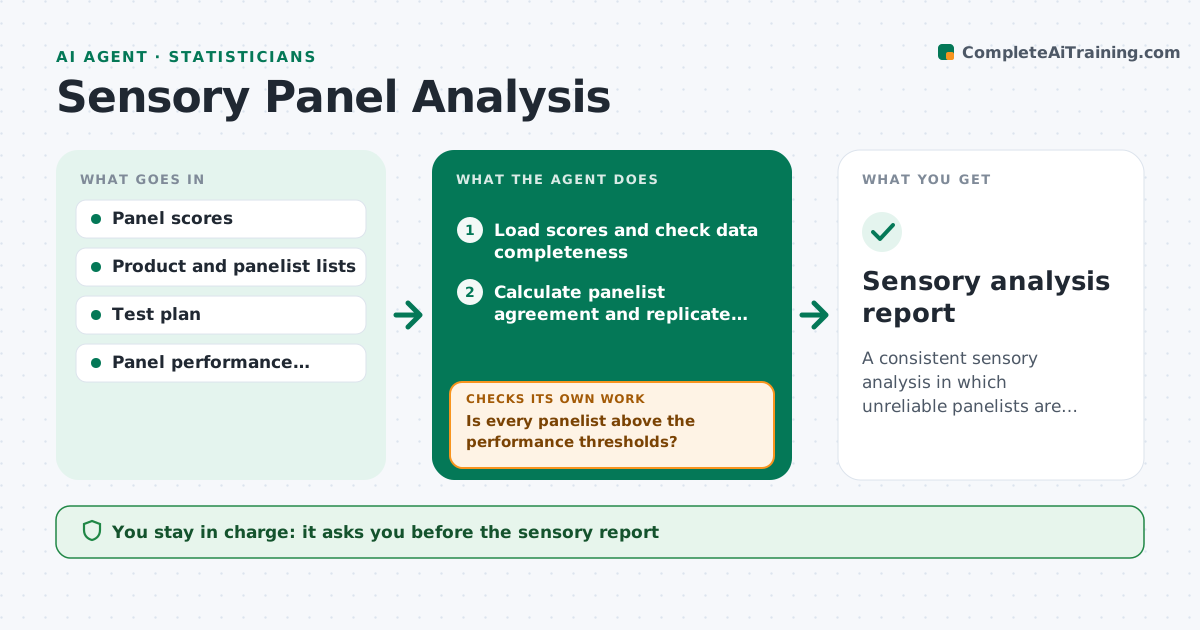
A consistent sensory analysis in which unreliable panelists are identified and their effect on conclusions is shown.
What it does
A sensory session produces scores from 12 panelists and one of them rated everything the same, while another reversed the scale. This agent checks panelist agreement and replicate consistency first, using panel performance statistics. Then it runs the planned tests, such as analysis of variance and post hoc comparisons, and flags panelists or products that behave oddly. It reruns the analysis without the flagged panelists and compares the conclusions. If conclusions change, it reports both. It writes up the results with the test details. You approve the report. Edge case: when a product is only tested by some panelists, the analysis uses a design that allows incomplete data.
How it works
Follow the arrows from top to bottom. The orange dashed arrow is the loop: when a check fails, the agent goes back and tries again.
Read the steps as a list
- Panel data exported
- Load scores and check data completeness
- Calculate panelist agreement and replicate consistency
- Is every panelist above the performance thresholds?If not: flag the panelists and note patterns such as scale reversal or no variation. Back to step 3.
- Run the planned tests on all data
- Rerun the tests without the flagged panelists
- Are the conclusions the same with and without the flagged panelists?If not: report both results and mark the conclusion as dependent. Back to step 5.
- Write the results with test details and product differences
- Sensory scientist approves the reportThe agent waits here for your OK.
- Sensory analysis report
How it decides
A panelist is flagged when agreement or replicate consistency falls below the thresholds. The conclusion is robust if it holds with and without flagged panelists.
- Panelist agreement below the threshold: flag
- Panelist gave the same score to every sample: flag no discrimination
- Conclusion changes without flagged panelists: report as dependent
- Missing scores over 10 percent: use an incomplete design analysis
Make it yours
Every agent is a starting point. You choose these settings for your own situation.
- Performance thresholds
- Tests to run
- Significance level (default 0.05)
- Panel size
- Report template
What keeps you in control
It always asks you first
- The sensory report
- Any removal of a panelist from future panels
Hard limits
- Never remove a panelist from the panel list
- Never hide the all-data result
It stops when
- Done: report approved
- Stop: too few panelists after exclusion for the test
Set it up
We guide you through the set-up, step by step
Members get the full set-up guide for this agent. No technical skills needed: you copy, paste and upload.
- One set of instructions to paste into your AI, with the clicks for ChatGPT, Claude, Microsoft 365 Copilot, Gemini and Grok
- The agent then walks you through connecting your own data, one source at a time
- A downloadable copy with the flow chart, the rules and the full guide