AI agent for judges
Sentencing Calculation Check Agent
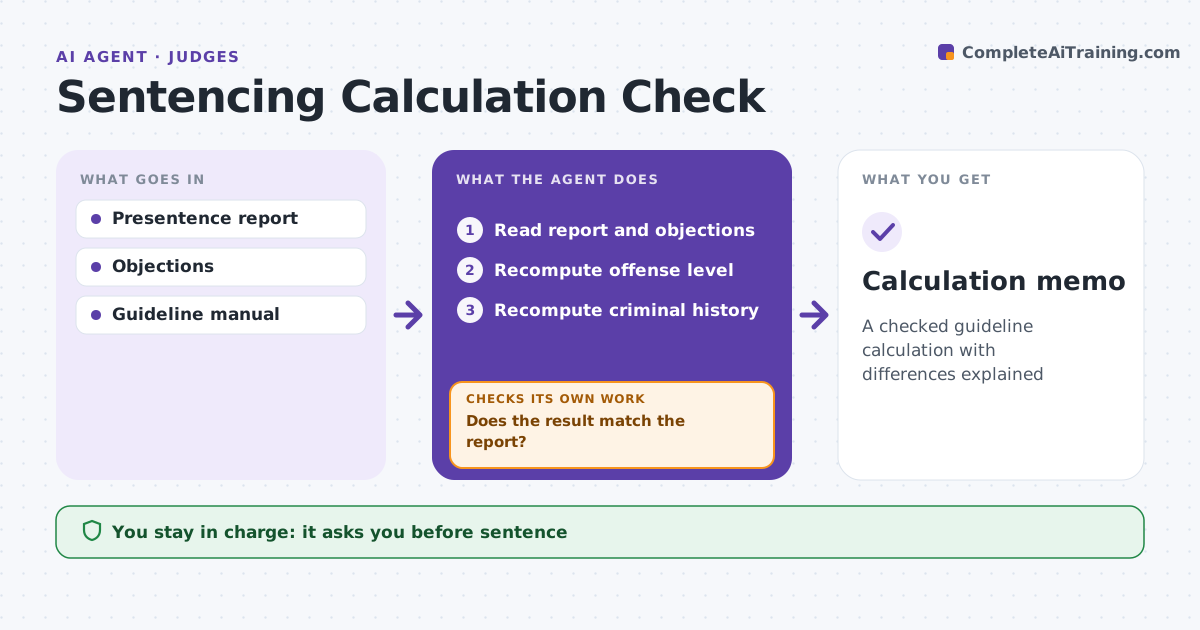
A checked guideline calculation with differences explained
What it does
Guideline calculations in a presentence report involve many steps, and one wrong point changes the sentencing range. Before sentencing, this agent recomputes the offense level from the offense, specific characteristics, adjustments and acceptance, and the criminal history score from prior convictions. It checks each prior conviction against the look-back time rules. It uses the manual in effect on the date of sentencing unless there is an ex post facto issue. It compares its result with the report and the parties' objections. Where results differ, it shows the exact step and rule. Where facts are disputed, such as an enhancement, it shows the range under each version. The judge resolves objections and decides the sentence; the agent recommends nothing. Edge case: a prior conviction falls outside the look-back period, so it earns no points.
How it works
Follow the arrows from top to bottom. The orange dashed arrow is the loop: when a check fails, the agent goes back and tries again.
Read the steps as a list
- Report and objections filed
- Read report and objections
- Recompute offense level
- Recompute criminal history
- Does the result match the report?If not: show the differing step and rule. Back to step 3.
- Show ranges for disputed facts
- Judge resolves objectionsThe agent waits here for your OK.
- Calculation memo
How it decides
It recomputes each step under the manual and shows ranges for disputed facts.
- Prior outside look-back: no points
- Disputed enhancement: show both ranges
- Manual version: date of sentencing unless ex post facto issue
Make it yours
Every agent is a starting point. You choose these settings for your own situation.
- Manual version
- Memo format
- Look-back rules
- Disputed fact display
What keeps you in control
It always asks you first
- Sentence
Hard limits
- Never recommends a sentence
- Never contacts parties
It stops when
- Done: memo ready
- Stop: report incomplete
Set it up
We guide you through the set-up, step by step
Members get the full set-up guide for this agent. No technical skills needed: you copy, paste and upload.
- One set of instructions to paste into your AI, with the clicks for ChatGPT, Claude, Microsoft 365 Copilot, Gemini and Grok
- The agent then walks you through connecting your own data, one source at a time
- A downloadable copy with the flow chart, the rules and the full guide