AI agent for service managers
Service Reminder and Declined Work Agent
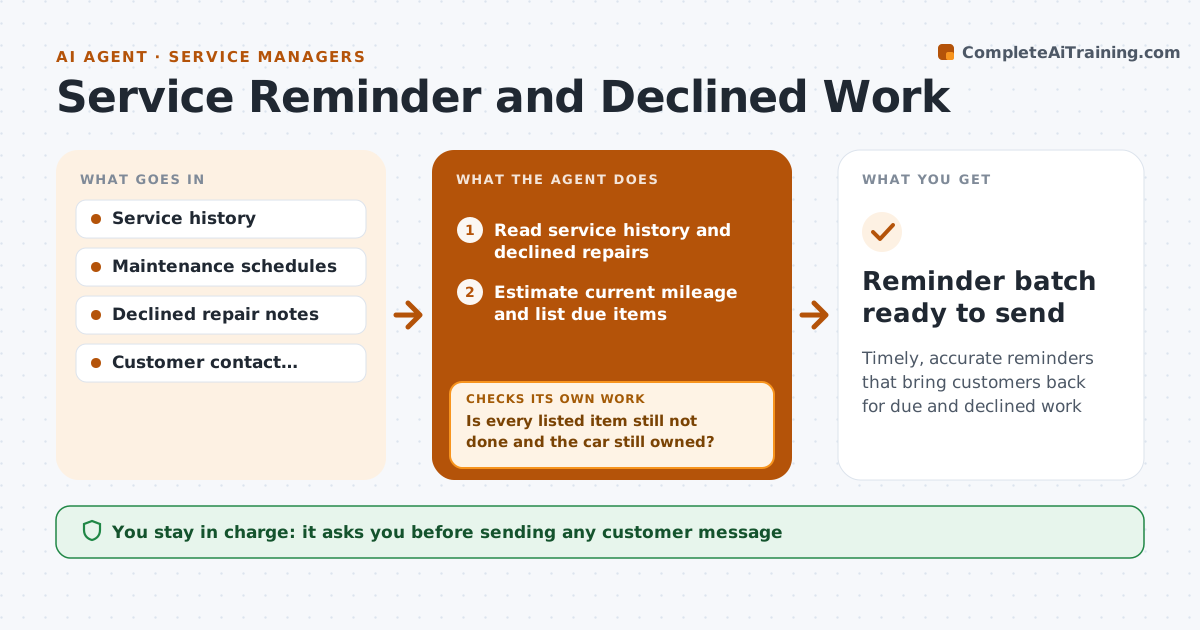
Timely, accurate reminders that bring customers back for due and declined work
What it does
Shops hold years of service history but rarely use it, so due maintenance and declined repairs are forgotten until something breaks. Each week this agent reads each vehicle's history, the maker's maintenance schedule and repairs the customer declined. It estimates current mileage from the average daily miles between past visits and lists items due within 30 days or 1,000 miles. Declined safety items are reminded after 30 days, others after 60. Before drafting anything, it checks the latest records and customer notes so it does not remind someone about work done elsewhere or a car they sold. If an item is done or the car is gone, it rebuilds the list. It then drafts reminders with appointment times that fit shop capacity. Opt-outs are always respected. The service manager approves the messages. Edge case: a customer who said they sold the car is removed.
How it works
Follow the arrows from top to bottom. The orange dashed arrow is the loop: when a check fails, the agent goes back and tries again.
Read the steps as a list
- Weekly run
- Read service history and declined repairs
- Estimate current mileage and list due items
- Check latest records and customer notes
- Is every listed item still not done and the car still owned?If not: remove done items or sold cars and rebuild the list. Back to step 3.
- Draft reminders with suggested times
- Service manager approves messagesThe agent waits here for your OK.
- Reminder batch ready to send
How it decides
It estimates mileage from the average daily miles between past visits and flags items due within 30 days or 1,000 miles.
- Declined safety items are reminded after 30 days, others after 60
- Sold vehicles are removed
- Opt-outs are always respected
Make it yours
Every agent is a starting point. You choose these settings for your own situation.
- Reminder window (default 30 days)
- Channels used (text, email)
- Message tone
- Follow-up interval for declined work
What keeps you in control
It always asks you first
- Sending any customer message
Hard limits
- No messages without approval
- Respects opt-outs and contact hours
It stops when
- Done: approved batch sent
- Stop: customer has no contact consent, skip them
Set it up
We guide you through the set-up, step by step
Members get the full set-up guide for this agent. No technical skills needed: you copy, paste and upload.
- One set of instructions to paste into your AI, with the clicks for ChatGPT, Claude, Microsoft 365 Copilot, Gemini and Grok
- The agent then walks you through connecting your own data, one source at a time
- A downloadable copy with the flow chart, the rules and the full guide