AI agent for service managers
Shared Services Service Level Review Agent
Show whether each shared service meets its agreed level and what to fix
What it does
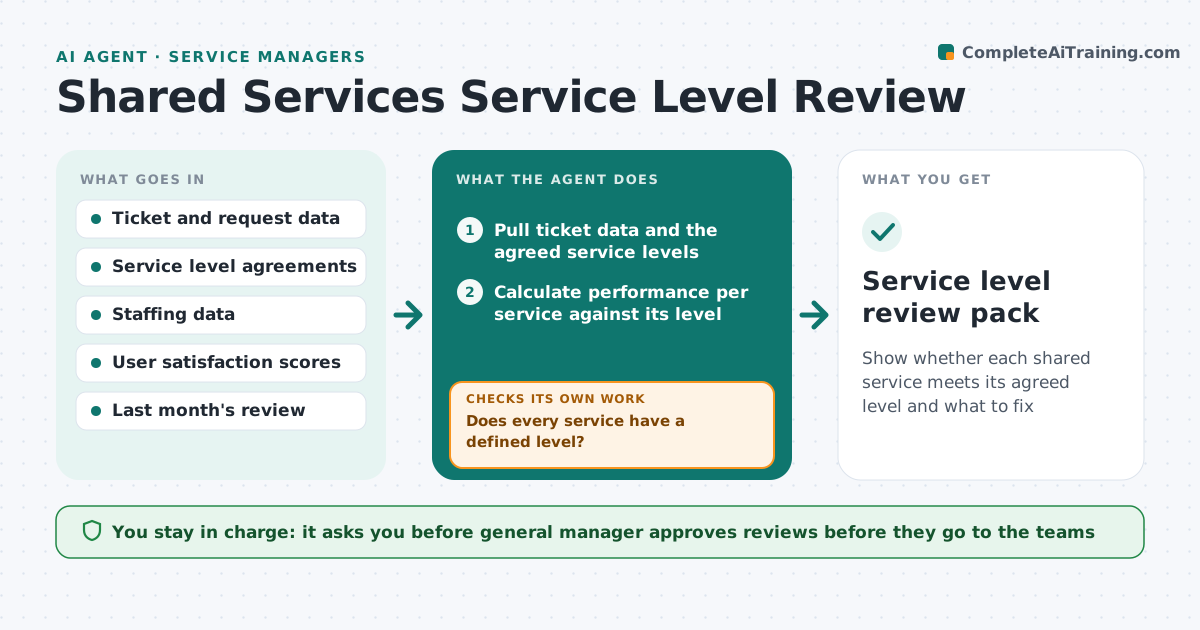
IT, HR, finance and facilities all promise service levels to the business, such as password resets in 4 hours or invoices paid in 30 days, and nobody checks whether the promises are kept. Complaints arrive instead of data. This agent runs a monthly review. It pulls ticket and request data per service, compares each with the agreed level, finds the misses and gathers the likely causes from ticket tags, volumes and staffing. It drafts a review for each service team with the numbers, the trend and a suggested action. It checks again next month to see if the fix worked. The manager approves each review before it is shared. Edge case: a service has no agreed level. The agent proposes one from the last 6 months.
How it works
Follow the arrows from top to bottom. The orange dashed arrow is the loop: when a check fails, the agent goes back and tries again.
Read the steps as a list
- Monthly ticket data closes
- Pull ticket data and the agreed service levels
- Does every service have a defined level?If not: Propose a level from six months of data and mark it as draft. Back to step 2.
- Calculate performance per service against its level
- Identify misses and group them by cause
- Compare with last month and note the trend
- Draft a review per service team with numbers and a suggested action
- General manager approves each review before it is sharedThe agent waits here for your OK.
- Send the reviews to service owners
- Did last month's actions improve the result?If not: Revise the suggested action and flag repeated misses. Back to step 5.
- Service level review pack
How it decides
A service passes when at least the agreed share of requests meets the target time. Causes are ranked by how many missed tickets they explain.
- A service passes if the agreed share of tickets meets the target time
- Two months of misses trigger a deep dive on causes
- Services with fewer than 20 tickets are reported as small sample
- A proposed level needs the service owner's agreement
Make it yours
Every agent is a starting point. You choose these settings for your own situation.
- Service levels and targets
- Minimum ticket sample (default 20)
- Review day of the month
- Services included
- Who receives the reviews
What keeps you in control
It always asks you first
- General manager approves reviews before they go to the teams
Hard limits
- Never changes an agreed service level without the owner
- Reports teams, not individual staff
It stops when
- Done: all services reviewed and shared
- Stop: data is missing for a service, request access from its owner
Set it up
We guide you through the set-up, step by step
Members get the full set-up guide for this agent. No technical skills needed: you copy, paste and upload.
- One set of instructions to paste into your AI, with the clicks for ChatGPT, Claude, Microsoft 365 Copilot, Gemini and Grok
- The agent then walks you through connecting your own data, one source at a time
- A downloadable copy with the flow chart, the rules and the full guide