AI agent for robotics engineers
Simulation to Real Gap Agent
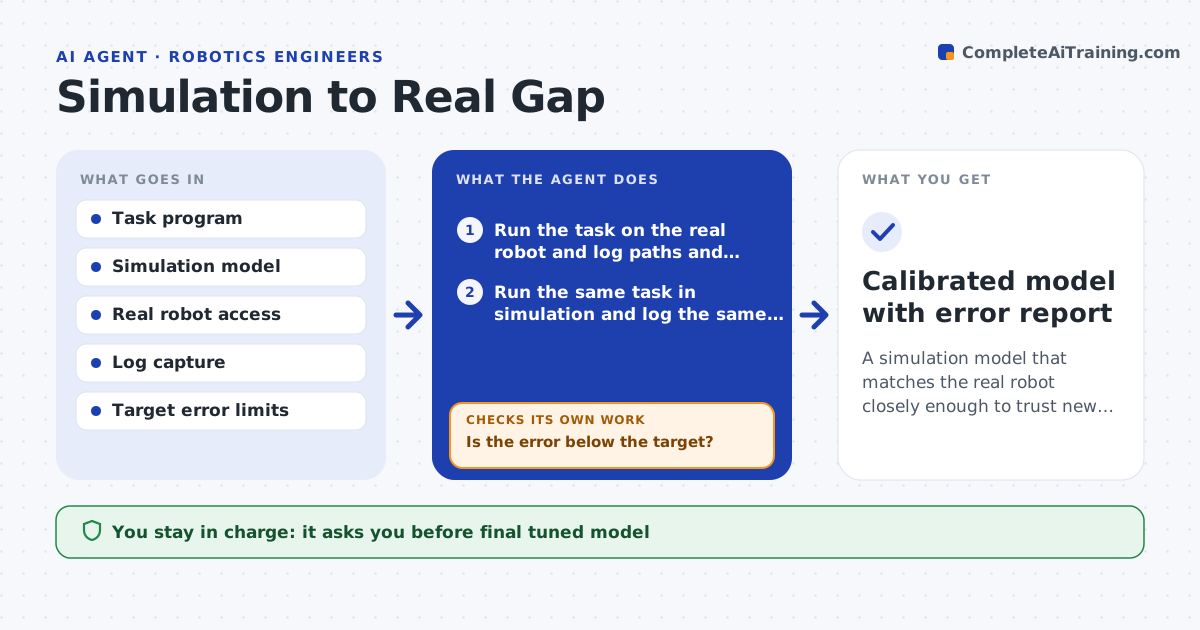
A simulation model that matches the real robot closely enough to trust new code
What it does
A motion that looks perfect in simulation may be too slow, off target or jerky on the real arm. This agent runs the same task in both places and records paths, joint positions and timing. It lines up the two runs and finds where they differ most, such as joint three lagging at the start or a payload sag at full reach. It then tunes simulation parameters, like friction, payload mass and motor delay, to shrink the largest gap and reruns the simulation. It compares again with the real data and repeats until the error is below the target on the full task and on a second task it has not tuned on. The engineer approves the final model. Edge case: the gap grows when the arm is cold, so the agent records the temperature.
How it works
Follow the arrows from top to bottom. The orange dashed arrow is the loop: when a check fails, the agent goes back and tries again.
Read the steps as a list
- Engineer reports a mismatch or the hardware changes
- Run the task on the real robot and log paths and timing
- Run the same task in simulation and log the same data
- Align both runs and find the largest gaps by joint and time
- Pick the parameter most likely to cause the biggest gap
- Adjust the parameter in the model and rerun the simulation
- Is the error below the target?If not: try the next parameter and keep the best change so far. Back to step 4.
- Test the tuned model on a second task
- Does the model also match on the second task?If not: retune with data from both tasks. Back to step 4.
- Engineer approves the tuned modelThe agent waits here for your OK.
- Calibrated model with error report
How it decides
It tunes the parameter linked to the biggest gap and keeps the change only if the total error falls.
- Tune one parameter at a time
- Target path error below 2 mm and timing within 3 percent
- Reject a change that improves one joint and worsens the total
- Log temperature and payload with every run
Make it yours
Every agent is a starting point. You choose these settings for your own situation.
- Path error target (default 2 mm)
- Timing error target (default 3 percent)
- Parameters it may tune
- Tasks used for validation
What keeps you in control
It always asks you first
- Final tuned model
- Real robot runs at full speed
Hard limits
- Never runs the robot at full speed without the engineer present
- Never overwrites the original model file
It stops when
- Done: both tasks match within targets
- Stop: real robot data is too noisy to align
Set it up
We guide you through the set-up, step by step
Members get the full set-up guide for this agent. No technical skills needed: you copy, paste and upload.
- One set of instructions to paste into your AI, with the clicks for ChatGPT, Claude, Microsoft 365 Copilot, Gemini and Grok
- The agent then walks you through connecting your own data, one source at a time
- A downloadable copy with the flow chart, the rules and the full guide