AI agent for global head of its
Site IT Maturity Benchmark Agent
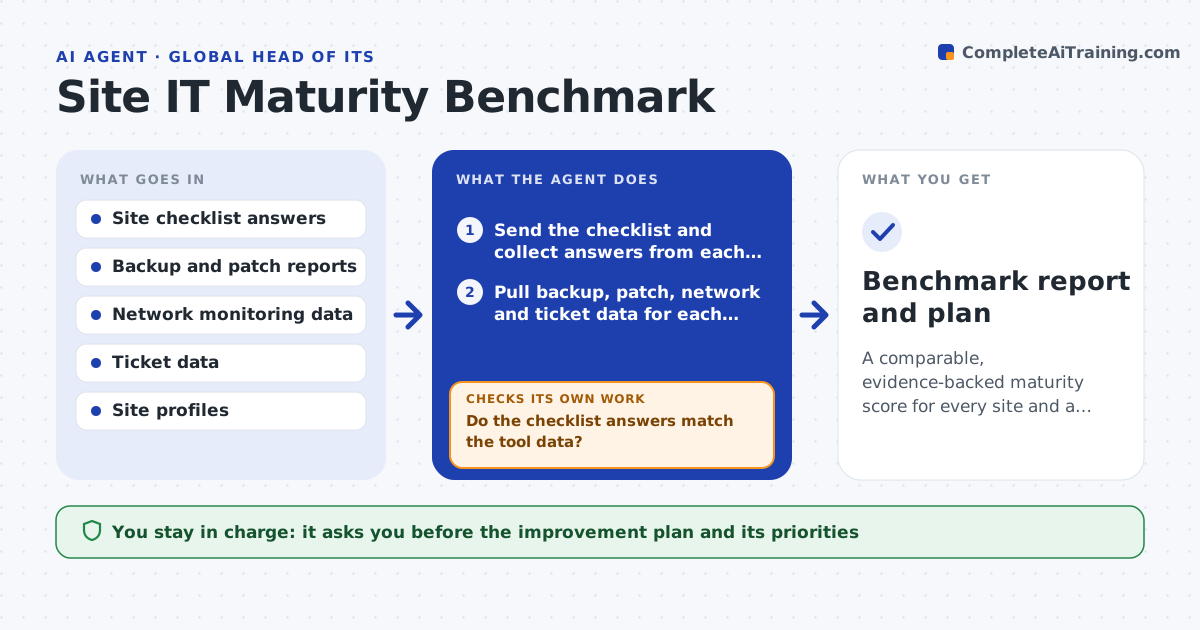
A comparable, evidence-backed maturity score for every site and a ranked improvement plan
What it does
A head of IT with forty sites learns which ones are weak when one has an outage. This agent sends a standard checklist to each site and pulls tool data to back it up, such as backup job results, patch levels, network device status and ticket handling times. It scores each site on backup, patching, network and support maturity, and compares the sites. Where a site's answers do not match its tool data, it asks for evidence and re-scores. It then drafts an improvement plan that ranks the sites and actions by risk and effort. The head of IT approves the plan. Edge case: a small site with no on-site staff is scored against a remote-managed standard, not the standard for a full office.
How it works
Follow the arrows from top to bottom. The orange dashed arrow is the loop: when a check fails, the agent goes back and tries again.
Read the steps as a list
- Quarterly benchmark begins
- Send the checklist and collect answers from each site
- Pull backup, patch, network and ticket data for each site
- Score each site on backup, patching, network and support
- Do the checklist answers match the tool data?If not: ask the site for evidence and rescore with what arrives. Back to step 3.
- Compare sites and group them into tiers
- Is every site scored against the right standard for its size?If not: apply the remote-managed or office standard and rescore. Back to step 4.
- Draft the improvement plan ranked by risk and effort
- Head of IT approves the planThe agent waits here for your OK.
- Benchmark report and plan
How it decides
Scores come from tool data first and self-reported answers second. A mismatch of more than one level triggers a request for evidence.
- Trust tool data over self-reported answers
- Ask for evidence when the two differ by more than one level
- Score remote-managed sites on their own standard
- Mark any site with failed backups in 30 days as critical
Make it yours
Every agent is a starting point. You choose these settings for your own situation.
- Maturity levels and weights
- Standards by site type
- Data sources per site
- Benchmark schedule
What keeps you in control
It always asks you first
- The improvement plan and its priorities
Hard limits
- Never changes site systems
- Shares scores only with those named by the head of IT
It stops when
- Done: every site scored and the plan approved
- Stop: more than 20 percent of sites send no data
Set it up
We guide you through the set-up, step by step
Members get the full set-up guide for this agent. No technical skills needed: you copy, paste and upload.
- One set of instructions to paste into your AI, with the clicks for ChatGPT, Claude, Microsoft 365 Copilot, Gemini and Grok
- The agent then walks you through connecting your own data, one source at a time
- A downloadable copy with the flow chart, the rules and the full guide