AI agent for geologists
Slope Hazard Monitoring Agent
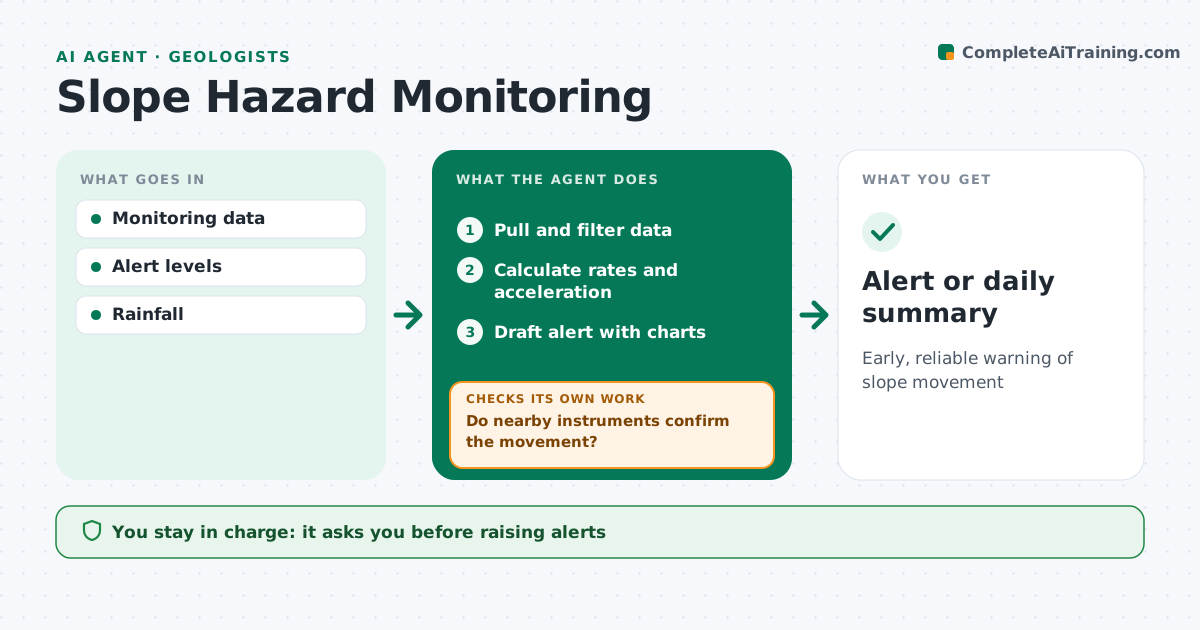
Early, reliable warning of slope movement
What it does
Slopes near mines, roads and dams are watched with prisms, inclinometers, radar and piezometers, and missing an acceleration can be dangerous. This agent pulls readings, filters noise, and calculates displacement rates. It compares rates with alert levels and looks for acceleration over recent days. It also lines movement up with rainfall and pore pressure, since rising water often comes before faster movement. Before raising an alert, it checks for instrument faults and whether nearby instruments show the same movement. If they do not, it flags a possible instrument fault instead. For confirmed movement it drafts an alert notice with charts. You decide on alert levels and any area closures. Edge case: a single prism jump caused by a disturbed target is checked against its neighbors before any alarm.
How it works
Follow the arrows from top to bottom. The orange dashed arrow is the loop: when a check fails, the agent goes back and tries again.
Read the steps as a list
- New readings
- Pull and filter data
- Calculate rates and acceleration
- Do nearby instruments confirm the movement?If not: flag possible instrument fault. Back to step 2.
- Draft alert with charts
- Geologist decides alert levelThe agent waits here for your OK.
- Alert or daily summary
How it decides
It flags acceleration or rates above alert levels confirmed by nearby instruments.
- Confirm with neighbors
- Flag acceleration
- Include rainfall context
Make it yours
Every agent is a starting point. You choose these settings for your own situation.
- Alert levels
- Filter settings
- Neighbor rule
- Summary time
What keeps you in control
It always asks you first
- Raising alerts
- Closing areas
Hard limits
- Never closes areas itself
It stops when
- Done: summary sent
- Stop: data feed lost
Set it up
We guide you through the set-up, step by step
Members get the full set-up guide for this agent. No technical skills needed: you copy, paste and upload.
- One set of instructions to paste into your AI, with the clicks for ChatGPT, Claude, Microsoft 365 Copilot, Gemini and Grok
- The agent then walks you through connecting your own data, one source at a time
- A downloadable copy with the flow chart, the rules and the full guide