
AI agent for marketing coordinators
Social Profile Consistency Audit Agent
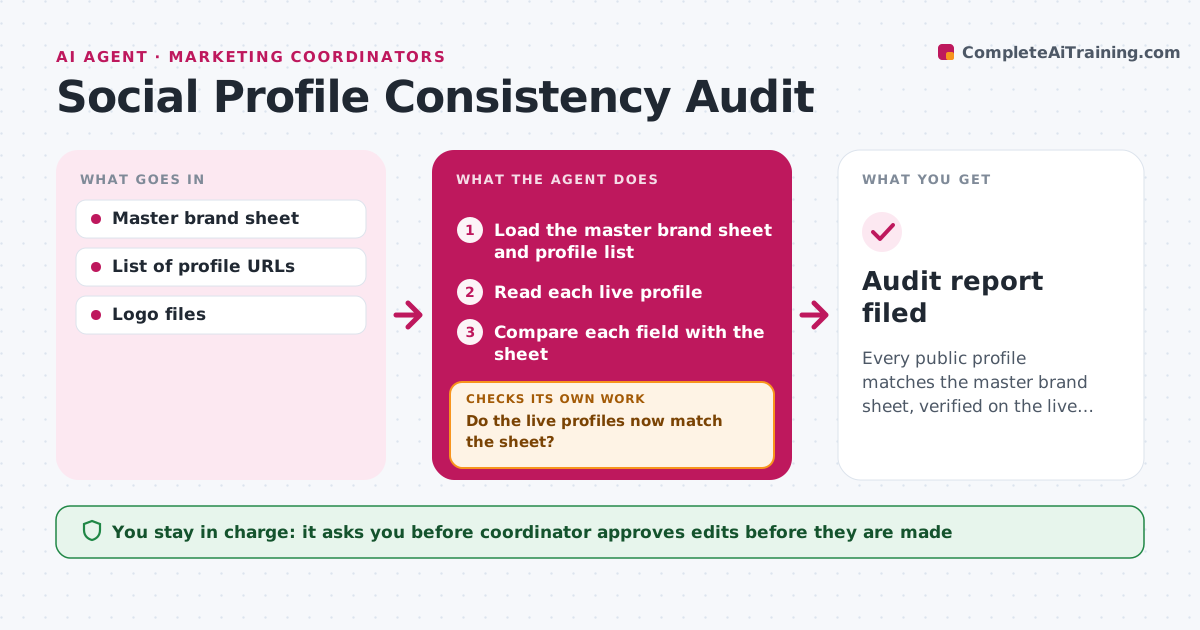
Every public profile matches the master brand sheet, verified on the live pages.
What it does
A customer finds old opening hours on one platform and a retired logo on another. This agent reads each social profile and related page every month and compares it with the master brand sheet: name, bio, link, hours, address, logo and handle. It lists every mismatch and drafts the fix text for each. After the coordinator approves and the edits are made, it reads the live profiles again to verify the changes show up. Anything that did not change loops back. It also looks for old or duplicate pages that should be merged or closed. Edge case: a platform trims the bio text, so the agent proposes a shorter version.
How it works
Follow the arrows from top to bottom. The orange dashed arrow is the loop: when a check fails, the agent goes back and tries again.
Read the steps as a list
- Monthly audit run
- Load the master brand sheet and profile list
- Read each live profile
- Compare each field with the sheet
- List mismatches and old or duplicate pages
- Draft the fix text and the changes needed per profile
- Coordinator approves the editsThe agent waits here for your OK.
- Wait for the edits and then reread the live profiles
- Do the live profiles now match the sheet?If not: list what did not change, adjust for platform limits and send back for edit. Back to step 4.
- Update the audit log
- Audit report filed
How it decides
A field matches only when the live text equals the sheet or is the approved shortened form.
- Compare name, bio, link, hours, address, logo and handle.
- Use an approved short form where a platform limits length.
- Flag duplicate or abandoned pages for closure.
- Recheck profiles after edits within 2 days.
Make it yours
Every agent is a starting point. You choose these settings for your own situation.
- Fields checked
- Profile list
- Audit frequency
- Approved short forms
What keeps you in control
It always asks you first
- Coordinator approves edits before they are made
Hard limits
- Never edit profiles itself
- Use only the master sheet as the source of truth
It stops when
- Done: all profiles match and log updated.
- Stop: a profile is locked or inaccessible, so the coordinator is told.
Set it up
We guide you through the set-up, step by step
Members get the full set-up guide for this agent. No technical skills needed: you copy, paste and upload.
- One set of instructions to paste into your AI, with the clicks for ChatGPT, Claude, Microsoft 365 Copilot, Gemini and Grok
- The agent then walks you through connecting your own data, one source at a time
- A downloadable copy with the flow chart, the rules and the full guide



