AI agent for agricultural scientists
Soil Lab Result Interpretation and Recommendation Agent
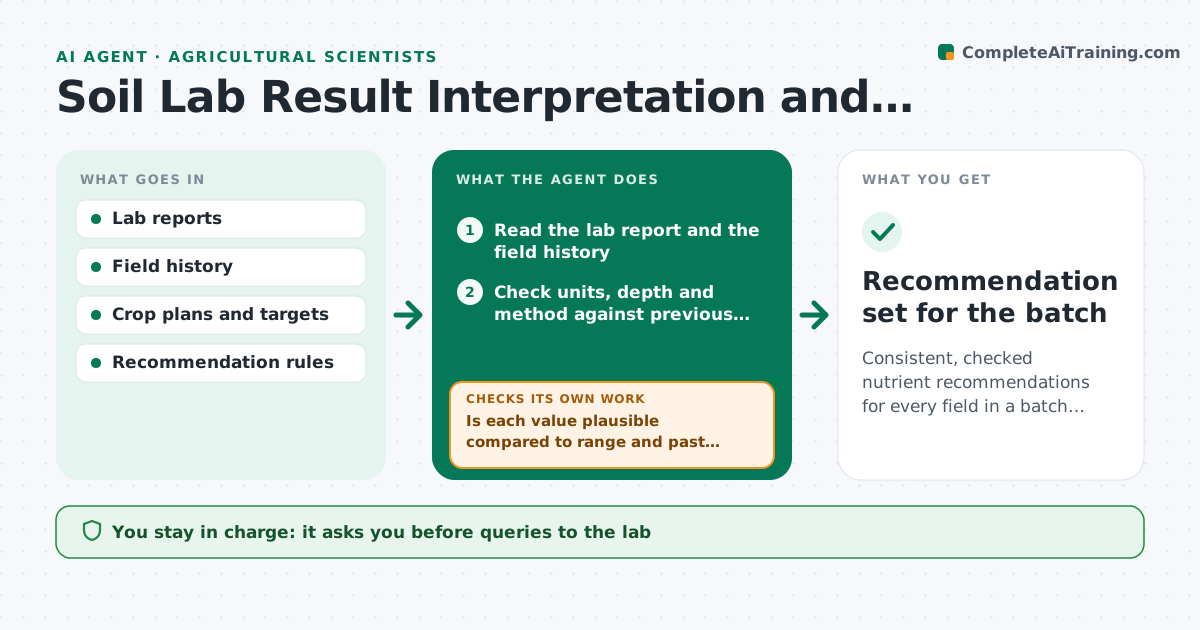
Consistent, checked nutrient recommendations for every field in a batch, with doubtful results resolved first.
What it does
When a lab sends 80 soil samples in one spreadsheet, getting consistent recommendations for each field takes days. This agent reads the lab reports, checks units and expected ranges, and compares each field to its past years and to the crop's target levels. It drafts a nutrient recommendation for each field, such as lime, phosphorus, potassium or nitrogen adjustments, using your recommendation rules. Implausible values, like pH 11 or phosphorus ten times last year, are not used; they are sent back to the lab as a draft query or flagged for resampling. It rechecks when the lab replies. You approve recommendations before they go to farmers. Edge case: a sample taken at a different depth than previous years is compared with a note.
How it works
Follow the arrows from top to bottom. The orange dashed arrow is the loop: when a check fails, the agent goes back and tries again.
Read the steps as a list
- Lab batch arrives
- Read the lab report and the field history
- Check units, depth and method against previous years
- Is each value plausible compared to range and past results?If not: draft a query to the lab or flag for resampling, and exclude the value. Back to step 3.
- Scientist approves queries sent to the labThe agent waits here for your OK.
- Read lab replies and update values
- Compare each field to the crop target and calculate the gap
- Draft nutrient recommendations with rates and timing
- Does each recommendation fit label limits and field restrictions?If not: adjust the rate to the limit and note the reason. Back to step 8.
- Scientist approves recommendations to farmersThe agent waits here for your OK.
- Recommendation set for the batch
How it decides
It accepts a value when units are right and it sits within plausible range and trend. Then it applies the crop-specific rule table to the gap between result and target.
- pH outside 4 to 9: treat as implausible and query the lab
- Value changes more than 3 times from last year: confirm before use
- Sample depth differs from history: compare with a note, not directly
- Nitrogen advice limited by regulatory cap: apply the cap and state it
Make it yours
Every agent is a starting point. You choose these settings for your own situation.
- Plausible range per test
- Change factor that triggers a check (default 3x)
- Recommendation rule tables
- Crop targets
- Report language and format
What keeps you in control
It always asks you first
- Queries to the lab
- Recommendations delivered to farmers
Hard limits
- Never use an implausible value in a recommendation
- Never exceed legal application caps
It stops when
- Done: recommendations approved
- Stop: lab does not confirm doubtful values, resample
Set it up
We guide you through the set-up, step by step
Members get the full set-up guide for this agent. No technical skills needed: you copy, paste and upload.
- One set of instructions to paste into your AI, with the clicks for ChatGPT, Claude, Microsoft 365 Copilot, Gemini and Grok
- The agent then walks you through connecting your own data, one source at a time
- A downloadable copy with the flow chart, the rules and the full guide