AI agent for community moderators
Spam Wave Rule Tuning Agent
A new or adjusted moderation rule that catches the spam wave with an acceptable false positive rate
What it does
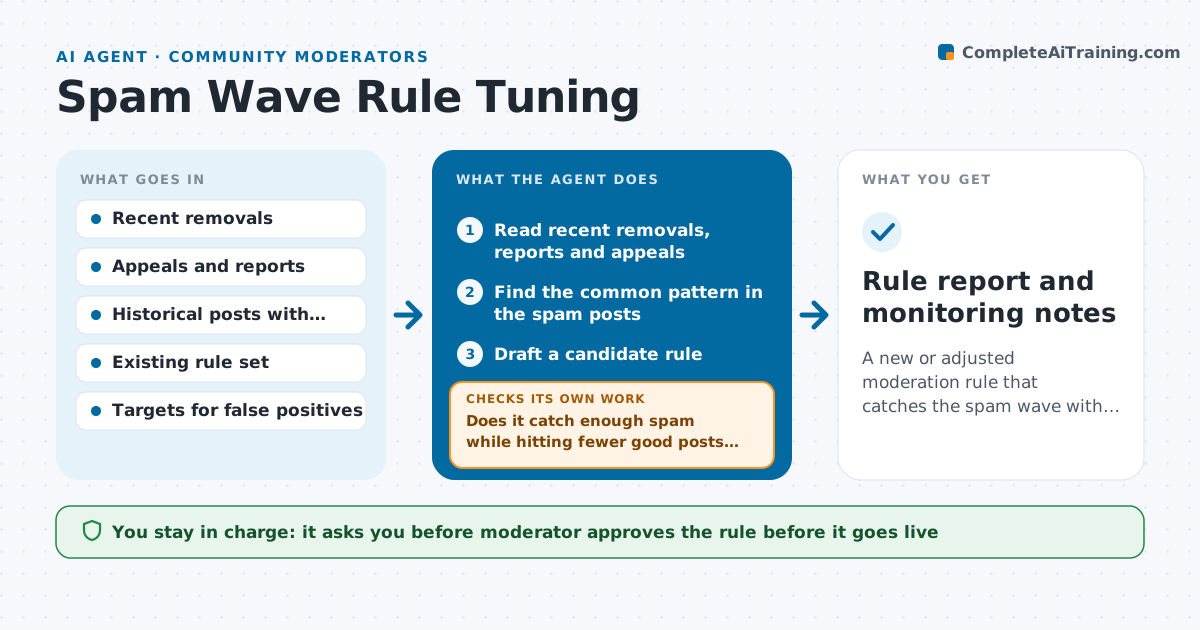
A new spam wave uses misspelled links, and at the same time the current rules remove a member's genuine post about a sale. This agent reads recent removals, user reports and appeals, then builds candidate rules to catch the new pattern, such as a phrase, a link pattern or a new-account posting rate. It tests each rule against historical posts, both known spam and known good posts, and measures how many spam posts it catches and how many good posts it would wrongly hit. It adjusts the rule and retests until the balance meets the targets. It also checks that a rule does not conflict with existing rules. The moderator approves the rule going live. Edge case: a rule that would catch 99 percent of spam but hit 4 percent of good posts is revised, not approved.
How it works
Follow the arrows from top to bottom. The orange dashed arrow is the loop: when a check fails, the agent goes back and tries again.
Read the steps as a list
- Spam wave detected
- Read recent removals, reports and appeals
- Find the common pattern in the spam posts
- Draft a candidate rule
- Test the rule against labeled past spam and good posts
- Does it catch enough spam while hitting fewer good posts than the limit?If not: Narrow or change the rule and test again. Back to step 3.
- Check the rule for conflicts with the existing rule set
- Moderator approves the rule going liveThe agent waits here for your OK.
- After going live, read the removals and appeals for the next 48 hours
- Are the live results consistent with the test results?If not: Pause the rule suggestion and revise it with the new data. Back to step 3.
- Rule report and monitoring notes
How it decides
It accepts a rule when it catches at least 90 percent of known spam in the test set and wrongly flags less than 0.5 percent of good posts.
- Require at least 90 percent spam catch rate in testing
- Require false positives under 0.5 percent of good posts
- Test on at least 500 labeled posts
- Prefer a narrower rule to a broad one
Make it yours
Every agent is a starting point. You choose these settings for your own situation.
- Catch and false positive targets
- Minimum test size
- Monitoring period (default 48 hours)
- Rule format of the platform
- Which accounts are trusted
What keeps you in control
It always asks you first
- Moderator approves the rule before it goes live
Hard limits
- Never turn on a rule without approval
- Never use private messages in the test set
It stops when
- Done: The rule meets both targets and is monitored
- Stop: No rule meets the targets, so the agent suggests manual review for this wave
Set it up
We guide you through the set-up, step by step
Members get the full set-up guide for this agent. No technical skills needed: you copy, paste and upload.
- One set of instructions to paste into your AI, with the clicks for ChatGPT, Claude, Microsoft 365 Copilot, Gemini and Grok
- The agent then walks you through connecting your own data, one source at a time
- A downloadable copy with the flow chart, the rules and the full guide