
AI agent for neuroscientists
Spike Sorting Quality Review Agent
Give every session a reviewed unit list with documented quality for each unit.
What it does
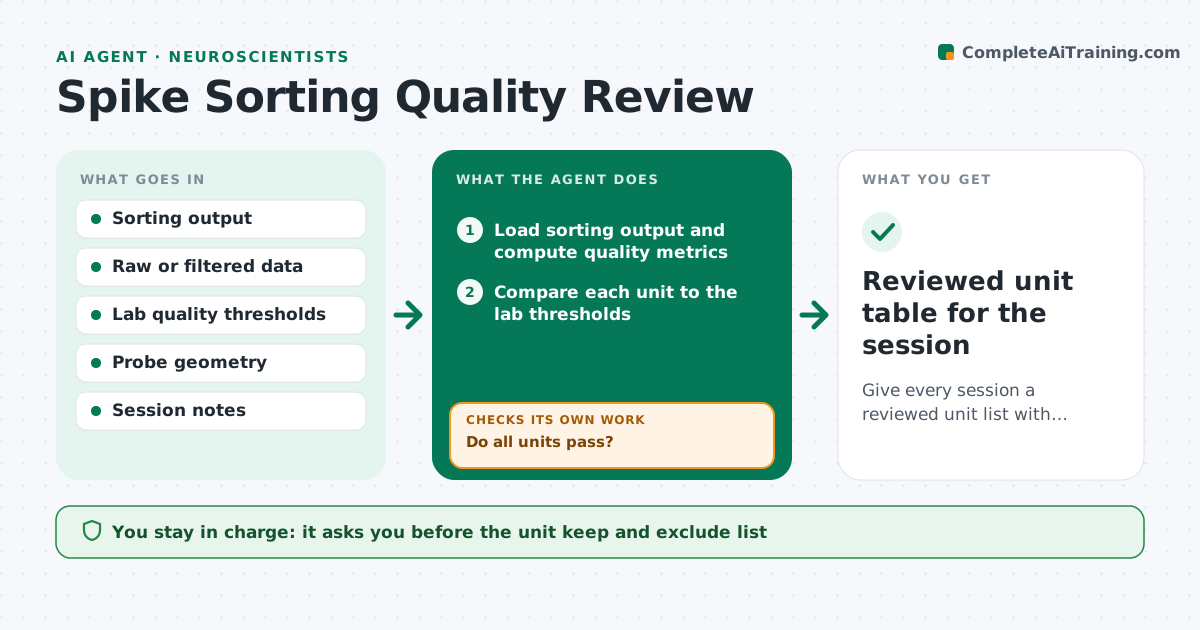
After each recording session, spike sorting produces dozens of units, and some are noisy, contaminated or drifting, yet end up in the analysis because nobody reviews all of them. This agent reads the sorting output and computes the quality metrics the lab uses: isolation distance, refractory period violations, amplitude cutoff, signal to noise and drift over the session. It flags units that fail and reruns sorting for the affected channels with adjusted settings, such as different thresholds or drift correction. It then recomputes the metrics to see if the units improved, and keeps the better result. It builds a list of units to exclude with reasons. It never changes the dataset used for analysis. The scientist approves the unit list. Edge case: a unit that passes quality but fires only in one minute is flagged as possible artifact.
How it works
Follow the arrows from top to bottom. The orange dashed arrow is the loop: when a check fails, the agent goes back and tries again.
Read the steps as a list
- Sorting finished
- Load sorting output and compute quality metrics
- Compare each unit to the lab thresholds
- Check drift and amplitude over the session
- Do all units pass?If not: rerun sorting on the affected channels with adjusted settings. Back to step 2.
- Recompute metrics for the rerun
- Did the rerun improve the failing units?If not: keep the original result and mark the units for exclusion. Back to step 5.
- Build the unit list with keep or exclude and reasons
- Scientist approves the unit listThe agent waits here for your OK.
- Reviewed unit table for the session
How it decides
A unit is kept if all metrics pass the thresholds. Failing units get one rerun with changed settings, and the better of the two results is kept if it improves.
- Exclude units with refractory violations above 1%
- Exclude units with isolation distance below the lab threshold
- Flag units with over 20% amplitude drift for drift correction
- Rerun each channel only once
Make it yours
Every agent is a starting point. You choose these settings for your own situation.
- Quality thresholds
- Rerun settings
- Drift limit (default 20%)
- Report fields
- Probe type
What keeps you in control
It always asks you first
- The unit keep and exclude list
- Any change to sorting settings for the lab pipeline
Hard limits
- Never delete raw data or original sorting output
- Never silently remove a unit
It stops when
- Done: unit list approved
- Stop: raw data corrupted or missing
Set it up
We guide you through the set-up, step by step
Members get the full set-up guide for this agent. No technical skills needed: you copy, paste and upload.
- One set of instructions to paste into your AI, with the clicks for ChatGPT, Claude, Microsoft 365 Copilot, Gemini and Grok
- The agent then walks you through connecting your own data, one source at a time
- A downloadable copy with the flow chart, the rules and the full guide



