AI agent for immigration consultants
Sponsor and Employer Document Chase Agent
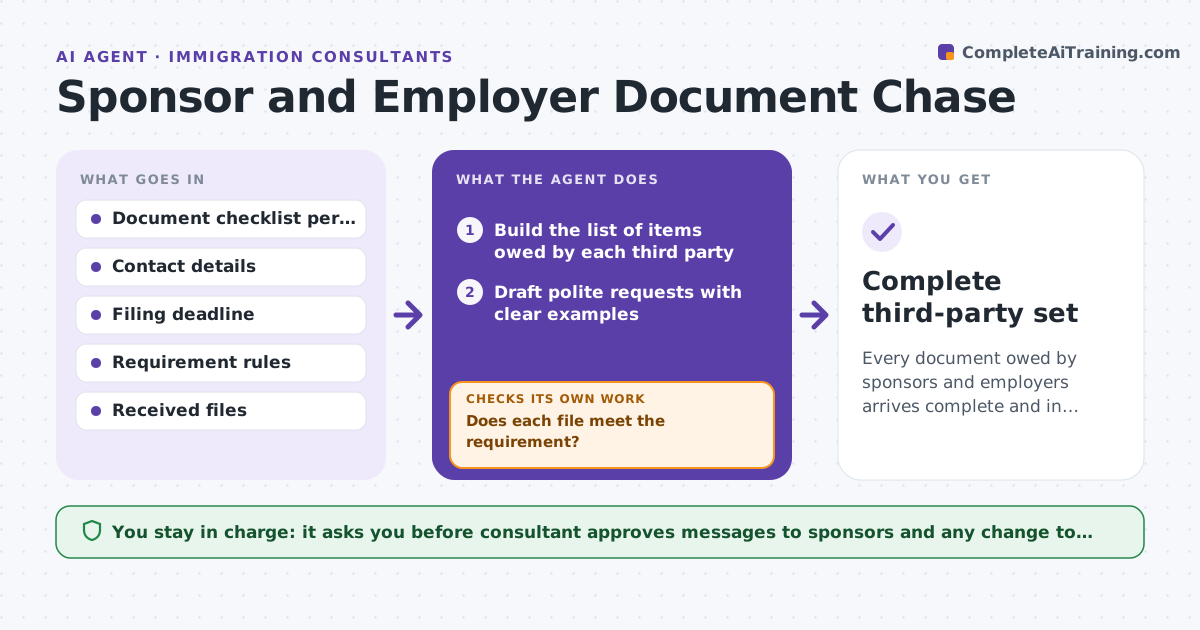
Every document owed by sponsors and employers arrives complete and in time for the filing date.
What it does
Applications stall because an employer has not sent a letter or a family sponsor has not found payslips. Consultants spend hours chasing third parties by email. This agent lists what each third party owes, sends polite requests on a schedule, and checks each file that arrives against the requirement. If a file fails, such as a letter missing a signature or a payslip for the wrong month, it returns it with a clear fix. It updates the deadline view. The consultant approves messages to sponsors. Edge case: an employer sends a letter that says employment started in May, but the form says April, so the agent returns it with the conflict explained.
How it works
Follow the arrows from top to bottom. The orange dashed arrow is the loop: when a check fails, the agent goes back and tries again.
Read the steps as a list
- Case needs third-party documents
- Build the list of items owed by each third party
- Draft polite requests with clear examples
- Consultant approves the first messagesThe agent waits here for your OK.
- Send reminders on schedule and log replies
- Read each received file
- Does each file meet the requirement?If not: return it with the specific fix and a new date. Back to step 4.
- Update the deadline view
- Complete third-party set
How it decides
It schedules requests based on the deadline and escalates when a document is more than 3 days late. It accepts a file only when it meets every requirement in the checklist.
- Send a reminder 3 days after each request
- Escalate to the consultant after 2 reminders
- Reject a file with a mismatch to the form data
- Move the filing date warning forward when an item is overdue
Make it yours
Every agent is a starting point. You choose these settings for your own situation.
- Reminder spacing (default 3 days)
- Escalation count
- Document checklists
- Tone of messages
- Deadline buffer days
What keeps you in control
It always asks you first
- Consultant approves messages to sponsors and any change to the filing date
Hard limits
- Never send a message without consultant approval
- Never accept an unsigned or incomplete document
It stops when
- Done: all items received and accepted
- Stop: a sponsor refuses or does not reply after two reminders
Set it up
We guide you through the set-up, step by step
Members get the full set-up guide for this agent. No technical skills needed: you copy, paste and upload.
- One set of instructions to paste into your AI, with the clicks for ChatGPT, Claude, Microsoft 365 Copilot, Gemini and Grok
- The agent then walks you through connecting your own data, one source at a time
- A downloadable copy with the flow chart, the rules and the full guide