AI agent for hospital administrators
Payer Denial Trend Agent
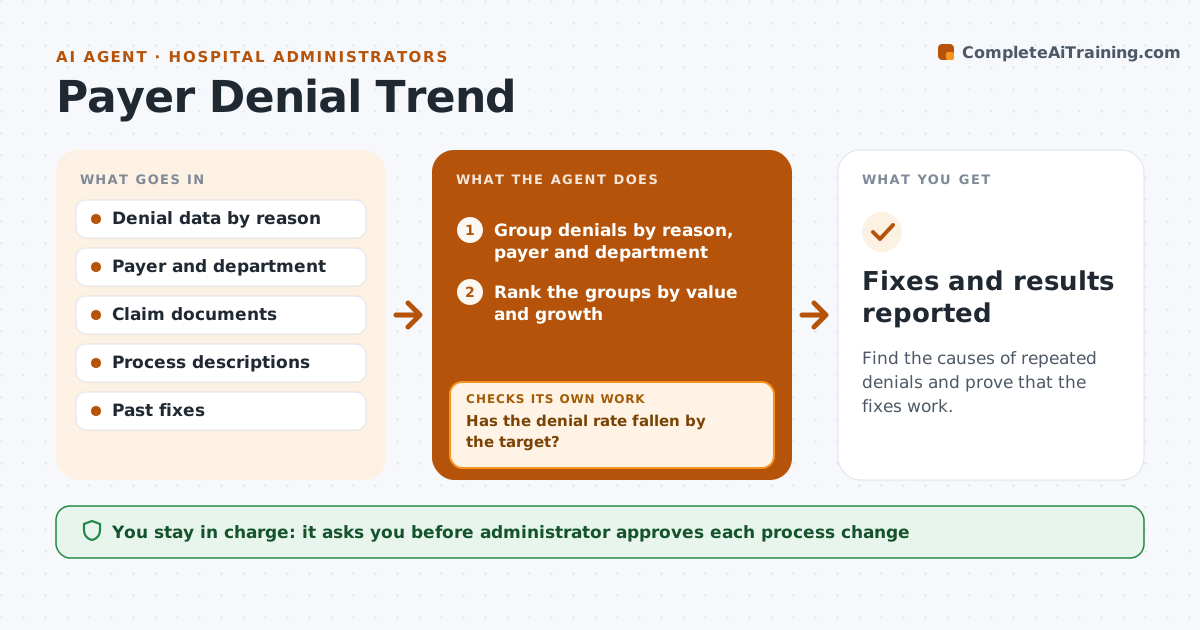
Find the causes of repeated denials and prove that the fixes work.
What it does
Denied claims cost money each time, and the same denials return month after month. This agent reads the denial data and groups it by reason code, payer and department. It looks for the biggest and fastest growing groups and traces them back to the documents, such as a missing authorization or a coding detail. It proposes fixes: a checklist, a template, or a change at registration. After the administrator approves changes it tracks the denial rate for that group over the next weeks to see whether it falls. If it does not, it digs deeper into the root cause. Edge case: a spike from one payer after a policy change is flagged as a payer issue, not an internal one.
How it works
Follow the arrows from top to bottom. The orange dashed arrow is the loop: when a check fails, the agent goes back and tries again.
Read the steps as a list
- Monthly denial data arrives
- Group denials by reason, payer and department
- Rank the groups by value and growth
- Trace the top groups to their documents
- Propose fixes at the cause
- Administrator approves process changesThe agent waits here for your OK.
- Record the change and the start date
- Wait for enough new claims to measure
- Read the denial rate for the group
- Has the denial rate fallen by the target?If not: Reopen the root cause search and propose a different fix. Back to step 3.
- Fixes and results reported
How it decides
It ranks groups by dollars lost and growth, proposes the cheapest fix at the cause, and judges success by the denial rate.
- Focus on groups above 5 percent of denied dollars
- Treat a sudden payer-wide spike as a payer issue
- Measure a fix over at least 30 days of claims
- A fix works when the rate falls by 25 percent
Make it yours
Every agent is a starting point. You choose these settings for your own situation.
- Denial reasons to track
- Minimum share of denied dollars (default 5 percent)
- Measurement window (default 30 days)
- Target reduction (default 25 percent)
What keeps you in control
It always asks you first
- Administrator approves each process change
Hard limits
- Never change a claim itself
- Never claim a fix worked without enough claims
It stops when
- Done: denial rates for the top groups fall by the target
- Stop: data is too thin and the administrator waits for more claims
Set it up
We guide you through the set-up, step by step
Members get the full set-up guide for this agent. No technical skills needed: you copy, paste and upload.
- One set of instructions to paste into your AI, with the clicks for ChatGPT, Claude, Microsoft 365 Copilot, Gemini and Grok
- The agent then walks you through connecting your own data, one source at a time
- A downloadable copy with the flow chart, the rules and the full guide