AI agent for database administrators
Statistics and Plan Regression Agent
Regressed queries identified quickly and returned to baseline performance with measured, approved fixes
What it does
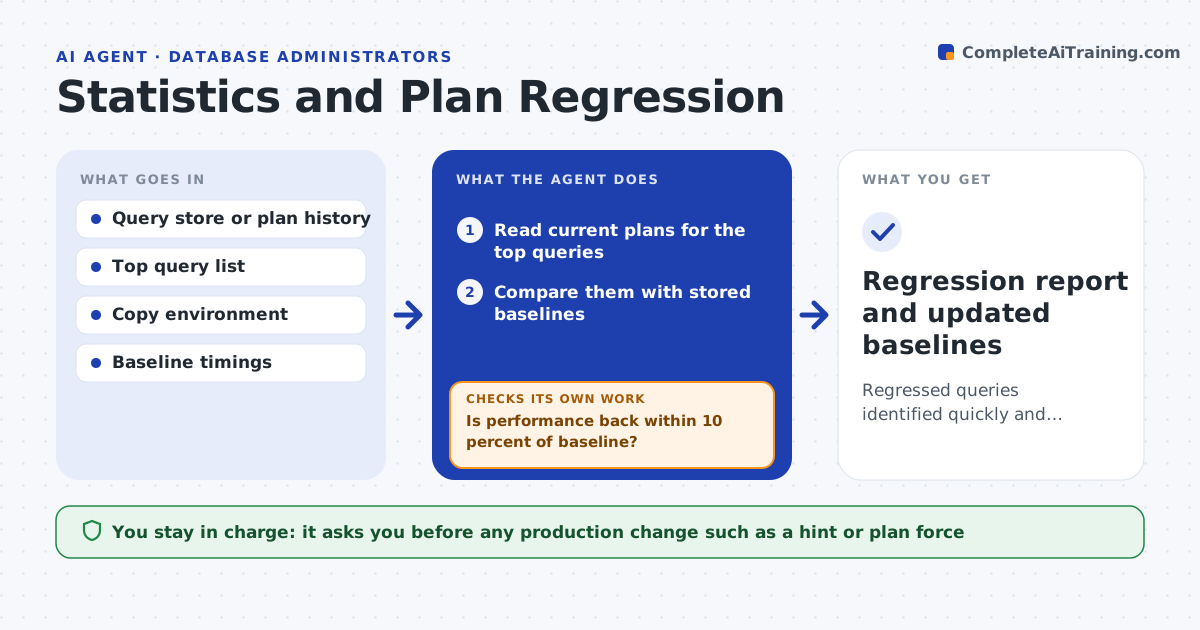
After a statistics refresh or an upgrade, a query that ran in two seconds suddenly takes forty, and users complain before the DBA sees it. This agent stores baselines for the top queries by cost: their plans and timings. After any change, it compares current plans with the baselines and finds the ones that changed for the worse. In a copy of the database it tests fixes, such as fresh statistics, a hint or a forced plan, and measures the effect on timing and reads. It keeps trying alternatives until performance returns to the baseline or the options run out. The DBA approves any production change. Edge case: a plan change that is faster is recorded as a new baseline, not treated as a regression.
How it works
Follow the arrows from top to bottom. The orange dashed arrow is the loop: when a check fails, the agent goes back and tries again.
Read the steps as a list
- Statistics refresh, upgrade or slow query alert
- Read current plans for the top queries
- Compare them with stored baselines
- List regressions and rank by total time lost
- Test fresh statistics in the copy and measure
- Is performance back within 10 percent of baseline?If not: try the next option, such as a hint or a forced plan, and measure again. Back to step 4.
- Compare the fix on other queries for side effects
- Did any other query get slower?If not: drop the option and try a narrower one. Back to step 4.
- DBA approves the production changeThe agent waits here for your OK.
- Apply and verify in production
- Regression report and updated baselines
How it decides
A regression is a plan change with at least 50 percent more time or reads. A fix is accepted when the copy shows recovery to within 10 percent of the baseline.
- Call a regression when time or reads grow by 50 percent or more
- Accept a fix only within 10 percent of baseline
- Update the baseline when a new plan is faster
- Escalate after 3 options fail for the same query
Make it yours
Every agent is a starting point. You choose these settings for your own situation.
- Regression threshold (default 50 percent)
- Number of top queries tracked (default 50)
- Allowed fix types (statistics, hint, plan force)
- Recovery tolerance (default 10 percent)
What keeps you in control
It always asks you first
- Any production change such as a hint or plan force
Hard limits
- Never changes production without approval
- Tests only in a copy
It stops when
- Done: all regressions fixed or documented
- Stop: no copy environment is available for testing
Set it up
We guide you through the set-up, step by step
Members get the full set-up guide for this agent. No technical skills needed: you copy, paste and upload.
- One set of instructions to paste into your AI, with the clicks for ChatGPT, Claude, Microsoft 365 Copilot, Gemini and Grok
- The agent then walks you through connecting your own data, one source at a time
- A downloadable copy with the flow chart, the rules and the full guide