AI agent for dentists
Sterilization and Infection Control Log Agent
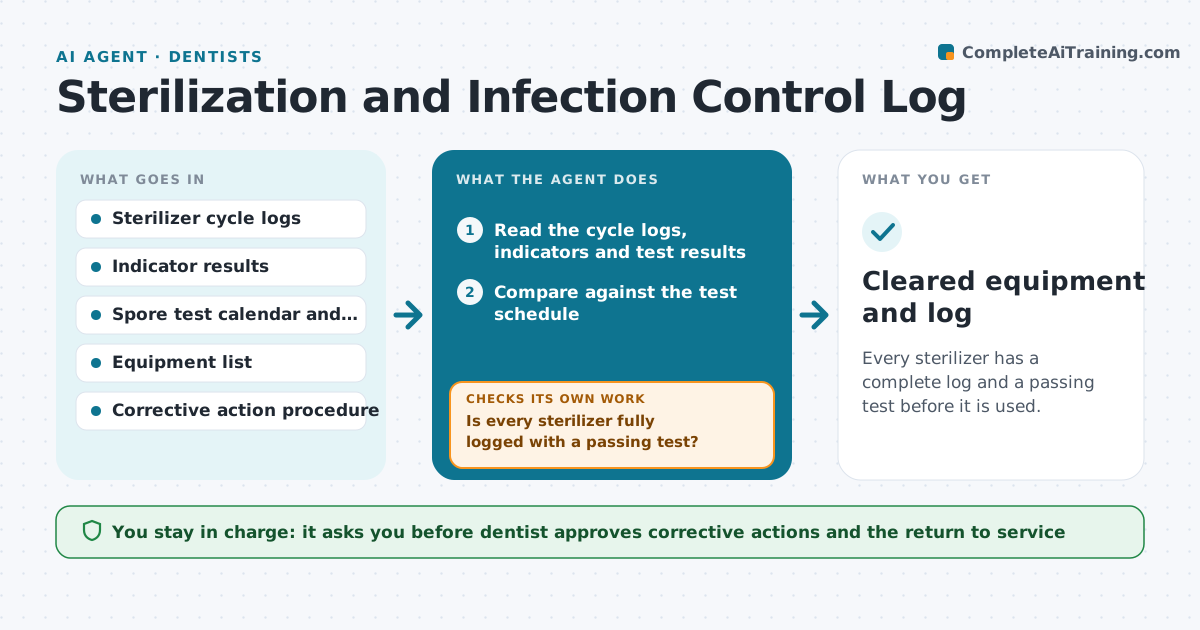
Every sterilizer has a complete log and a passing test before it is used.
What it does
Sterilizer logs and weekly spore tests must be complete, and a gap can mean instruments cannot be proven safe. Every morning the agent reads the sterilizer cycle logs, the indicator checks and the test calendar, and finds missing entries, failed indicators or a spore test due. When a spore test is missing or failed, it drafts the corrective steps, such as taking the sterilizer out of use, rerunning the test and reviewing the instruments processed since the last good test. It then rechecks the next test result before clearing the equipment. The dentist approves every corrective action and the return to service. Edge case: a failed test means the instruments processed since the last pass are quarantined until the retest passes.
How it works
Follow the arrows from top to bottom. The orange dashed arrow is the loop: when a check fails, the agent goes back and tries again.
Read the steps as a list
- Every morning before clinic
- Read the cycle logs, indicators and test results
- Compare against the test schedule
- List missing entries, failed indicators or tests due
- Draft corrective steps for each issue
- Is every sterilizer fully logged with a passing test?If not: Mark the unit out of use, quarantine its load and draft the corrective steps. Back to step 3.
- Dentist approves the corrective actionThe agent waits here for your OK.
- Assign tasks and record the action
- Read the retest result
- Did the retest pass?If not: Keep the unit out of use and escalate to service. Back to step 3.
- Cleared equipment and log
How it decides
It compares the logs and test calendar with the schedule and treats any gap or fail as a stop for that machine.
- A missing spore test blocks the unit
- A failed indicator means quarantine the load
- Retest must pass before return to service
- Gaps in logs are reported the same day
Make it yours
Every agent is a starting point. You choose these settings for your own situation.
- Test frequency
- Equipment list
- Corrective steps
- Who is alerted
- Return to service rule
What keeps you in control
It always asks you first
- Dentist approves corrective actions and the return to service
- Dentist approves any reprocessing of instruments
Hard limits
- Never clear equipment without approval
- Never skip a failed test
- Never delete a log entry
It stops when
- Done: all units are cleared with passing tests
- Stop: a unit fails again and is sent for service
Set it up
We guide you through the set-up, step by step
Members get the full set-up guide for this agent. No technical skills needed: you copy, paste and upload.
- One set of instructions to paste into your AI, with the clicks for ChatGPT, Claude, Microsoft 365 Copilot, Gemini and Grok
- The agent then walks you through connecting your own data, one source at a time
- A downloadable copy with the flow chart, the rules and the full guide