AI agent for laboratory technicians
Sterilization Cycle Verification Agent
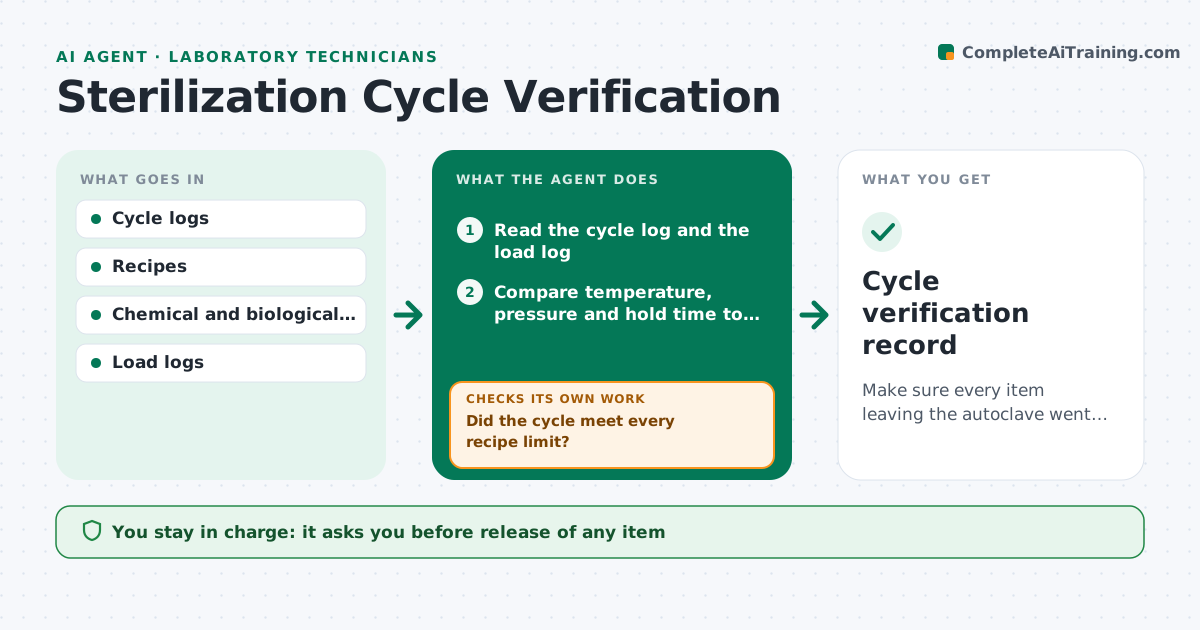
Make sure every item leaving the autoclave went through a verified cycle.
What it does
An autoclave cycle that ran short or never reached temperature can leave waste or media unsterilized, and a failed biological indicator can be seen days later. This agent reads each cycle log and compares temperature, pressure and hold time to the cycle recipe. It checks the chemical indicator result and the biological indicator results that come back. It flags cycles that were short, cool or aborted, and lists what was in each load from the load log. It proposes reprocessing of those items and checks the new cycle the same way. If an indicator fails later, it traces back to all loads since the last pass. It never releases items. The lead approves release. Edge case: a cycle missing its load log is treated as unverified, not passed.
How it works
Follow the arrows from top to bottom. The orange dashed arrow is the loop: when a check fails, the agent goes back and tries again.
Read the steps as a list
- Cycle ends
- Read the cycle log and the load log
- Compare temperature, pressure and hold time to the recipe
- Did the cycle meet every recipe limit?If not: mark the cycle failed and list its loaded items. Back to step 3.
- Read the chemical indicator result
- Wait for and read biological indicator results
- Did the biological indicator pass?If not: trace back to all loads since the last pass and mark them held. Back to step 2.
- Propose reprocessing for failed or held items
- Lead approves reprocessing or releaseThe agent waits here for your OK.
- Cycle verification record
How it decides
A cycle passes only if time and temperature met the recipe and the indicators passed. Later indicator failures reopen all loads since the last good indicator.
- Fail a cycle if hold time is under the recipe by any amount
- Treat a missing load log as unverified
- Hold all loads since the last good biological indicator when one fails
- Require a new cycle with a passing indicator before releasing reprocessed items
Make it yours
Every agent is a starting point. You choose these settings for your own situation.
- Recipes by cycle type
- Biological indicator schedule
- Loads held after a failure
- Who to notify
- Log format
What keeps you in control
It always asks you first
- Release of any item
- Reprocessing orders
Hard limits
- Never mark items sterile
- Never delete cycle logs
It stops when
- Done: all cycles verified and items released
- Stop: indicator results missing beyond the allowed time
Set it up
We guide you through the set-up, step by step
Members get the full set-up guide for this agent. No technical skills needed: you copy, paste and upload.
- One set of instructions to paste into your AI, with the clicks for ChatGPT, Claude, Microsoft 365 Copilot, Gemini and Grok
- The agent then walks you through connecting your own data, one source at a time
- A downloadable copy with the flow chart, the rules and the full guide