AI agent for civil engineers
Stormwater Inspection Follow-up Agent
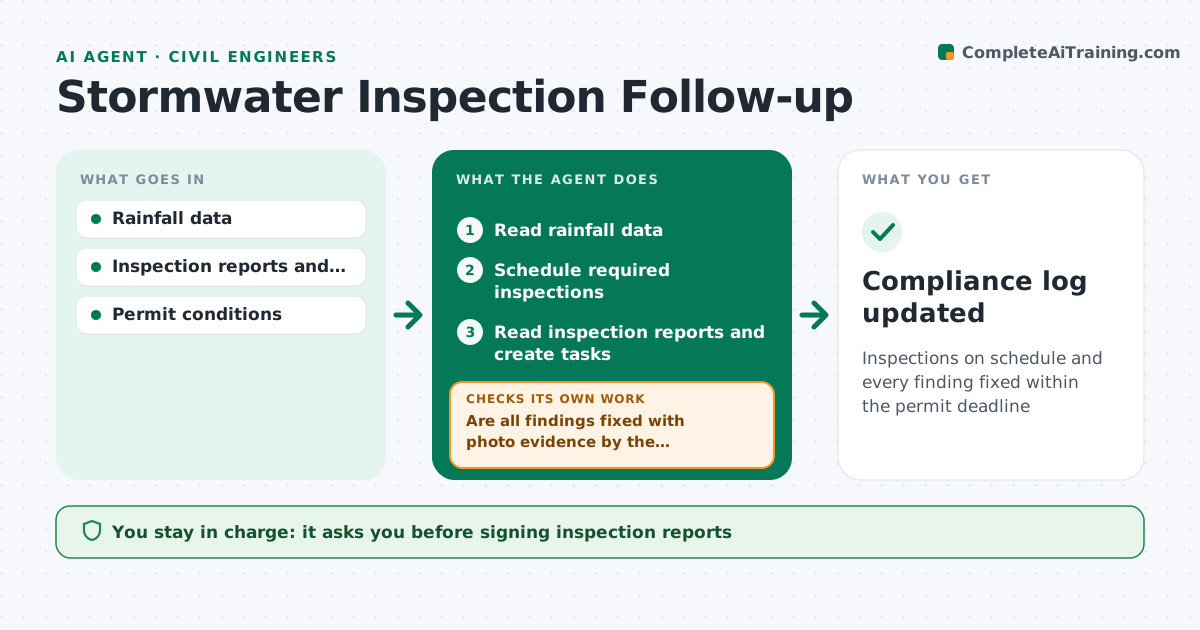
Inspections on schedule and every finding fixed within the permit deadline
What it does
Stormwater permits require routine inspections, extra inspections after qualifying rain, and fixes within set deadlines. Missing any of these can lead to a violation. This agent watches rainfall data for each site and schedules required inspections when a storm passes the trigger amount. After each inspection it reads the report and photos, lists findings such as a broken silt fence or a blocked inlet, and creates corrective tasks with deadlines. When the crew uploads follow-up photos, it checks that each fix is visible and complete. If a fix is missing or late, it escalates to the site manager and keeps tracking until it closes. You sign inspection reports and approve any notice to the regulator. Edge case: a rain event below the trigger amount is logged but does not create an inspection.
How it works
Follow the arrows from top to bottom. The orange dashed arrow is the loop: when a check fails, the agent goes back and tries again.
Read the steps as a list
- Daily check or rain event
- Read rainfall data
- Schedule required inspections
- Read inspection reports and create tasks
- Are all findings fixed with photo evidence by the deadline?If not: escalate to the site manager. Back to step 4.
- Engineer approves reportsThe agent waits here for your OK.
- Compliance log updated
How it decides
It schedules inspections by permit rules and closes findings only with photo evidence of the fix.
- Schedule inspections after trigger rainfall
- Close findings only with photos
- Escalate late fixes
Make it yours
Every agent is a starting point. You choose these settings for your own situation.
- Rain trigger (default 0.5 inch)
- Fix deadlines
- Escalation contacts
- Report format
What keeps you in control
It always asks you first
- Signing inspection reports
- Notices to regulators
Hard limits
- Never signs reports
It stops when
- Done: all findings closed
- Stop: inspector unavailable
Set it up
We guide you through the set-up, step by step
Members get the full set-up guide for this agent. No technical skills needed: you copy, paste and upload.
- One set of instructions to paste into your AI, with the clicks for ChatGPT, Claude, Microsoft 365 Copilot, Gemini and Grok
- The agent then walks you through connecting your own data, one source at a time
- A downloadable copy with the flow chart, the rules and the full guide