AI agent for quality control specialists
Construction Quality Checklist Adaptation Agent
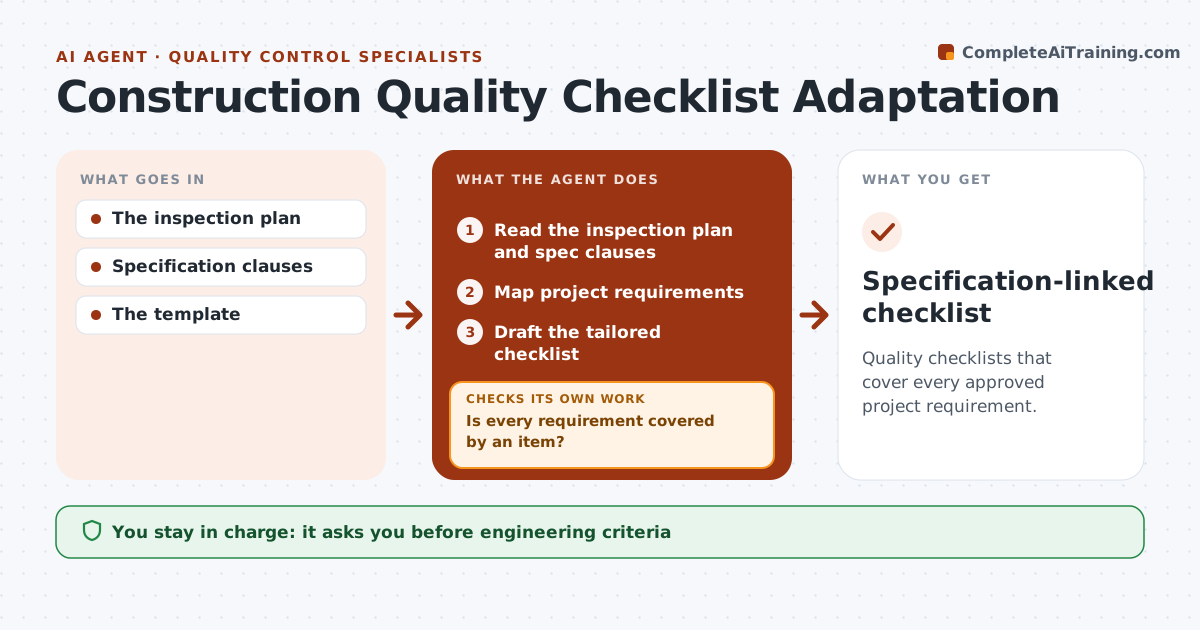
Quality checklists that cover every approved project requirement.
What it does
Generic quality checklists miss requirements that are specific to a project, such as a test record per concrete pour or a particular fire stopping product. This agent runs when a work package starts. It reads the approved inspection and test plan and the specification clauses for that package, then maps each requirement to a checklist item. Missing items are added, worded from the approved requirement and citing the clause. When two clauses conflict or a threshold is unclear, it sends the question to a specialist instead of inventing a number. It checks coverage again after changes. The quality lead approves the tailored checklist before use. Edge case: a requirement found only in a superseded spec revision is not added.
How it works
Follow the arrows from top to bottom. The orange dashed arrow is the loop: when a check fails, the agent goes back and tries again.
Read the steps as a list
- Package starts
- Read the inspection plan and spec clauses
- Map project requirements
- Is every requirement covered by an item?If not: add it, or route conflicts to a specialist. Back to step 3.
- Draft the tailored checklist
- Quality lead approvesThe agent waits here for your OK.
- Specification-linked checklist
How it decides
It only adds items backed by approved requirements.
- Each added item cites its clause.
- Conflicting or unclear thresholds go to a specialist.
- Superseded revisions are never used.
- Coverage is rechecked after every change.
Make it yours
Every agent is a starting point. You choose these settings for your own situation.
- Base checklist templates per trade
- Specification and inspection plan sources
- Specialist contacts per discipline
- Who approves the checklist (default: quality lead)
- Output format (default: checklist with clause references)
What keeps you in control
It always asks you first
- Engineering criteria
- Quality sign-off
Hard limits
- No invented thresholds.
It stops when
- Done: checklist ready.
Set it up
We guide you through the set-up, step by step
Members get the full set-up guide for this agent. No technical skills needed: you copy, paste and upload.
- One set of instructions to paste into your AI, with the clicks for ChatGPT, Claude, Microsoft 365 Copilot, Gemini and Grok
- The agent then walks you through connecting your own data, one source at a time
- A downloadable copy with the flow chart, the rules and the full guide