AI agent for geologists
Student Field Course Safety Agent
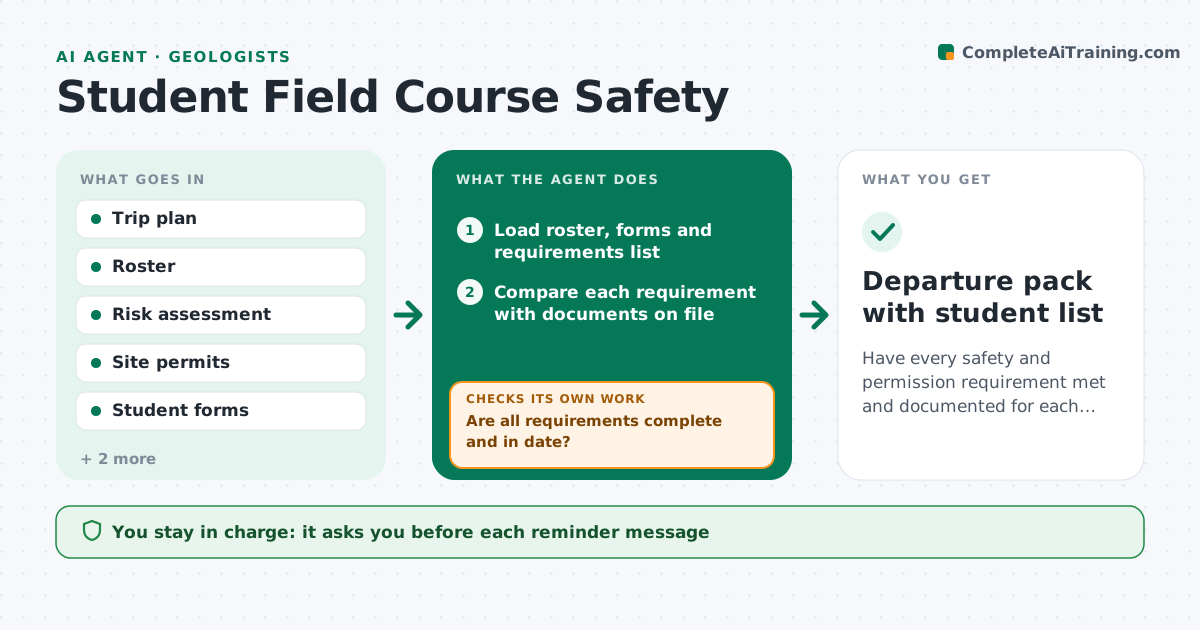
Have every safety and permission requirement met and documented for each student before departure.
What it does
Before a field trip, an instructor must confirm risk assessments, site permissions, parental or student consent, medical and emergency forms, rosters, vehicles and supervisor ratios. These live in different places and arrive late. This agent keeps one checklist per trip and compares the roster against what each requirement demands. It lists every gap by student and owner, sends draft reminders to the right person, and rechecks daily as forms come in. Near departure it runs a full check and produces a go or no-go summary. It never decides to run the trip. The instructor approves the trip and every message. Edge case: a student with an unreviewed medical form is held back from the list, and the agent flags it instead of guessing.
How it works
Follow the arrows from top to bottom. The orange dashed arrow is the loop: when a check fails, the agent goes back and tries again.
Read the steps as a list
- Trip created or daily run
- Load roster, forms and requirements list
- Compare each requirement with documents on file
- List gaps by student, site item and owner
- Instructor approves reminder messagesThe agent waits here for your OK.
- Send approved reminders and log replies
- Are all requirements complete and in date?If not: recheck the files, then list what is still open and escalate items under 3 days to departure. Back to step 2.
- Is the supervisor ratio met with confirmed staff?If not: flag the shortfall and ask for added supervisors or a smaller group. Back to step 4.
- Build the go or no-go summary
- Instructor approves the tripThe agent waits here for your OK.
- Departure pack with student list
How it decides
It marks a requirement complete only when a signed document is on file and in date. Any open item for a student blocks that student, and any open item for the site blocks the trip.
- Block a student whose consent or medical form is missing or expired
- Block the trip if the site permit or risk assessment is not approved
- Escalate any open item at 3 days to departure
- Require the supervisor ratio set by institution rules
Make it yours
Every agent is a starting point. You choose these settings for your own situation.
- Requirements list per trip type
- Supervisor ratio (default 1 per 10)
- Escalation window (default 3 days)
- Reminder channel and wording
- Who receives the go or no-go summary
What keeps you in control
It always asks you first
- Each reminder message
- Final trip approval
Hard limits
- Never decide that a student is cleared to travel
- Keep medical details out of reminder messages
It stops when
- Done: all items complete and the instructor approves
- Stop: a blocking item stays open at departure
Set it up
We guide you through the set-up, step by step
Members get the full set-up guide for this agent. No technical skills needed: you copy, paste and upload.
- One set of instructions to paste into your AI, with the clicks for ChatGPT, Claude, Microsoft 365 Copilot, Gemini and Grok
- The agent then walks you through connecting your own data, one source at a time
- A downloadable copy with the flow chart, the rules and the full guide